Sculptie Exporter for AC3D, Ready to Go!
|
|
Zora Spoonhammer
Registered User
Join date: 29 Jan 2006
Posts: 23
|
06-09-2007 02:48
Hi Everyone! I just finished the docs and tutorial for the sculpted prim exporter for AC3D and it's ready for download. I know I'm biased since I wrote the plug-in, but I sincerely believe you'll find this is as easy as it gets. Video Tutorial, Making a Sculpty Pear to go with those Linden apples: http://www.youtube.com/watch?v=Y8RC5aJuWksDownload the plug-in here: http://www.ccccybernetics.com/You can download the pear model and sculpt maps from the plug-in page, too. Yours to enjoy even if you aren't into modeling yourself. If you head over to Luna, you can see my sculpty snake--and accessories, of course--that were all made with the plug-in. I should have those up for free download as well in the curiosity shop behind the pond in Areumdeuli shortly. Enjoy!! If you make any cool sculpties with it, show them to me or Zee Pixel! And tell a friend about the plug-in. Happy building, -Zora 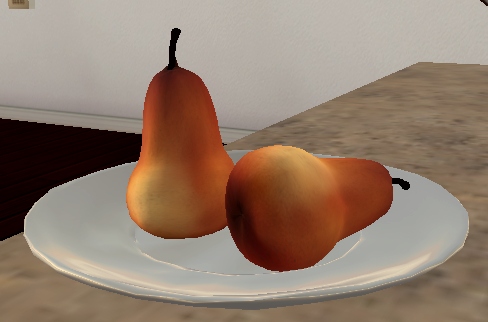 |
|
Gryff Richard
Registered User
Join date: 10 Nov 2005
Posts: 51
|
06-09-2007 08:32
Just downloaded it .... another afternoon shot experimenting  Hope it works ... my favorite 3d modeler. Does not have the bells and whistles of the big boys ... but learning curve not as steep  |
|
Zora Spoonhammer
Registered User
Join date: 29 Jan 2006
Posts: 23
|
06-09-2007 17:14
Cool! Send some pics if you do anything you want to share.
AC3D is my favorite modeler too, and it's exactly for the same reason: ease of use. I've had to use Max and Lightwave alot in my job, but those take a long time to learn. AC3D is the first 3D program I've been able to set my kids in front of, and have them build some pretty decent looking stuff on their very first try with almost no instructions and very little help from me.
I've also found that AC3D+Poser makes a pretty lethal combination with the right plug-ins.
|
|
Krimson Gray
Registered User
Join date: 5 Dec 2006
Posts: 40
|
06-10-2007 04:17
http://pro52.msshost.com/~unfluffy/Kpics/bootstestpreview.jpgI made these boots (uppers on the part on the foot) in Mudbox which I exported to OBJ then imported to AC3D. There I fixed the rotation, and then exported via the exporter. The only problem I had with the generated targa file was a line along the left side and one at the bottom. I solved that by selecting the whole sculpt map in Paint Shop Pro (it also works in Photoshop), deselecting the dark lines, making the selected region a new layer, then applying the Flaming Pear Solidify filter. When I uploaded it looked almost exactly like it did in mud box. I used a Zbrush cylinder (I found in another thread in the builder's forum) as my base. I think sliced several times and made my shape. This seems to help, as when I finally saved the sculpt map, it was only 64x64 but yeilded a high quality sculpty.
|
|
Kaimi Kyomoon
Kah-EE-mee

Join date: 30 Nov 2006
Posts: 5,664
|
I did it!
06-10-2007 10:00
OMG! I'm so excited! I'm amazed! I'm thrilled! I'm incoherent!
I understood AC3d enough right away to make the object I need for a job I'm working on. It is actually close enough to Milkshape 3d, the only 3d modeler with which I'm at all familiar.
I'm on a deadline and I wasn't that hopeful that I could learn to make sculpties in time to make this look really good. But from the time I started looking for help until I had what I need in SL took about an hour.
I still have to make the texture but that seems pretty straight forward. Did I mention I am thrilled! What I made is a folded tee shirt to display for a client on shelves.
Thank you so much!!!!
_____________________

Kaimi's Normal Wear From: 3Ring Binder i think people are afraid of me or something.
|
|
Gryff Richard
Registered User
Join date: 10 Nov 2005
Posts: 51
|
06-10-2007 12:20
Well here is an inworld snapshot of my first sculpty made solely with AC3D. The surface texture was created with Corel Photopaint -- that took longer than making the sculpty I have highlited an area were I think there is a little roughness ... but its not much. The sculpty was built from the base cylinder shape, and the sculpty texture was 64x64 no modifications at all to it ... straight from the exporter. The smaller inlaid images are snapshots taken as I move away from object ... seems to retain shape well. Slight changes in the surface texture though. Kaimi .... there are some plugins for AC3D that you might find useful. One is a select surfaces by material. The other allows you to save an image of the texture map that you see when you open the texture editor.The first plugin is useful as the sculpty gets more and more shaped. If before you start you apply different colors (materials) to blocks of surfaces ... while it is easy to do. Now as you sculpt select one surface and invoke the plugin ... all surfaces of same colour will be selected. gryff |
|
Zee Pixel
Registered User
Join date: 14 Feb 2006
Posts: 99
|
06-10-2007 16:35
From: someone The only problem I had with the generated targa file was a line along the left side and one at the bottom. I solved that by selecting the whole sculpt map in Paint Shop Pro (it also works in Photoshop), deselecting the dark lines, making the selected region a new layer, then applying the Flaming Pear Solidify filter. Krimson, Zora asked me to tell you that all you have to do to avoid that is make sure your texture coordinates are edge to edge after you import your model. In the texture coordinate editor, highlight everything, then click "Snap > Max". |
|
Krimson Gray
Registered User
Join date: 5 Dec 2006
Posts: 40
|
06-11-2007 01:02
From: Zee Pixel Krimson, Zora asked me to tell you that all you have to do to avoid that is make sure your texture coordinates are edge to edge after you import your model. In the texture coordinate editor, highlight everything, then click "Snap > Max". Please extend my thanks to Zora, that seemed to work well. http://pro52.msshost.com/%7Eunfluffy/Kpics/Sculpthoodimage.jpg |
|
Betty Doyle
Ingenue

Join date: 15 Aug 2006
Posts: 336
|
06-11-2007 08:26
Thank you, thank you, thank you!! Finally a non-lathe only type 3D program that doesn't make my brain hurt! So, I made my object.... easy peasy, but the SL exporter plugin isn't showing up under export. I've restarted the program several times since putting the sculptie.p file in the plug-ins folder. I'm on a Mac... doesn't seem like that should make a difference in this case.... any suggestions greatly appreciated. **EDIT: Nevermind...I see that being on a Mac is the problem. It loaded just fine running AC3D through Parallels. |
|
Zora Spoonhammer
Registered User
Join date: 29 Jan 2006
Posts: 23
|
06-11-2007 16:46
From: Betty Doyle **EDIT: Nevermind...I see that being on a Mac is the problem. It loaded just fine running AC3D through Parallels. Give it a couple of days... I submitted the code back to Inivis, and it's being look at to see if it can be ported to other platforms. |
|
Zora Spoonhammer
Registered User
Join date: 29 Jan 2006
Posts: 23
|
06-11-2007 16:49
*Love* the hood. What sim is that you're standing in? |
|
Betty Doyle
Ingenue
Join date: 15 Aug 2006
Posts: 336
|
06-11-2007 20:02
From: Zora Spoonhammer Give it a couple of days... I submitted the code back to Inivis, and it's being look at to see if it can be ported to other platforms. That would be wonderful! Crossing my fingers because I love AC3D, but I'm not really sure I want to pay for the PC version. |
|
Krimson Gray
Registered User
Join date: 5 Dec 2006
Posts: 40
|
06-11-2007 21:13
From: Zora Spoonhammer *Love* the hood. What sim is that you're standing in? That would be Byss. A Star Wars themed Roleplaying sim. |
|
Mikale Cazalet
Registered User
Join date: 16 May 2007
Posts: 1
|
where is the plug in?
06-12-2007 08:00
http://www.ccccybernetics.com doesnt seem to exist anymore. where can i download the sculpty export plugin now?
|
|
Krimson Gray
Registered User
Join date: 5 Dec 2006
Posts: 40
|
06-12-2007 10:31
I just went to the site and its still there. Perhaps a direct link to the zip would help? http://www.ccccybernetics.com/downloads/sculpties.zip |
|
Zee Pixel
Registered User
Join date: 14 Feb 2006
Posts: 99
|
06-12-2007 11:14
We're running on one DNS server currently while we do some system upgrades and that one is parked behind a firewall which suffered an outage this morning. So... while the web server was still available, no name lookups prevented anyone from getting to it. Sorry for the inconvience.
Zee
|
|
Zora Spoonhammer
Registered User
Join date: 29 Jan 2006
Posts: 23
|
Avatar Head as Sculpty
06-13-2007 01:13
Someone was asking if it were possible to import the SL avatar as an obj, then export the head as a sculpty, so here it is! All I had to do was cut off the ears--these should be added later as a separate sculpty--and then spherical map the whole thing.
[EDIT]I did notice the nose is a little flat. I won't have time to mess with the code until at least the weekend, but I want to try an experiment. I've got some ideas and I think I *might* be able to sharpen things up more and tighten up detected edges by using the crease angle... no promises the idea will work, but worth a shot![/EDIT]
|
|
Kaimi Kyomoon
Kah-EE-mee
Join date: 30 Nov 2006
Posts: 5,664
|
06-13-2007 20:02
From: Kaimi .... there are some plugins for AC3D that you might find useful. One is a select surfaces by material. The other allows you to save an image of the texture map that you see when you open the texture editor.The first plugin is useful as the sculpty gets more and more shaped. If before you start you apply different colors (materials) to blocks of surfaces ... while it is easy to do. Now as you sculpt select one surface and invoke the plugin ... all surfaces of same colour will be selected.
gryff :)[/QUOTE
Thanks, that could really help.
_____________________
Kaimi's Normal Wear From: 3Ring Binder i think people are afraid of me or something.
|
|
Gryff Richard
Registered User
Join date: 10 Nov 2005
Posts: 51
|
06-14-2007 02:57
From: Zora Spoonhammer All I had to do was cut off the ears--these should be added later as a separate sculpty--and then spherical map the whole thing. I had a go at this too Zora ... with a lot less success than you. The SLAvatar (M) I used - cut off the head. But head had more than just ears to get rid of. Inside the mouth are some polygons, and the eyes are sockets - there are openings. I was able to remove the ears and fill the holes created. I also removed the internal mouth parts. However there are now four holes - two eye sockets, between lips and the under part of neck were head was cut. I can map this spherically (UVMapper) but it does not completely fill a rectangle --- so sculpty texture has black areas. I closed up the holes by snapping together vertices around eyes/mouth and remapping. Still have the neck problem. Any thoughts? I assume its is crucial to get a square/rectangle filled map. gryff |
|
Zora Spoonhammer
Registered User
Join date: 29 Jan 2006
Posts: 23
|
06-14-2007 09:13
I used the SL female avatar, which is the neutral avatar. The male is really a morph of the female.
Yes, you are most right. I completely forgot about the mouth parts. I naxed those too, but they are internal, so they're unseen anyway... grab the faces, snap together, then optimize vertices and surfaces. Not only are the mouth internals gone that way, then there's no hole either.
You need to snap the map to max after you do the spherical mapping to make it fill the whole thing. You are also correct on the eye uvs... snap those together, too, or fill the hole in the model by adding an ordered face. Either way works, it's only important that you fill the map space.
You can do the same with the neck, tweak the uvs. Or if you want to do it an easier way, grab all the verts around the neck, then click Vertex > Create 2D Mesh > Plan. This will close the neck off. Combine the surface and use Surface > Create Hole to give yourself quads so you'll have a prettier map. You shouldn't have to fuss with the neck uvs at all then.
|
|
Gryff Richard
Registered User
Join date: 10 Nov 2005
Posts: 51
|
06-14-2007 11:37
hi Zora, I worked on the eyes and mouth holes ... basically snapping vertices together. Seems easy to do this given the original mesh structure. The neck area I am still playing with trying various options. But attached is where I am so far. Attached picture is my current state of tweaking Not sure whether it is the fact that AC3D is my favorite low polymodeler and am so used to it, or your plugin is so good - but having tried most of the options here for making sculpties (not 3dmax), it is by far the easiest to use gryff |
|
Zora Spoonhammer
Registered User
Join date: 29 Jan 2006
Posts: 23
|
06-28-2007 18:24
That looks great, Gryff. Can't wait to see it with textures.
|
|
Betty Doyle
Ingenue
Join date: 15 Aug 2006
Posts: 336
|
07-01-2007 13:20
Any word back on a Mac exporter yet? The trial ran out, and I'd really like to buy AC3D, but am reluctant to buy the PC version to run through Parallels if there is a Mac exporter coming out soon. edit... just a thought... wish I had tried this before the trial ran out. If I used the AC3D Mac version, could I then open it in Wings and export the sculptie file though there?
_____________________
Ingenue :: Fashion with a Past ::
http://ingenuevintage.wordpress.com
http://slurl.com/secondlife/Lo%20Lo/201/99/21/
|
|
Zee Pixel
Registered User
Join date: 14 Feb 2006
Posts: 99
|
Monday...
07-01-2007 20:34
Hi Betty, I just asked Zora and she told me that her and Andy (the author of AC3D) should be finished with testing and that Andy was planning to release the new official plug-in on Monday. So... I would keep any eye on the AC3D site for news.
As for the Wings question... I don't know and I'll have to pass the word to Zora. If she get's a chance she can stop by and answer you.
|
|
Zora Spoonhammer
Registered User
Join date: 29 Jan 2006
Posts: 23
|
07-02-2007 04:35
Hi Betty,
The Mac exporter should be up on the Inivis site in the morning.
As for the Wings question... no, sadly, that probably won't work. The AC3D plug-in allows the export of near-arbitrary geometry as long as the map is good. The Wings exporter is more restrictive and requires very particular geometry to work. Unless it's been updated since I last looked, I believe Wings requires exactly 32 or 64 vertices derived from a sphere. So, if your model meets these parameters, it may work, but otherwise it probably won't export correctly.
|

