I've never seen this talked about but I guess it must had had lots of chat in the past.
Any SIM has a certain amount of "power" (one core of a Quad CPU I understand) which allows it to run itself.
Now, all the time more and more fancy things get programmed in scripts (I guess in the very eary days there were very few fancy things happening on a SIM)
Are the any tools that actually Tell you WHAT items you have out "in World" are using what percentage of the SIMS "Power" for want of a better word?
Perhaps one of two scripts in a SIM are sucking a lot of power away.
Can you find them? Locate their positon and where they are in a SIM and perhaps replace them with something less resourse hungry?
I mean, how is anyone supposed to know?
A Noob, joins SL, buy loads of Poofers and Paticle effect items, and piles them onto their land.
Can we find out what's using what, and where it is?
It would seen an Essential thing to be able to track down performance sucking scripts/object.
Anyone?
Welcome to the Second Life Forums Archive
These forums are CLOSED. Please visit the new forums HERE
Script Loading affecting SIM Performance - Any Detection Tools? |
|
|
Piggie Paule
Registered User
Join date: 22 Jul 2008
Posts: 675
|
02-01-2009 12:01
|
|
Taff Nouvelle
Virtual Business Owners
Join date: 4 Sep 2006
Posts: 216
|
02-01-2009 12:15
This is something we have been asking for for a long time, there is nothing available unless its a private sim, then the iwner can look at the scripts to find what is causing problems.
Tools have been promised so keep watching this channel  ) ) |
|
Piggie Paule
Registered User
Join date: 22 Jul 2008
Posts: 675
|
02-01-2009 12:21
This is something we have been asking for for a long time, there is nothing available unless its a private sim, then the iwner can look at the scripts to find what is causing problems. Tools have been promised so keep watching this channel )Thanks for the quick reply Seems crazy doesn't it. A sim can be running quite well, a new innocent noob rents a plot and starts putting pretty things (they think) on their land and the whole sim slows down and no-one knows why. It's the kind of thing that's so obvious that it should have been there since day 1. Crazy. I guess it would be nice (possibly) impractical if a script had a rating (shall we say) and somhow each person on the sim would get their fare rating share, so 1 person does not hog all the power and make everyone else suffer (albeit unintentionally) |
|
Very Keynes
LSL is a Virus
Join date: 6 May 2006
Posts: 484
|
02-01-2009 13:00
I guess it would be nice (possibly) impractical if a script had a rating (shall we say) and somhow each person on the sim would get their fare rating share, so 1 person does not hog all the power and make everyone else suffer (albeit unintentionally) That is actually in the pipeline, it was one of the few positive spin-offs from the recent Open Space/Homestead fiasco. Now that script use is going to be capped in Homesteads, the technology used will be retrofitted to mainland and other Sim's. I can't give you a direct reference, but it was in a recant Blog Posting. I think the time scale for implementation was 6 months or so away. _____________________
House of Keynes http://slurl.com/secondlife/Seopophang/237/151/104
 Romantica Yacht Club http://slurl.com/secondlife/Jeffrey/58/227/26 Salsa Romantica http://slurl.com/secondlife/Seopophang/77/91/94 |
|
Sindy Tsure
Will script for shoes
Join date: 18 Sep 2006
Posts: 4,103
|
02-01-2009 13:11
/me points at http://jira.secondlife.com/browse/SVC-835
New "Top Scripts on Parcel" estate flag for parcel owners to see script times on their land (and enabled on mainland) Suggestion to allow mainland land owners the ability to find scripts that are misbehaving on their land and for script writers to be able to get performance measurements without needing to be an estate manager. I think this should include a new estate switch so that estate managers (LL on the mainland) could allow land owners to see Top Scripts on their parcels and a new group role priv so that group owners could control who has access to this on group-owned land. |
|
Piggie Paule
Registered User
Join date: 22 Jul 2008
Posts: 675
|
02-01-2009 13:41
Thanks.
Perhaps (for my info and poss other who are reading this, but not "too up" on these things) could someone explain the type of things that SUCK power out of the system? For me, I'm talking about things such as: Simple rotation scripts turning things round. Perhaps some animtated fires. Slideshow Hot tub, bubbles and stream Waves with sound and splashes on the beach. This kinda stuff. Is it easy to know what's "Heavyweight" I'm assuming something like a "Fog Generator" which is putting out a lot of temp particles had a resonable loading? I've also seem a BIG area all covered in clouds with rain and lightening which I assume must suck loads of power to keep going. |
|
Innula Zenovka
Registered User
Join date: 20 Jun 2007
Posts: 1,825
|
02-01-2009 15:45
. I can't give you a direct reference, but it was in a recant Blog Posting. I think the time scale for implementation was 6 months or so away. Even after we have decided on what those limits should be, we still have to then build into the viewer the tools you will need to monitor and measure your own script usage. Once those tools have gone through QA, First Look and Release Candidate stages, they will finally make it into the default viewer. Then we will need to provide you all with a reasonable length of time to adjust to those limits This is a process that will take some time. To give you a rough idea of our current timeline, we plan on finalizing what the script limits will be in Q1, then releasing the Viewer tools in Q2 for possible enforcement in Q3. Once we have more definite dates, we will let you know. |
|
Taff Nouvelle
Virtual Business Owners
Join date: 4 Sep 2006
Posts: 216
|
02-01-2009 15:55
Thanks. Perhaps (for my info and poss other who are reading this, but not "too up" on these things) could someone explain the type of things that SUCK power out of the system? For me, I'm talking about things such as: Simple rotation scripts turning things round. Perhaps some animtated fires. Slideshow Hot tub, bubbles and stream Waves with sound and splashes on the beach. This kinda stuff. Is it easy to know what's "Heavyweight" I'm assuming something like a "Fog Generator" which is putting out a lot of temp particles had a resonable loading? I've also seem a BIG area all covered in clouds with rain and lightening which I assume must suck loads of power to keep going. In the cases that you have mentioned, it is more likely to be particles that cause lag, an easy way to check this is to turn particles to zero in your preferences and see if that makes a big difference. rotation scripts are mainly client side, and so do not load the server. Slide viewers can cause viewer lag due to texture loading, but, suprisingly, most well written scripts do not in themselves cause a lot of lag, it is mainly the effects that they generate that do |
|
Piggie Paule
Registered User
Join date: 22 Jul 2008
Posts: 675
|
02-01-2009 16:19
In the cases that you have mentioned, it is more likely to be particles that cause lag, an easy way to check this is to turn particles to zero in your preferences and see if that makes a big difference. rotation scripts are mainly client side, and so do not load the server. Slide viewers can cause viewer lag due to texture loading, but, suprisingly, most well written scripts do not in themselves cause a lot of lag, it is mainly the effects that they generate that do Ah, right.... I guess I don't understand what is Client side and just slow for me. And what's the other side and causing the Server to be slow. So (or of curiosity) what is it when you are walking in a straight line, and you for a few moments you seem to be moving slowly forwards, and then you suddenly spring forward and catch up with where you should be. I get this all the time. and it happens for just a few seconds and then catches up. I find often I can't walk anywhere without a jerky forward movement on and off. === EDIT === Is "Time Dilation" in the statistics window the thing that tells you how fast/slow the sim is running? Sometimes it appears to vary a LOT, like 0.41, 0.50, 0.68 and then 0.93, 0.66, 0.79 all within a few seconds, despite there being nothing much going on (apparently) |
|
Innula Zenovka
Registered User
Join date: 20 Jun 2007
Posts: 1,825
|
02-02-2009 00:25
You may find the following links useful in figuring out how to interpret the mysteries of the statistics bar: https://support.secondlife.com/ics/support/KBAnswer.asp?questionID=4004 and http://www.secondlifeinsider.com/2006/12/18/under-the-grid-simulator-frame-times-and-lag/. The article at http://www.lslwiki.net/lslwiki/wakka.php?wakka=lag is also very helpful.
It's very difficult, to my mind, to answer questions about "what causes lag?", partly because "lag" means so many different things in different contexts; as the lsl wiki puts it, It is confusing to technical people to call any slowdown at all lag--technically, the "tardiness" of network data, which happens with long distances, busy servers, and having much too little bandwidth) because in SL it will regularly mean it applies only to the reporting person whose settings are taxing their computer |
|
Very Keynes
LSL is a Virus
Join date: 6 May 2006
Posts: 484
|
02-02-2009 06:08
So (or of curiosity) what is it when you are walking in a straight line, and you for a few moments you seem to be moving slowly forwards, and then you suddenly spring forward and catch up with where you should be. I get that in the release Candidate Viewer, but surprisingly not in the current production viewer. It is so bad in fact that I only fire up the RC if I want to ensure a script I am woking on will not be broken by the next viewer release. (it has happened, believe me). _____________________
House of Keynes http://slurl.com/secondlife/Seopophang/237/151/104
Romantica Yacht Club http://slurl.com/secondlife/Jeffrey/58/227/26 Salsa Romantica http://slurl.com/secondlife/Seopophang/77/91/94 |
|
Meade Paravane
Hedgehog

Join date: 21 Nov 2006
Posts: 4,845
|
02-02-2009 08:18
So (or of curiosity) what is it when you are walking in a straight line, and you for a few moments you seem to be moving slowly forwards, and then you suddenly spring forward and catch up with where you should be. The server side controls _ALL_ movement on the sim. I think there's client-side prediction/interpolation that goes on to smooth things out, though. Like, the client gets messages from the sim saying "Piggy is at position 1 at time A" then "Piggy is at position 2 at time B" so the client assumes "Piggy will be at position 3 at time C" and draws things based on assumptions like that. This usually works fine for when you're doing something more-or-less constant - if you're just walking down the road, you can miss a few updates from the sim (because the sim is lagging or the network is funky) and probably won't notice. If you're making a change in movement, it may not be so fine. Losing an update from the sim just as you're starting/stopping moving or turning or something like that will show you the client predicting that you're not making any change then you'll snap back to the 'real' position once update from the sim arrives. When you see a lot of this, open the stats bar and keep an eye on ping sim, time dilation and sim fps. One of those will probably show changes very close to the same times that the client acts weird. Is "Time Dilation" in the statistics window the thing that tells you how fast/slow the sim is running? Sorta. It's, IIRC, how fast the physics engine is processing stuff relative to real time. A number close to 1.0 means that the sim is keeping things pretty close to how they should be. _____________________
Tired of shouting clubs and lucky chairs? Vote for llParcelSay!!!
- Go here: http://jira.secondlife.com/browse/SVC-1224 - If you see "if you were logged in.." on the left, click it and log in - Click the "Vote for it" link on the left |
|
Hewee Zetkin
Registered User
Join date: 20 Jul 2006
Posts: 2,702
|
02-02-2009 11:04
Your best bet for now would probably be to shut down or ease of intensive operations (on scripts likely to produce lag) when llGetRegionTimeDilation() falls. Unfortunately you then have to hope other people's scripts do similar. But at least you've been a good citizen.
|
|
Piggie Paule
Registered User
Join date: 22 Jul 2008
Posts: 675
|
02-02-2009 15:24
Ok, taken 3 screen grabs over the past few hours.
I picked 3 different places at different times (very few avatars on the sim) I snapped 3 different TimeDilation speeds, but to be honest, this figure jumps between around 45 and around 95 literally from second to second. I actually wrote down the numbers as they came in (once per second) so you could see how it's jumping about: (I had to be quick!) .95 .90 .90 .93 .84 .80 .60 .82 .83 .86 .66 .77 .79 .72 .82 .62 .98 .93 .83 .78 .53 (oh my god!) .93 (and a second later!) .86 .98 .77 Here are the 3 grabs of the statistics bar. (Oh and the SIM owner/Landlord is well aware of it and would love to find out why - I did ask about that bot thing and yes it is checking as this only started 3 days ago) 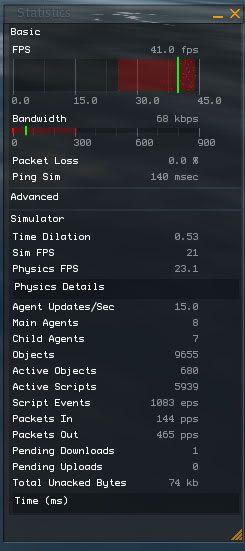 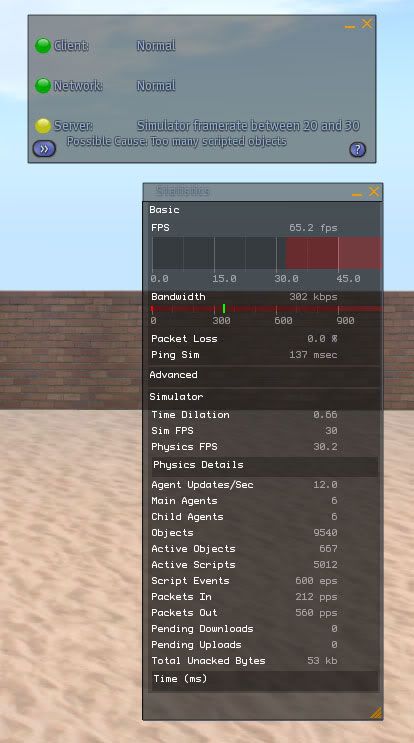 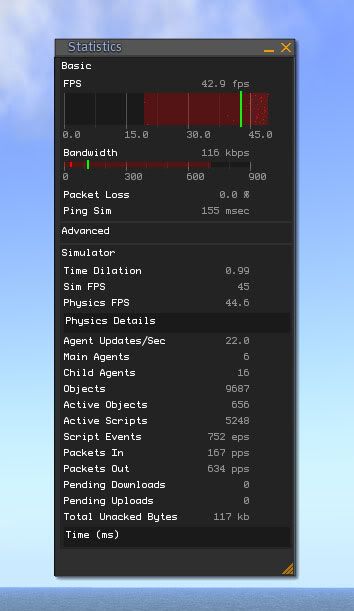 |
|
Sindy Tsure
Will script for shoes
Join date: 18 Sep 2006
Posts: 4,103
|
02-02-2009 16:34
Which region are we talking about?
|
|
Piggie Paule
Registered User
Join date: 22 Jul 2008
Posts: 675
|
02-03-2009 07:10
Another question on this topic:
Simple Prim Rotation Scripts......... What is their affect/loading on the SIM (server lag / time dilation) ? Also, the difference between a prim rotating that's "Physical" vs one thats "Phantom" And also (like in a disco) when you have one prim rotating (a base) and 4 more prims attached (disco lights) rotating as they are connected to the one base (which has the script) and all this (obviously) being phantom. Thanks. |
|
Lee Ponzu
What Would Steve Do?
Join date: 28 Jun 2006
Posts: 1,770
|
02-03-2009 08:07
Things are going to change more in the next five years than they just did in the last ten.
By the time you get this all worked out, the CPUs will be twice as powerful, and the networks twice as fast. _____________________
So many monkeys, so little Shakespeare.
|
|
Awnee Dawner
object returned to sim
Join date: 7 Apr 2008
Posts: 206
|
02-03-2009 08:35
hey!
a sim doesnt run rocksolid at - time dilation 1.0 - sim fps 45 - physics fps 45 what causes a dropdown in sim_performance even on a healthy sim : changin cloth / primstuff / attach, detach objects people tp in or tp out, ... one heavy scripted person can lag down a sim - i have seen people with 800 running scripts and half a sim attached time (ms) in statistics bar will show the different threads - total frame time - net time - sim time (physics) - sim time (other) - agent time - images tme - script time - spare time _____________________
>> yes <<
|
|
Piggie Paule
Registered User
Join date: 22 Jul 2008
Posts: 675
|
02-03-2009 09:45
hey! a sim doesnt run rocksolid at - time dilation 1.0 - sim fps 45 - physics fps 45 what causes a dropdown in sim_performance even on a healthy sim : changin cloth / primstuff / attach, detach objects people tp in or tp out, ... one heavy scripted person can lag down a sim - i have seen people with 800 running scripts and half a sim attached time (ms) in statistics bar will show the different threads - total frame time - net time - sim time (physics) - sim time (other) - agent time - images tme - script time - spare time Of course, we fully appreciate that. But if just a handful of items can be removed (perhaps replaced with better/alternate items, and the whole sim speeds up (in general) then it's well worth doing. Hence really asking what are the worst offenders and what takes almost zero power and can be ignored. I did the maths and I think on my 1/8th of a full mainland sim I have probaly 60 running scripts myself (and some of these are just texture anims, prim rotation stuff) Even say I've forgottn a few and bump my figure up to 100 running scripts. Apparently there are around 5000 active scripts on the sim, and hardly any avatars. So a lot of stuff is running somewhere. I have found ONE of mine that made a noticable difference. It was a 1 prim flower generator. I'm contacting the author to ask about it, But it put out a nice ring of temp flowers, and it had a noticable effect on the sims Time Dilation figure. If just one or two are running something similar that could be the cause of the issues. |
|
Meade Paravane
Hedgehog
Join date: 21 Nov 2006
Posts: 4,845
|
02-03-2009 09:51
I have found ONE of mine that made a noticable difference. It was a 1 prim flower generator. I'm contacting the author to ask about it, But it put out a nice ring of temp flowers, and it had a noticable effect on the sims Time Dilation figure.. /me has seen two kinds of laggy flower scripts. One is a temp rezzer. Lots of flower objects rezzed every minute. If you can right-click on one of the flowers, it's probably being temp-rezzed. The other is a particle flower system. These are far less costly than temp rezzers but every call to llParticleSystem forces a full object update and if the particles are changing quickly (which they tend to, do get varying raduis) and you've got a bunch of them, it can add up.. _____________________
Tired of shouting clubs and lucky chairs? Vote for llParcelSay!!!
- Go here: http://jira.secondlife.com/browse/SVC-1224 - If you see "if you were logged in.." on the left, click it and log in - Click the "Vote for it" link on the left |
|
Awnee Dawner
object returned to sim
Join date: 7 Apr 2008
Posts: 206
|
02-03-2009 10:28
hey!
Of course, we fully appreciate that. But if just a handful of items can be removed (perhaps replaced with better/alternate items, and the whole sim speeds up (in general) then it's well worth doing. you can deactivate all particle - texture_animation - sit_target - loop_sound - hover_text -> scripts once the event is baked to the prim, thers no need to have this script running the estate owner can read out top_scripts with his estate tools _____________________
>> yes <<
|
|
Piggie Paule
Registered User
Join date: 22 Jul 2008
Posts: 675
|
02-03-2009 10:59
hey! you can deactivate all particle - texture_animation - sit_target - loop_sound - hover_text -> scripts once the event is baked to the prim, thers no need to have this script running the estate owner can read out top_scripts with his estate tools I have kinda asked this in another thread but you have given more examples of the types of events that can be stopped. Are you saying that once the script has run, the "effect" so to speak (from the list you gave) has been applied to the prim and been started off, that by stopping the script, it carries on running for free with zero draw on the Sim's capacity? Just so I understand, does a rotation script (for example) keep going round in a loop 10's or 100's of times a minute, continually going over and over the same instruction to tell the prim to spin, when just telling it once and stopping would do the same. Unless something crashed of caused the prim to be reset? If this is true, seems crazy not to have a very basic easy to use tickbox on all prims like this to stop this waste of power. |
|
Awnee Dawner
object returned to sim
Join date: 7 Apr 2008
Posts: 206
|
02-03-2009 13:25
hey!
the script is deactivated or removed - it doesnt count to "active scripts" / "script time" anymore. _____________________
>> yes <<
|
|
Hewee Zetkin
Registered User
Join date: 20 Jul 2006
Posts: 2,702
|
02-03-2009 13:55
Simple Prim Rotation Scripts......... What is their affect/loading on the SIM (server lag / time dilation) ? Also, the difference between a prim rotating that's "Physical" vs one thats "Phantom" And also (like in a disco) when you have one prim rotating (a base) and 4 more prims attached (disco lights) rotating as they are connected to the one base (which has the script) and all this (obviously) being phantom. It depends on how the rotation is done. PHYSICAL rotating objects tend to have a pretty heavy effect, since the rotation is actually done on the server and a lot of collisions and non-trivial bouncing can happen. Solid but non-physical objects rotating shouldn't be a big deal, I believe. At least, they shouldn't if you use llTargetOmega(). Continuous use of llSetRot() or llLookAt()/llRotLookAt() may cause some lag. Phantom objects gain the usual advantage of not causing any collisions (I think they are even skipped in the collision tests unless they use llVolumeDetect() rather than being truly phantom). |
|
Hewee Zetkin
Registered User
Join date: 20 Jul 2006
Posts: 2,702
|
02-03-2009 13:58
Just so I understand, does a rotation script (for example) keep going round in a loop 10's or 100's of times a minute, continually going over and over the same instruction to tell the prim to spin, when just telling it once and stopping would do the same. Unless something crashed of caused the prim to be reset? If this is true, seems crazy not to have a very basic easy to use tickbox on all prims like this to stop this waste of power. Again it depends on how the rotation is done. If llTargetOmega() is used, the script shouldn't need to keep running after the call is made. If more active means are used to continually update the object's rotation (such as llSetRot(), llSetPrimitiveParams() with PRIM_ROTATION, llLookAt(), or llRotLookAt()), then the script very much needs to keep running to keep the rotation going. Keep in mind that (like I stated above) the latter solution can cause a lot more lag, so if your application CAN use llTargetOmega() instead, it's probably a good idea to do that. |