I am trying to make a skin from photographs of my face and body and finding it extremely difficult. I have downloaded the templates and got the front of the face to line up but thats about all I can manage (I haven't started to work on the body yet). There are a few things I wanted to know.
1. Is it possible to download the textures used on the default skins (or any skins for that matter) in SL? I need an example skin so that I can see what a finnished skin looks like.
2. What photos will I need to make a complete skin and how do I blend them together? I am not sure how to get the skin to wrap round the sides of the head for example.
3. Do I need any other tools apart from photoshop and SL clothes previewer?
Any help would be much appreciated.
EDIT: Oh yeah one more thing: When photographing my face should I have eyes closed or open? I done it with closed at the moment and completely removed my eyelids and eyelashes. Is this the right way to do it?
Welcome to the Second Life Forums Archive
These forums are CLOSED. Please visit the new forums HERE
Creating a skin from phorographs |
|
|
Stephen Meriman
Registered User
Join date: 12 Feb 2007
Posts: 2
|
02-12-2007 07:41
|
|
Vx Shaw
Abydos Owner/Partner
Join date: 7 Jun 2005
Posts: 10
|
02-12-2007 09:12
Hi Stephen,
I've done some investigating in making skins, and one thing I can say is to be prepared for a lot of work! A few pointers I can give you: Detail is good AND bad. Using digital photographic information can enhance certain parts of the skin, and can detract in others. Too much detail can make a skin look "blotchy," especially if your photos show a lot of veins. Lighting will also be a factor. You will have to find a balance that works for your tastes. When using the templates, realize that they are not exact, they are guides. Allow plenty of bleed over the edges to allow for seam coverage. You can always sample the colors near the seam edges to match them up. Anything you can do to help hide the seams will improve the skin. Unfortunately, nobody is going to provide a skin texture set for you to copy from (if you do, it's probably not a skin that would help you). However, the clothing templates available in the downloads area of the SL website are the templates you need. The skin actually consists of 3 textures: (1) the head, (2) torso/arms and (3) from the waist down. You can actually use the templates to make a gridded skin, to see how everything fits. I believe the templates are still named: "CMFF-Master_Template-Head" "CMFF-Master_Template-Upper" "CMFF-Master_Template-Lower" Get the PSD versions, they are more precise and layered - giving you better control over the needed information (seam and edge matching guides). Chip Midnight created them, and they are the standard. (the page seems to be inaccessible today, but but this is one location to get them) http://secondlife.com/community/templates.php You can make a skin from any graphics editor, Photoshop will do everything you need, as will most other editors (personally, I use several, but mostly gimp and Paint Shop Pro). I would recommend an editor that supports layers (PS, PSP and gimp support layers). Also, expect to upload the textures several times, even with a clothes previewer. Examine your development in different lights and views in SL. Good designers have persistence. The eye lashes have their own little area on the template - in the upper right corner of the texture. The eye lids should be black, I believe. I'm not sure how it uses this information, but I believe that SL has this area reserved I hope that gets you a jump-start. Good luck! ~ V ~ |
|
Namssor Daguerre
Imitates life
Join date: 18 Feb 2004
Posts: 1,423
|
02-12-2007 09:31
This thread has some useful information. VX is right. It will be a lot of work. If you're going the photographic route be prepared to take around 40-50 high resolution (at least 2000x3000) photos from all possible angles in a Da Vinci style pose with some special angles for the head, hands, legs, and feet.
|
|
Chip Midnight
ate my baby!

Join date: 1 May 2003
Posts: 10,231
|
02-12-2007 09:35
Just a couple of points to add to Vx's excellent post - you can find all the files associated with the default skin in the "character" subfolder of your SL install directory. They're not great but can be a big help with getting the lay of the land, so to speak. The templates available for download in the communtiy section of this site are still the Linden made templates as far as I know. You can find links to my templates and those by Robin Sojourner in the first post of the sticky templates thread at the top of this forum
 _____________________
 My other hobby: www.live365.com/stations/chip_midnight |
|
Stephen Meriman
Registered User
Join date: 12 Feb 2007
Posts: 2
|
02-12-2007 13:25
Thanks for your replies - this is hepful. I think it is going to be a lot of work so I will probably start with the head - at least that way if I give up half way i will be able to use my face.
|
|
Thunderclap Morgridge
The sound heard by all

Join date: 30 Sep 2006
Posts: 517
|
02-14-2007 22:15
Try out the program, facegen. It will save you sometime. Otherwise, they are right.
_____________________
Gimp:
n : disability of walking due to crippling of the legs or feet ie. lameness, limping, gameness, claudication secondlife://Amaro/77/130/39 Come to Thunderclap: the gospel chapel and Thunderburst: Mens clothes and more. |
|
Johan Durant
Registered User
Join date: 7 Aug 2006
Posts: 1,657
|
02-15-2007 07:22
I made the skin I normally wear using photos of myself. My main tip is to make sure the photos are evenly well lit. You want the highest image quality possible; in particular, note that digital cameras get pretty grainy if there isn't enough light, and that image grain, while maybe not noticeable when you take a casual look at the photo, will make any texture you create look god awful.
Outdoors on an overcast day is great for evenly lit photos. Ever seen how professional photo shoots will use big screens to diffuse the light? Direct sunlight looks harsh and blown out in photos, and an overcast sky acts as a natural diffuser. If you wanna take the photos indoors (after all, it's pretty cold outside this time of year) then do it on a bright sunny day with lots of sunlight streaming in the windows and don't use flash. The trick though is don't stand in a sunbeam; you want all that light coming in the room, but again you don't want direct sunlight on the subject of your photo (ie. you.) If you stand off to the side you will still be well lit from all the light bouncing around the room, and you won't have harsh highlights from direct sunlight. I am not sure how to get the skin to wrap round the sides of the head for example. Take front and side shots of your head. Line up the front of the face in the templates. Now paste the side shot as a layer over the front, and line it up so the features are all at the same height. Now use the eraser tool with soft edges to erase off the overlapping features. Gimme a minute and I'll post the photos I used and the skin I made so you can see what I'm talking about. ADDITION: Okay here are the images. First the front and side photos like you will want to take: 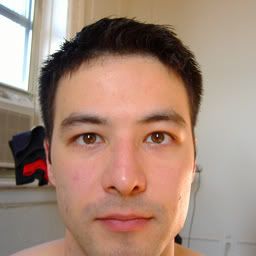 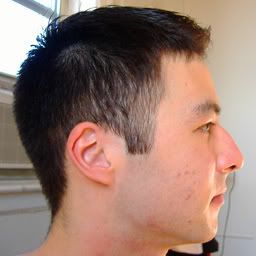 Incidentally, even though I avoided direct sunlight you can still see hotspots on my face. Fortunately the reflected light was all on the edges of my face so those parts didn't matter anyway. Still, you can see how such blown out highlights could ruin the usefulness of that photo for texture work. And here's the head texture map created in the way I described: 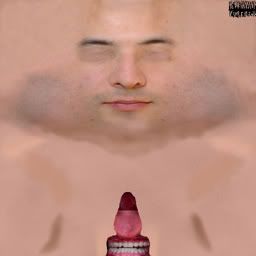 You can see lots of other tweaks made too, like adjusting the images so the skin tone matches, removing the eyes and hair, stuff like that. There's a lot to know to prepare a good texture... _____________________
 (Aelin 184,194,22) (Aelin 184,194,22)The Motion Merchant - an animation store specializing in two-person interactions |
|
Sarah85 Oh
Registered User
Join date: 4 Feb 2007
Posts: 9
|
02-15-2007 11:42
This is exactly what I needed! Thanks for the help. This weekend I think I will make the skin. Thanks a lot guys!
|
|
Jesseaitui Petion
king of polynesia :P
Join date: 2 Jan 2006
Posts: 2,175
|
02-16-2007 01:00
Sarah,OP, check this too
/109/97/165848/1.html Video tutorials, etc for what you are trying to do. A lot easier when you can see someone doing it and explaining. |
|
Johan Durant
Registered User
Join date: 7 Aug 2006
Posts: 1,657
|
02-16-2007 05:19
oo nice! *bookmarks*
_____________________
(Aelin 184,194,22)The Motion Merchant - an animation store specializing in two-person interactions |