Welcome to the Second Life Forums Archive
These forums are CLOSED. Please visit the new forums HERE
Big domes and spheres... |
|
|
Keto Pera
Registered User
Join date: 1 Oct 2007
Posts: 5
|
10-13-2007 09:32
I have seen a few very nice builds of large spheres in the sky, divided into two halves by a horizontal plain that serves as the floor. It looks fairly simple (at least the sphere) with a 40x40x40 megaprim, if you are into such things. But I want to do this with a 30 m diameter dome (or shpere). 32 m max. No megaprims available for that. I have searched this forum to no avail. Any suggestions that A) don't require a google of prims and B) don't require linear algebra, calculus or an engineering degree?
|
|
Stephen Zenith
Registered User
Join date: 15 May 2006
Posts: 1,029
|
10-13-2007 10:40
I have seen a few very nice builds of large spheres in the sky, divided into two halves by a horizontal plain that serves as the floor. It looks fairly simple (at least the sphere) with a 40x40x40 megaprim, if you are into such things. But I want to do this with a 30 m diameter dome (or shpere). 32 m max. No megaprims available for that. I have searched this forum to no avail. Any suggestions that A) don't require a google of prims and B) don't require linear algebra, calculus or an engineering degree? Can probably do it with a few sculpties of the right shape, pieced together. However, until the lossless issue is fixed, it may or may not look so good. _____________________
|
|
Ceera Murakami
Texture Artist / Builder

Join date: 9 Sep 2005
Posts: 7,750
|
10-14-2007 16:33
If you have a large prim budget, "Shapegen" by Cadroe Murphy is a free tool that can make domes, rings and other large shapes, using multitudes of smaller prims.
Sculpties may soon offer a way to make curved panels to make large domes, but for now it's a tough setup for that, for most people. _____________________
Sorry, LL won't let me tell you where I sell my textures and where I offer my services as a sim builder. Ask me in-world.
|
|
Logan Bauer
Inept Adept

Join date: 13 Jun 2004
Posts: 2,237
|
10-14-2007 16:47
Hmm, well you can take a 40x40x40 megaprim sphere (set phantom, and assuming that you want to use a megaprim with the possibility of them all being borked shortly)....
- Make it about hollow 77.0 (may want to make this a bit more or less to get to exactly 32m) - Set the outside texture to a completely transparent texture - Set twist beginning to 180 and twist end to 180 (flip it inside out) This will only create a "one-sided" sphere/dome however. Make a copy of your megaprim sphere, put this new copy in the same spot as the first megaprim, and set it to 0 twist beginning and end, and you'll have the "inside" dome piece. |
|
Cadroe Murphy
Assistant to Mr. Shatner

Join date: 31 Jul 2003
Posts: 689
|
10-14-2007 17:29
Sculpties may soon offer a way to make curved panels to make large domes, but for now it's a tough setup for that, for most people. Yeah, that seems like the next step. I guess there are compression and LOD issues, but otherwise there doesn't seem to be any reason not to have very smooth arbitrary curves made of interlocking sculpties. I have a feeling it will require someone with more eLitE skilz in 3d math than mine to automate it. P.S. You didn't mention how many prims ShapeGen uses  _____________________
ShapeGen 1.12 and Cadroe Lathe 1.32 now available through
SLExchange. |
|
Stephen Zenith
Registered User
Join date: 15 May 2006
Posts: 1,029
|
10-14-2007 17:45
Hmm, just a bit of 3d trig. Realistically, you also need a shape that will tessellate well, I can make a 1/8th segment of a sphere easily, but that would only give a 20m sphere.
Texturing it is another issue altogether. _____________________
|
|
Stephen Zenith
Registered User
Join date: 15 May 2006
Posts: 1,029
|
10-14-2007 18:29
Ok, first effort: the sphere on the left is a regular 10x10x10 sphere. The one on the right is 8 sculpties, complete with a nice gap in between each one where they don't quite match up! In addition, the sculpty doesn't have a flawless surface, probably due to some rounding errors in the code I knocked up to generate it. The gaps are caused by a mistake I know about.
2nd effort will be tomorrow! 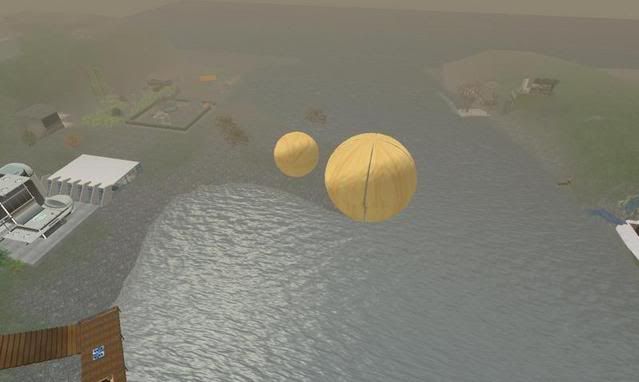 _____________________
|
|
Cadroe Murphy
Assistant to Mr. Shatner
Join date: 31 Jul 2003
Posts: 689
|
10-15-2007 06:15
Cool, Stephen, I'm looking forward to seeing your progress. Are you sure the lack of smoothness isn't due to texture compression artifacts, rather than your code?
_____________________
ShapeGen 1.12 and Cadroe Lathe 1.32 now available through
SLExchange. |
|
Stephen Zenith
Registered User
Join date: 15 May 2006
Posts: 1,029
|
10-15-2007 06:40
Cool, Stephen, I'm looking forward to seeing your progress. Are you sure the lack of smoothness isn't due to texture compression artifacts, rather than your code? I uploaded them as lossless - which may or may not be the best idea for this, but it was just a proof of concept. There's several places in my code where I could be rounding it, and it was just something I knocked up quickly before going to bed so I would assume it's with my code. I'm also working on an offline sculpty previewer, so I won't spend a fortune doing uploads! _____________________
|
|
Stephen Zenith
Registered User
Join date: 15 May 2006
Posts: 1,029
|
10-15-2007 12:14
Ok, had another go at this tonight, the results are below:
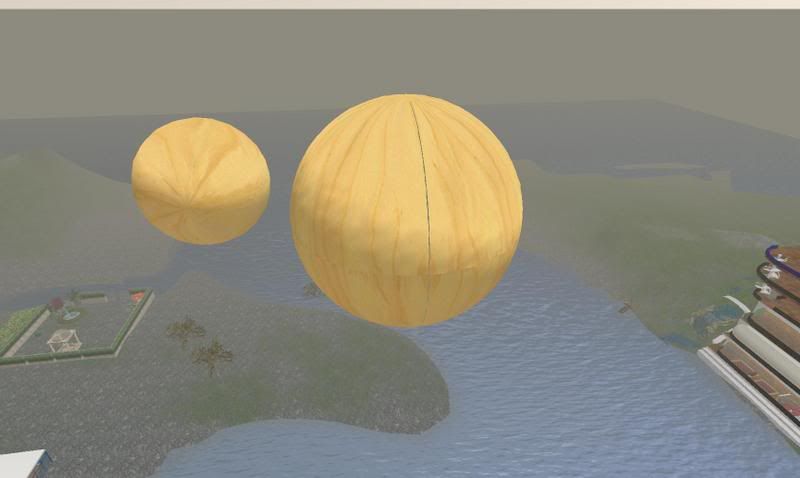 I fixed the main problem with the gap,but there's still an issue with the surface not being particularly true which is causing a smaller apparent gap. I think I've eliminated all the rounding problems, but I get the exact same effect regardless of lossy or lossless encoding. It might just be that 8 bits can't describe a segment of a 20x20x20 sphere accurately enough. _____________________
|
|
Keto Pera
Registered User
Join date: 1 Oct 2007
Posts: 5
|
10-15-2007 12:20
I just got a chance to review the post. Very impressive. For my purposes a gap would be irrelevant, since that area would be masked by the floor (a whole other issue).
|
|
Ceera Murakami
Texture Artist / Builder
Join date: 9 Sep 2005
Posts: 7,750
|
10-15-2007 13:09
P.S. You didn't mention how many prims ShapeGen uses  I'd love to see what you could do with a version of Shapegen that would somehow generate sculpty pieces of the required shapes... _____________________
Sorry, LL won't let me tell you where I sell my textures and where I offer my services as a sim builder. Ask me in-world.
|
|
Ceera Murakami
Texture Artist / Builder
Join date: 9 Sep 2005
Posts: 7,750
|
10-15-2007 13:14
I fixed the main problem with the gap,but there's still an issue with the surface not being particularly true which is causing a smaller apparent gap. I think I've eliminated all the rounding problems, but I get the exact same effect regardless of lossy or lossless encoding. It might just be that 8 bits can't describe a segment of a 20x20x20 sphere accurately enough. Question for Stephen Zenith. Does the method you are using produce a hollow sphere, and could it be used to make a half-sphere dome, with a 24 M diameter? I have a building job coming up that will need a 24 M diameter dome, that needs to look good from both inside and out. And the cylindrical room under the dome needs to remain usable. _____________________
Sorry, LL won't let me tell you where I sell my textures and where I offer my services as a sim builder. Ask me in-world.
|
|
Stephen Zenith
Registered User
Join date: 15 May 2006
Posts: 1,029
|
10-15-2007 13:29
Question for Stephen Zenith. Does the method you are using produce a hollow sphere, and could it be used to make a half-sphere dome, with a 24 M diameter? I have a building job coming up that will need a 24 M diameter dome, that needs to look good from both inside and out. And the cylindrical room under the dome needs to remain usable. At the moment, I'm using planar sculpties - they have the interesting effect of being totally invisible from the wrong side. So at the moment, yes it's hollow but no, it won't look like anthing from the inside! On the other hand, they're very useful for testing things with, because you don't have to worry about the stitching or poles. There's a few options for doing the inside - one is to use spherical sculpties (the usual ones), the other is to make an inverted sphere to go inside. The 2nd way uses more prims, but the first way has half the number of defined points per side. And the 2nd way is more flexible for texturing. Also, because I'm only using 8 of them, the max radius will be 20m. However, it's possible to use smaller segments of a sphere, and more of them to get larger spheres. But that's not in place yet. To everybody getting excited about these, they aren't ready yet. The gap is much more noticable up-close than in the pictures. But it is a starting point. _____________________
|
|
Okiphia Rayna
DemonEye Benefactor

Join date: 22 Sep 2007
Posts: 2,103
|
10-15-2007 18:36
Using the planars, with that effect there, you could use the same sculpties, but scaled down slightly for the inside, couldnt you?
|
|
Stephen Zenith
Registered User
Join date: 15 May 2006
Posts: 1,029
|
10-16-2007 01:21
Using the planars, with that effect there, you could use the same sculpties, but scaled down slightly for the inside, couldnt you? Almost - you'd need to make it so that the inside of the sphere was drawn, not the outside - it's easy enough to do (a trivial mod to my code would do it), but it means you'd need 2 different sculpt textures and twice the prims if you needed both an inside & outside. _____________________
|
|
DanielFox Abernathy
Registered User
Join date: 20 Oct 2006
Posts: 212
|
10-16-2007 02:08
Stephen - you shouldn't get a gap assuming you're using the full 8 bit range. I've made a 20m diameter lighthouse at a 15 degree incline with sculpties, and there's no gap at all.
Could you post the sculpt texture you're using? |
|
Stephen Zenith
Registered User
Join date: 15 May 2006
Posts: 1,029
|
10-16-2007 02:36
Stephen - you shouldn't get a gap assuming you're using the full 8 bit range. I've made a 20m diameter lighthouse at a 15 degree incline with sculpties, and there's no gap at all. Could you post the sculpt texture you're using? How smooth is your curve once it's rezzed? The initial gap I had was caused by a bug, the gap I get now I think is actually because the surface doesn't appear truly spherical - it has slight bumps in it that don't line up perfectly. Thinking about it, when my code rounds off the floating point values to create the sculpt map, they could be up to +/-0.5 off - or very nearly 0.02m away from true in either direction, along any or all of the 3 axes when applied to a 10x10x10 prim. That's enough to cause the textures to be misaligned when placed piecewise in this way. I think spherical sculpties might give better looking results, as the depth of the sculpty in that case will mask the gaps. _____________________
|
|
Stephen Zenith
Registered User
Join date: 15 May 2006
Posts: 1,029
|
10-18-2007 16:02
First, some background
When I first started dabbling in generating sculpt maps from with scraps of code I knock up, I realised early on that the pnm family of formats were perfect for what I wanted. Specifically ppm, which comes in 2 variations - one is a few lines of header in ascii, describing the format, width, height and number of colours, then just uncompressed raw data. The other variation actually has each pixel in ascii, just as 3 numbers in a text file. I realised early on that if this were used for a sculpt map, each pixel in the file was an easily readable coordinate in the sculpt map. And it's ludicrously easy to generate, and most Linux distributions include a package called netpbm (pbm is another member of the pnm family) which provides command line utilities to convert between both types of pnm and more standard formats, such as jpg, tga, bmp etc, perfect for uploading to SL. Anyway, more recently I did some research into the .obj format used by 3d modellers, and realised that a sculpt map in ppm format, plus a mesh (which differs depending on the type of sculpty - sphere, plane, torus or cylinder - and the resolution) is almost identical to an .obj. So I knocked up a few converters, started playing with an open source .obj viewer etc. I also did some work converting SL terrain .raw files to both sculpty and .obj. Just tonight I decided to modify the bit of code I wrote to generate parts of spheres & domes to output an .obj instead. I also allowed a parameter to decide whether to round the coordinates to the same precision as in a sculpt map (ie integers 0-255) or use more precision, in an effort to prove that using 8 bits was insufficient for a spherical surface. The first image is a .obj of a 1/8th sphere, with 2 decimal places precision as shown in my hacked .obj viewer: 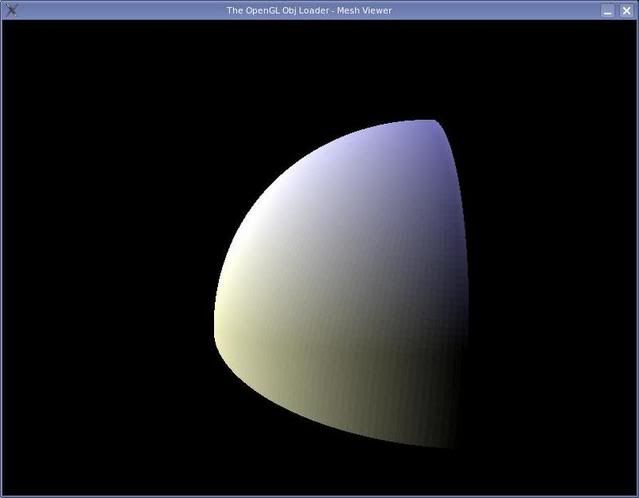 This second image is from the exact same algorithm, but with the values rounded off, which is exactly the same precision as present in a sculpt map: 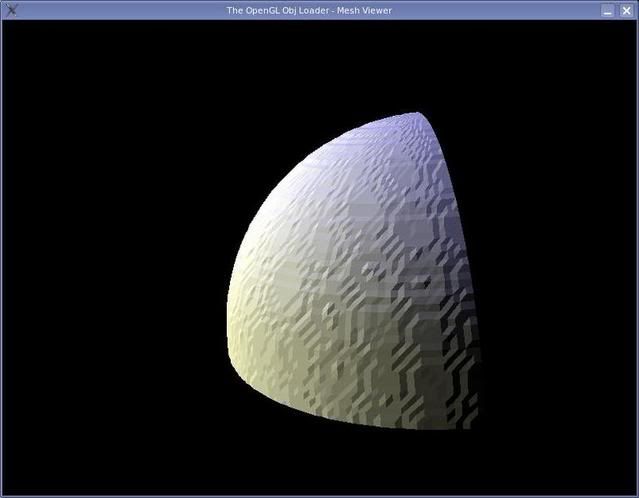 Both images use a 64x64 planar mesh. My point? 8 bits aren't enough for genuinely parametric surfaces. The same rounding error will be present on sculpt maps generated from entities such as Nurbs surfaces. etc. And at the edge of the sculpty, the quantization error causes the separate pieces to misalign. _____________________
|
|
Cadroe Murphy
Assistant to Mr. Shatner
Join date: 31 Jul 2003
Posts: 689
|
10-19-2007 05:46
Stephen - Impressive efforts. Would more constituent pieces in the shape help to minimize the effect of distortion due to rounding? The distortion wouldn't go away, but maybe if the scale for each piece is small enough it wouldn't be too noticeable. In theory the gaps with adjacent shapes would be smaller too. I'm no expert in sculpties though...
_____________________
ShapeGen 1.12 and Cadroe Lathe 1.32 now available through
SLExchange. |
|
Stephen Zenith
Registered User
Join date: 15 May 2006
Posts: 1,029
|
10-19-2007 05:56
Stephen - Impressive efforts. Would more constituent pieces in the shape help to minimize the effect of distortion due to rounding? The distortion wouldn't go away, but maybe if the scale for each piece is small enough it wouldn't be too noticeable. In theory the gaps with adjacent shapes would be smaller too. I'm no expert in sculpties though... Yes, that would work - however, my main aim here is to make bigger spheres with multiple pieces, i.e. being able to take smaller sections of a sphere and scale each to 10x10x10, rather than taking larger sections and scaling them down. Also, the effect is clearly visible on 5x5x5 section - I tried piecing 8 of those together with a differently coloured regular 10x10x10 sphere inside, to see how the fluctuations affected it. _____________________
|
|
Cadroe Murphy
Assistant to Mr. Shatner
Join date: 31 Jul 2003
Posts: 689
|
10-19-2007 06:19
Yes, that would work - however, my main aim here is to make bigger spheres with multiple pieces, i.e. being able to take smaller sections of a sphere and scale each to 10x10x10, rather than taking larger sections and scaling them down. Also, the effect is clearly visible on 5x5x5 section - I tried piecing 8 of those together with a differently coloured regular 10x10x10 sphere inside, to see how the fluctuations affected it. Do you mean you want to make a single set of pieces which can be used for any sized sphere? I was imagining something like my ShapeGen tool, which builds large spheres by combining box prims. How large a sphere and how many prims is up to the user. But the more prims the smoother it is. If you keep the same number of prims and increase the size of the sphere, it gets less smooth (and vice versa). Of course to do this you have to adjust each piece to fit given the radius, number of pieces, and piece position. What I was imagining was essentially replacing the box prims with sculpties. But it sounds like you're after something slightly different. _____________________
ShapeGen 1.12 and Cadroe Lathe 1.32 now available through
SLExchange. |
|
Stephen Zenith
Registered User
Join date: 15 May 2006
Posts: 1,029
|
10-19-2007 06:42
No, I'm after something similar, ultimately. On the other hand, I don't want to use hundreds of 2x2x2 sculpties (say) if I can use a few 10x10x10 ones. Using just 8 to produce a 20x20 sphere was really just a proof of concept, above that you need to look at more complicated structures, basically geodesic domes except with curved sections instead of flat ones.
I've not used ShapeGen much, except to have a quick look at it a few months ago - am I right in thinking it generates geodesic spheres from triangles? Or does it generate rings of tapered boxes? I'm aiming to be able to build a given sphere with 1 or 2 different sculpt meshes, which is one of the benefits of the geodesic approach. _____________________
|
|
Stephen Zenith
Registered User
Join date: 15 May 2006
Posts: 1,029
|
10-19-2007 06:47
Oh, and part of my issue with the gap might actually be caused by this: http://jira.secondlife.com/browse/VWR-2550 - "Scuplty vertex coordinates are size/256 meters too small on the positive faces"
Edit: Oh, and I wonder if this is the cause of your terrain sculpty generator needing the textures offsetting by 0.015? _____________________
|
|
Stephen Zenith
Registered User
Join date: 15 May 2006
Posts: 1,029
|
10-23-2007 15:58
Managed to do some more work on this - I rewrote the algorithm so it doesn't eliminate the crinkles, but it does make them line up when pieced together. Then I rewrote it again, to generate a spherical triangle or quadrilateral between any 3 or 4 points on a sphere, to allow me to play around with different tiling methods.
I was also getting problems because I was generating a genuine 128x128 grid, instead of a 64x64 doubles along each axis. Doh! Result is that it all looks much better. Oh, and here's a pic - 24 planar sculpties, each is an identical spherical quadrilateral. The one on the left is a regular 10x10x10 sphere. 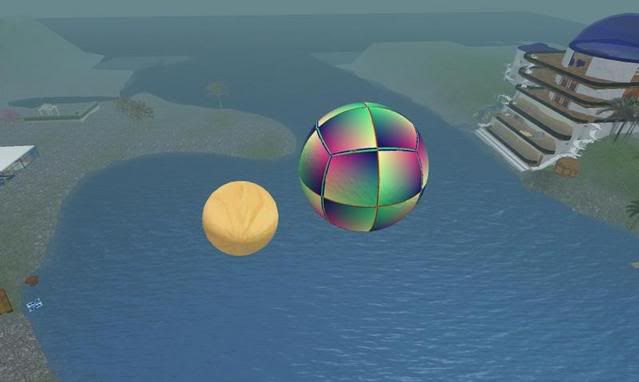 Next step is to try larger tiling patterns. _____________________
|