My avatar has gone completely blank!
|
|
Trebor Teardrop
Registered User
Join date: 14 Sep 2008
Posts: 18
|
02-07-2009 08:34
This is the most odd thing i have ever seen, now both my female avatars are just like this 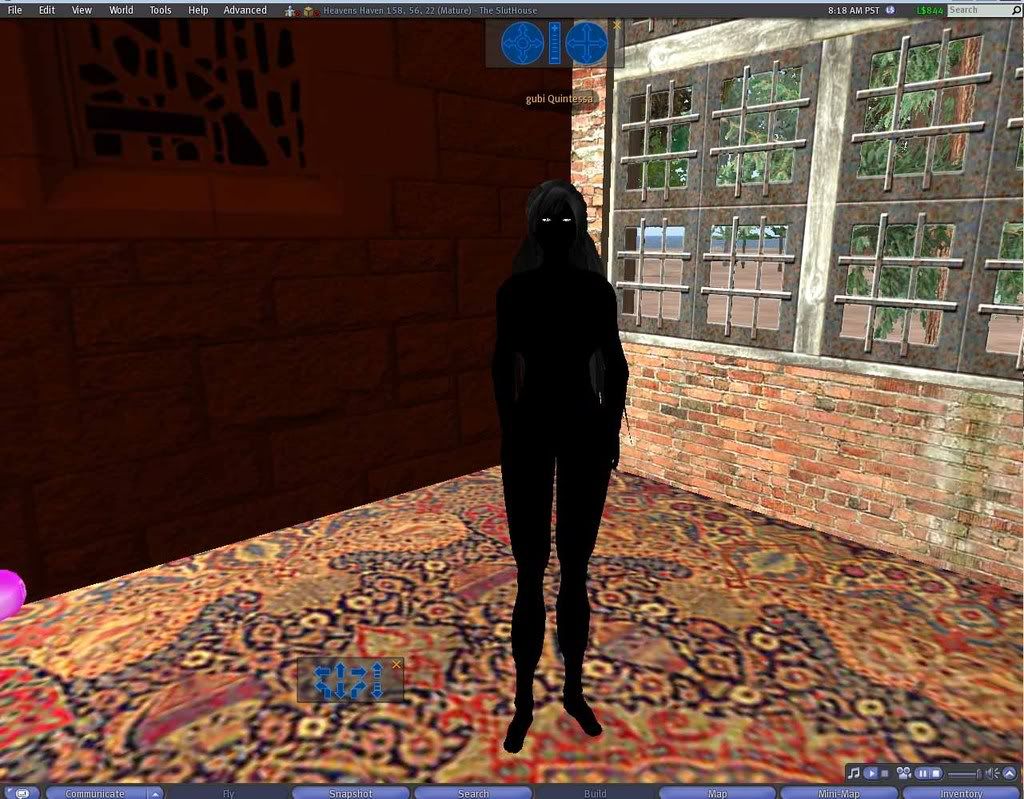 Her name is Gubi Quintessa I have changed skins...i have 6, changed clothes....cleared my cache, rebaked my textures and rebooted my computer and even reinstalled my video driver just to be sure. I used my second pc and it showed the same charcoal black avatar. This started 3 days ago as a random event...where her face or legs or something would just go completely black...but then i would just change skins and it would be fixed...but after last nite, now none of them work....all of her clothes...I mean ALL of them do not even show... I have another Female avatar and its just the same? WTF is going on here....I have tried this on 2 different PCs and i get the same result... BTW....both avatars do not have the same clothes....my male avs...are not affected at all |
|
SuezanneC Baskerville
Forums Rock!

Join date: 22 Dec 2003
Posts: 14,229
|
02-07-2009 08:44
Sigh, after all these years, LL can't display menu text or avatars properly. It's disappointing.
Have you tried changing skins on your second computer or were you just looking while on the second machine?
What model video card do you have on both systems and what version video drivers ?
If you have the palletized textures option you could try that: Advanced, Rendering, Features, uncheck Palletized Textures.
I believe I read someone say that switching your av from male to female worked for them.
_____________________
-
So long to these forums, the vBulletin forums that used to be at forums.secondlife.com. I will miss them.
I can be found on the web by searching for "SuezanneC Baskerville", or go to
http://www.google.com/profiles/suezanne
-
http://lindenlab.tribe.net/ created on 11/19/03.
Members: Ben, Catherine, Colin, Cory, Dan, Doug, Jim, Philip, Phoenix, Richard,
Robin, and Ryan
-
|
|
LittleMe Jewell
...........

Join date: 8 Oct 2007
Posts: 11,319
|
02-07-2009 09:47
From: SuezanneC Baskerville .....
If you have the palletized textures option you could try that: Advanced, Rendering, Features, uncheck Palletized Textures.
... When not using the Release Candidate, I will sometimes go all black like that and it was the palletized textures option. My guess is that you have Nvidia graphics with a driver higher than 175 version - so you could also downgrade the graphics driver. You can also start using the Release Candidate, as the problem is fixed there.
_____________________
♥♥♥
-Lil
Why do you sit there looking like an envelope without any address on it?
~Mark Twain~
Optimism is denial, so face the facts and move on.
♥♥♥
Lil's Yard Sale / Inventory Cleanout: http://slurl.com/secondlife/Triggerfish/52/27/22
.
http://www.flickr.com/photos/littleme_jewell
|
|
Trebor Teardrop
Registered User
Join date: 14 Sep 2008
Posts: 18
|
02-07-2009 09:48
Hmmmm I'll try that...
Im using Vista 64bit
my video card is Nvidia GeForce 9600 GT
im actually unsure of the Version...so here is the file name of the installation..
its the most recent version
181.22_geforce_winvista_64bit_english_whql
|
|
Trebor Teardrop
Registered User
Join date: 14 Sep 2008
Posts: 18
|
02-07-2009 09:49
From: LittleMe Jewell When not using the Release Candidate, I will sometimes go all black like that and it was the palletized textures option.
My guess is that you have Nvidia graphics with a driver higher than 175 version - so you could also downgrade the graphics driver.
You can also start using the Release Candidate, as the problem is fixed there. Im unsure if i can get a downgraded driver...or where to look... i doubt Nvidia would keep an old copy onhand |
|
LittleMe Jewell
...........
Join date: 8 Oct 2007
Posts: 11,319
|
02-07-2009 09:52
From: Trebor Teardrop
181.22_geforce_winvista_64bit_english_whql
This means the version is 181.22. Personally, I would either switch to the Release Candidate or turn off the Palletized Textures option -- though that has to be done at every login.
_____________________
♥♥♥
-Lil
Why do you sit there looking like an envelope without any address on it?
~Mark Twain~
Optimism is denial, so face the facts and move on.
♥♥♥
Lil's Yard Sale / Inventory Cleanout: http://slurl.com/secondlife/Triggerfish/52/27/22
.
http://www.flickr.com/photos/littleme_jewell
|
|
LittleMe Jewell
...........
Join date: 8 Oct 2007
Posts: 11,319
|
02-07-2009 09:53
From: Trebor Teardrop Im unsure if i can get a downgraded driver...or where to look...
i doubt Nvidia would keep an old copy onhand You can actually get lots of old versions, but I don't think I would downgrade just for this -- only if there were also other problems. I am also running the 181 version and have no other issues with it. Edited -- actually, for the Vista 64-bit 9600 GT, there may not be any older ones. You would have to search the nvidia site. Mine is 8800 GT for XP and I can still go back quite a few driver versions.
_____________________
♥♥♥
-Lil
Why do you sit there looking like an envelope without any address on it?
~Mark Twain~
Optimism is denial, so face the facts and move on.
♥♥♥
Lil's Yard Sale / Inventory Cleanout: http://slurl.com/secondlife/Triggerfish/52/27/22
.
http://www.flickr.com/photos/littleme_jewell
|
|
Tengu Yamabushi
Registered User
Join date: 25 Sep 2005
Posts: 191
|
02-07-2009 09:57
If you're running more than one monitor, this can happen when you have SL on a monitor that isn't the primary.
Try running windowed, reduce the window size a bit, drag SL to the primary monitor, and rebake (Ctrl-Alt-R). That may help things.
Good luck!
|
|
Nika Talaj
now you see her ...

Join date: 2 Jan 2007
Posts: 5,449
|
02-07-2009 09:58
From: Trebor Teardrop Im unsure if i can get a downgraded driver...or where to look...
i doubt Nvidia would keep an old copy onhand Nvidia archives all their drivers for download by users, here's the archive for XP: http://www.nvidia.com/object/winxp-2k_archive.htmlYou can continue with that driver, but every time you have a graphic anomaly with SL folks will tell you to downgrade  I'm sure sometime full compatibility will be achieved, but it's been this way for a year or so. If you decide to downgrade, be sure to uninstall the previous Nvidia driver first (it's ok, your computer will continue to work with its default driver for the card), then reboot, THEN install the new driver. . |
|
SuezanneC Baskerville
Forums Rock!
Join date: 22 Dec 2003
Posts: 14,229
|
02-07-2009 10:03
nVidia users have to install the older drivers so much I'll bet some folks here have not just version numbers memorized but also the urls to download them at. You go to nvidia.com, take the download drivers links, select your video card, and you'll end up with a fair number of choices. http://www.nvidia.com/object/winxp_175.19_whql.htmlhttp://www.nvidia.com/object/winxp_175.16_whql.htmlare the two that people here mention as being good for getting SL and nVidia card working well together.
_____________________
-
So long to these forums, the vBulletin forums that used to be at forums.secondlife.com. I will miss them.
I can be found on the web by searching for "SuezanneC Baskerville", or go to
http://www.google.com/profiles/suezanne
-
http://lindenlab.tribe.net/ created on 11/19/03.
Members: Ben, Catherine, Colin, Cory, Dan, Doug, Jim, Philip, Phoenix, Richard,
Robin, and Ryan
-
|
|
LittleMe Jewell
...........
Join date: 8 Oct 2007
Posts: 11,319
|
02-07-2009 10:11
However, the OP states he is using Vista 64-bit and a 9600 GT card -- I'm not sure what the oldest driver for that is.
Personally, I simply switched to the RC and never looked back -- well, really I used the RC until I found Kirstens and now I use it almost exclusively, but that one is no longer available for download.
_____________________
♥♥♥
-Lil
Why do you sit there looking like an envelope without any address on it?
~Mark Twain~
Optimism is denial, so face the facts and move on.
♥♥♥
Lil's Yard Sale / Inventory Cleanout: http://slurl.com/secondlife/Triggerfish/52/27/22
.
http://www.flickr.com/photos/littleme_jewell
|
|
Sling Trebuchet
Deleted User
Join date: 20 Jan 2007
Posts: 4,548
|
02-07-2009 10:37
From: SuezanneC Baskerville .....
I believe I read someone say that switching your av from male to female worked for them. I knew that there was something behind the drama threads on transgendering. People switch sex purely to fix their blackness and then go .... "Hmmmmmmmm. That's interesting!" I started getting partly black at random intervals after upgrading my PC and installing latest drivers for all hardware. I have an NVIDIA GeForce 8800 and the drivers became 180.48 from something way below that. It doesn't happen very often and the Palletised Texture CTRL-ALT-F7 plus Rebake fixes it on the fly.
_____________________
Maggie: We give our residents a lot of tools, to build, create, and manage their lands and objects. That flexibility also requires people to exercise judgment about when things should be used.
http://www.ace-exchange.com/home/story/BDVR/589
|
|
SuezanneC Baskerville
Forums Rock!
Join date: 22 Dec 2003
Posts: 14,229
|
02-07-2009 10:46
From: LittleMe Jewell However, the OP states he is using Vista 64-bit and a 9600 GT card -- I'm not sure what the oldest driver for that is. I can't keep track of which of nvidia cards can use the older drivers. And more annoyingly, if I leave the page where the user lists their specs to look at the nvidia site, by the time I get to the place where I need to know what video card and operating system to pick, I've forgotten what they said they had. Sigh.
_____________________
-
So long to these forums, the vBulletin forums that used to be at forums.secondlife.com. I will miss them.
I can be found on the web by searching for "SuezanneC Baskerville", or go to
http://www.google.com/profiles/suezanne
-
http://lindenlab.tribe.net/ created on 11/19/03.
Members: Ben, Catherine, Colin, Cory, Dan, Doug, Jim, Philip, Phoenix, Richard,
Robin, and Ryan
-
|
|
LittleMe Jewell
...........
Join date: 8 Oct 2007
Posts: 11,319
|
02-07-2009 10:50
From: SuezanneC Baskerville And more annoyingly, if I leave the page where the user lists their specs to look at the nvidia site, by the time I get to the place where I need to know what video card and operating system to pick, I've forgotten what they said they had.
Sigh. Browser "tabs" are a lifesaver.
_____________________
♥♥♥
-Lil
Why do you sit there looking like an envelope without any address on it?
~Mark Twain~
Optimism is denial, so face the facts and move on.
♥♥♥
Lil's Yard Sale / Inventory Cleanout: http://slurl.com/secondlife/Triggerfish/52/27/22
.
http://www.flickr.com/photos/littleme_jewell
|
|
Kammie Zhora
Registered User
Join date: 2 Oct 2007
Posts: 7
|
02-07-2009 11:17
I had a similar problem but the bottom half of my avatar was completely white - as suggested by SuezanneC and LittleMe, unchecking Palletized Textures (in Advanced menu, under Rendering, under Features), then a quick rebake solved it!
|
|
Trebor Teardrop
Registered User
Join date: 14 Sep 2008
Posts: 18
|
02-08-2009 14:54
I have tried all the above as mentioned....except for changing my video drivers...I dont see how that could be an issue...since my other male avatars are normal... I tried the unparalyzing textures and it did nothing.... My avatar just came up looking normal for a sec and went back to looking black For right now my av looks ok....but when i change clothes or go to Change appearance... i get this 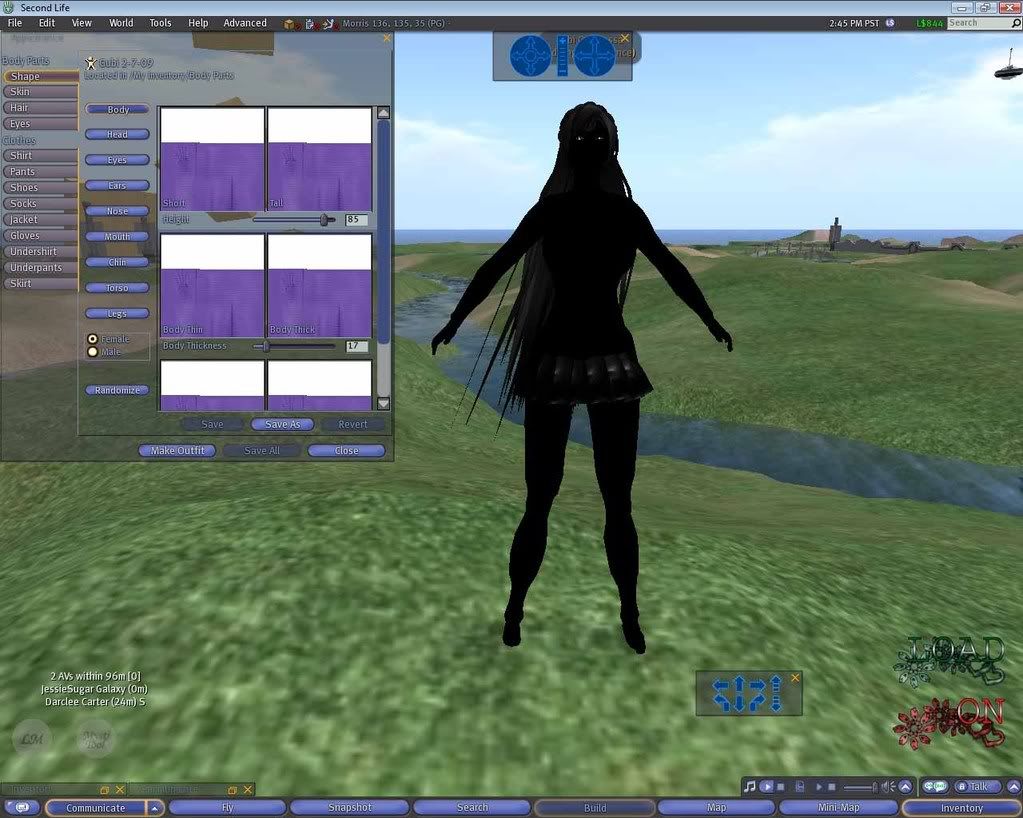 My change appearance looks all wierd... Now just a sec ago...Trebor is all black This feels like a virus maybe? but not on my PC....i check for Viruses with AVG daily Ive been looking for older Video drivers...no luck, but if im having the issue with the black Avatar...why do other see Gubi as all black too? |
|
SuezanneC Baskerville
Forums Rock!
Join date: 22 Dec 2003
Posts: 14,229
|
02-08-2009 15:17
From: LittleMe Jewell Browser "tabs" are a lifesaver. Oh, I use browser tabs, and plenty of them. I have 20 tabs open on this browser and 15 on the other machine at the moment. I just closed Internet Explorer on the other machine, where I was looking at the "Fix The BBcode" script for Internet Explorer, which had another 15 or so tabs open. Sadly, tabbed browser are no match for my faulty memory. I can forget things in a matter of seconds, or even less a second, repeatedly. Dialing a phone number I have to look at the phone book to get the area code, then dial the area code, then look back at the phone book to get the next three digits, then dial them, then look back at the phone book to get the next four digits, then dial them. If I try to remember them all at once it never seems to work. If I read a spec like 9500GT, then go to a list that has 9600GT and 9600GS, I'll forget whether it's GT or GS a lot of the time. Now, there are some applications that might be even more useful than browser tabs for memory problems. The clipboard utility called Ditto comes to mind. Copy stuff by highlighting and pressing Control C, and it all stays in Ditto, ready to be pasted or viewed or whatnot, and it can be text or images, which is pretty neat. Hmm, for Firefox, and presumably Flock, there's an add-on that will let you split the screen, either vertically or horizontally, so you have two or more tabs visible at once. I just use the 1024x768 resolution screens on my old CRT monitors, but on a widescreen, high resolution monitor, that might be pretty convenient. Of course I do use the browsers on both machines to have two pages visible at once, but that usually means I have one or more virtual worlds sitting unattended. All right, I'll stop now. ====================== Regarding the black avatar, I greatly doubt that it has anything to do with a virus or other malware. I think you'd be well advised to try a different driver if possible whether you think it makes sense to or not. Are you using multiple monitors on either machine?
_____________________
-
So long to these forums, the vBulletin forums that used to be at forums.secondlife.com. I will miss them.
I can be found on the web by searching for "SuezanneC Baskerville", or go to
http://www.google.com/profiles/suezanne
-
http://lindenlab.tribe.net/ created on 11/19/03.
Members: Ben, Catherine, Colin, Cory, Dan, Doug, Jim, Philip, Phoenix, Richard,
Robin, and Ryan
-
|
|
Trebor Teardrop
Registered User
Join date: 14 Sep 2008
Posts: 18
|
02-08-2009 16:02
Double post
|
|
Trebor Teardrop
Registered User
Join date: 14 Sep 2008
Posts: 18
|
02-08-2009 16:08
From: SuezanneC Baskerville Regarding the black avatar, I greatly doubt that it has anything to do with a virus or other malware.
I think you'd be well advised to try a different driver if possible whether you think it makes sense to or not.
Are you using multiple monitors on either machine? I use 2 monitors both Acer X223W 22inch Wide Screen monitors |
|
SuezanneC Baskerville
Forums Rock!
Join date: 22 Dec 2003
Posts: 14,229
|
02-08-2009 16:13
Is that two monitors connected to the same computer?
I ask that because you said you tried this on two computers.
Are you running SL on the primary monitor or the secondary monitor? You could try switching.
You could try disabling or unpluggging one monitor.
Black avatars when using two monitors on one computer is a years old long running problem for SL.
In the mental mentor group, mentors would ask for help for someone with this problem and the immediate response was "Are they using two monitors?"
You might try turning off Avatar Skinning. That's supposed to be for ATI problems but it can't hurt to try it.
_____________________
-
So long to these forums, the vBulletin forums that used to be at forums.secondlife.com. I will miss them.
I can be found on the web by searching for "SuezanneC Baskerville", or go to
http://www.google.com/profiles/suezanne
-
http://lindenlab.tribe.net/ created on 11/19/03.
Members: Ben, Catherine, Colin, Cory, Dan, Doug, Jim, Philip, Phoenix, Richard,
Robin, and Ryan
-
|
|
LittleMe Jewell
...........
Join date: 8 Oct 2007
Posts: 11,319
|
02-08-2009 16:28
From: Trebor Teardrop I tried the unparalyzing textures and it did nothing....
My avatar just came up looking normal for a sec and went back to looking black
My change appearance looks all wierd...
Now just a sec ago...Trebor is all black
Did you do the Rebake textures after unchecking the Palletized Textures? And the unchecking of Palletized Textures does not stay from one login to the next so you'll have to redo it at every login.
_____________________
♥♥♥
-Lil
Why do you sit there looking like an envelope without any address on it?
~Mark Twain~
Optimism is denial, so face the facts and move on.
♥♥♥
Lil's Yard Sale / Inventory Cleanout: http://slurl.com/secondlife/Triggerfish/52/27/22
.
http://www.flickr.com/photos/littleme_jewell
|
|
Osprey Therian
I want capslocklock

Join date: 6 Jul 2004
Posts: 5,049
|
02-08-2009 16:30
RC ftw.
|
|
Trebor Teardrop
Registered User
Join date: 14 Sep 2008
Posts: 18
|
02-08-2009 16:55
From: SuezanneC Baskerville In the mental mentor group, mentors would ask for help for someone with this problem and the immediate response was "Are they using two monitors?"
You might try turning off Avatar Skinning. That's supposed to be for ATI problems but it can't hurt to try it. I am using my 2 Acers on my Primary dual I have an old Viewsonic VA912b on the other... And how do i disable skinning? The dual monitors is what hurting my Avatars??? |
|
SuezanneC Baskerville
Forums Rock!
Join date: 22 Dec 2003
Posts: 14,229
|
02-08-2009 17:17
Osprey's suggestion might have been a little overly concise. Her "RC" means try downloading the Second Life Release Candidate, from http://secondlife.com/support/downloads.php or for windows, the direct download link is http://release-candidate-secondlife-com.s3.amazonaws.com/Second_Life_1-22-8-109366_ReleaseCandidate_Setup.exeThe Release Candidate is a test viewer, and it happens to have removed a feature that has been causing a lot of problems with avatar display. Trying the Release Candidate is a very easy thing to do so it's a good thing to try. From: Trebor Teardrop I am using my 2 Acers on my Primary dual
I have an old Viewsonic VA912b on the other...
And how do i disable skinning?
The dual monitors is what hurting my Avatars??? When two monitors are attached to one computer, one of the monitors is the Primary Display, and the other monitor is the Secondary Display. The long running problem of black avatars on dual monitor systems generally occurred when Second Life was started running on the Secondary Display. The suggestion that your problem might be connected with using two monitors is just that, a suggestion. The specific problem of black avatars on systems using two monitors has affected many people over the years. To see if it has an effect, you need to disable a monitor or with your computer turned off, unplug one. Reboot. Start SL, might as well detach all just to make sure you are starting with a clean slate do Advanced, Character, Character Tests, Test Female do Preferences, Network, Clear Cache Don't change your clothes or skin or anything. Restart SL. Report the results. I'd try downloading and installing the Release Candidate before investigating the effects of the dual monitors, because it's easier and more likely to solve the problem, I suspect. As for Hardware Skinning, that is an option at Preferences, Graphics. If you don't see a bunch of options there, you need to check the Custom box at the right near the top.
_____________________
-
So long to these forums, the vBulletin forums that used to be at forums.secondlife.com. I will miss them.
I can be found on the web by searching for "SuezanneC Baskerville", or go to
http://www.google.com/profiles/suezanne
-
http://lindenlab.tribe.net/ created on 11/19/03.
Members: Ben, Catherine, Colin, Cory, Dan, Doug, Jim, Philip, Phoenix, Richard,
Robin, and Ryan
-
|
|
Trebor Teardrop
Registered User
Join date: 14 Sep 2008
Posts: 18
|
02-08-2009 17:30
Ill give it a try, but seriously....I am using the RC, and using on both my Computers...
My second PC and my computer at my Job all give me the same result....
I will try removing the second monitor and see what happends...
But i really doubt this will work....
The other PCs only have one monitor...and have different Video Cards
|