Sculpty Problem - Help Needed
|
|
Digital Glass
Registered User
Join date: 11 Feb 2006
Posts: 76
|
09-14-2008 11:31
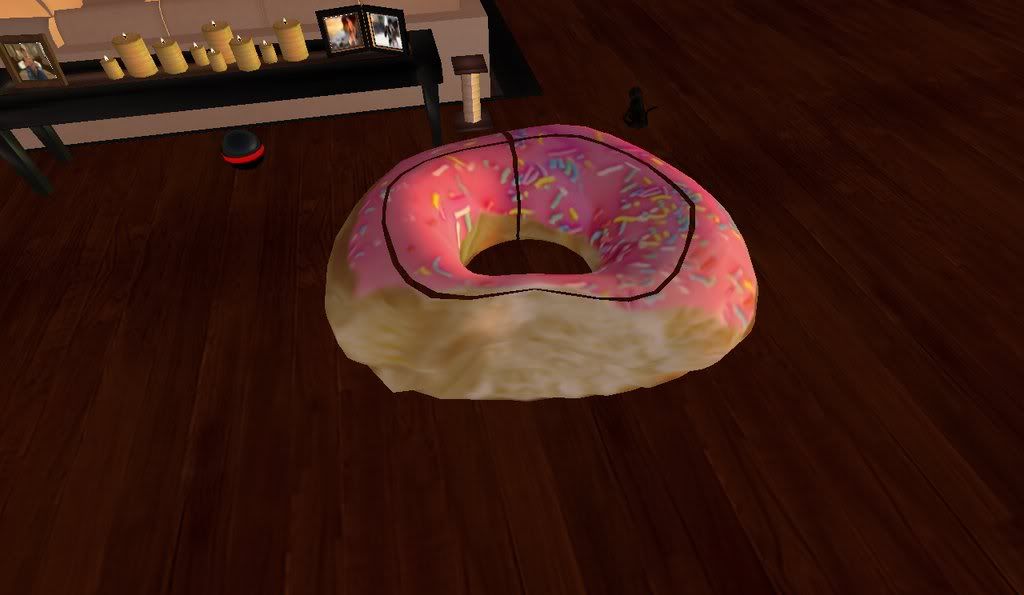
Hello, I am using ZBrush to model and texture a simple half-eaten donut, and all went well until I uploaded it into Second Life. Everything looked just right in ZBrush, the texture was seamless, and everything was in its place. The problem was, when rezzed in Second Life, it looked like somebody stuck a knife in it and cut along it...Picture below: http://i278.photobucket.com/albums/kk110/DigitalGlass_2008/FreakyDonut_001.jpgIf anybody has any advice or a solution to this problem, any help would be appreciated. Thank you in advance. Also - If it's of any matter I used Sculpty Maker to convert the object into a sculpt map, and the in-world Sculpty Rezzer to fit it into proportions. **EDIT: This issue has been resolved. |
|
Sylvia Trilling
Flying Tribe

Join date: 2 Oct 2006
Posts: 1,117
|
09-14-2008 12:09
Interesting. I've had this happen using Zbrush to make skins or clothes for the SL avatar.
If you open the texture in a paint program such as photoshop, do the black seams appear there? Also check for edge weirdness by offsetting horizontal and vertical by half of your pixel dimensions.
Also if you do horizontal and vertical offset by .5 in SL you might be able to determine whether the problem is with the sculpt map or with the texture.
_____________________
http://www.throughlinedesign.com/ 
|
|
Digital Glass
Registered User
Join date: 11 Feb 2006
Posts: 76
|
09-14-2008 12:17
No...in every program except Second Life, it appears as normal. That's why it's so confusing for me.
|
|
Sylvia Trilling
Flying Tribe
Join date: 2 Oct 2006
Posts: 1,117
|
09-14-2008 12:21
Try offsetting the texture in SL. If the seams stay in the same place and the jimmies on the donut move, it is a problem with the sculpt map.
_____________________
http://www.throughlinedesign.com/
|
|
Digital Glass
Registered User
Join date: 11 Feb 2006
Posts: 76
|
09-14-2008 12:21
Let me attempt the .5 offset in SL then get back to you. One moment.
|
|
Digital Glass
Registered User
Join date: 11 Feb 2006
Posts: 76
|
09-14-2008 12:24
No, the offset only made the problem occur on different sides of the object, so I guess the problem is within the sculpt map itself?
|
|
Sylvia Trilling
Flying Tribe
Join date: 2 Oct 2006
Posts: 1,117
|
09-14-2008 12:27
No, if the black seams moved then it is a problem with the texture. If you want to give me a copy of the donut and the texture, I would be happy to take a look.
_____________________
http://www.throughlinedesign.com/
|
|
Digital Glass
Registered User
Join date: 11 Feb 2006
Posts: 76
|
09-14-2008 12:29
Sure, sending that to you in SL now.  Thanks. |
|
Digital Glass
Registered User
Join date: 11 Feb 2006
Posts: 76
|
09-14-2008 12:39
Problem is still unresolved, if anybody has any other advice, it's welcome. Thank you.
|
|
Sylvia Trilling
Flying Tribe
Join date: 2 Oct 2006
Posts: 1,117
|
09-14-2008 12:43
The problem is indeed the sculpt map. There are transparent gaps.
_____________________
http://www.throughlinedesign.com/
|
|
Digital Glass
Registered User
Join date: 11 Feb 2006
Posts: 76
|
09-14-2008 12:50
I know, but I personally have no idea how I would fix that. I'm still learning how to use ZBrush and all that.
|
|
Digital Glass
Registered User
Join date: 11 Feb 2006
Posts: 76
|
Problem Resolved
09-14-2008 13:04
I fixed the problem after contacting 2k Suisei (creator of Sculpty Maker exporter) and he assisted me with resolving the issue.
All I had to do was go into edit and change the sculpty stitching type to Torus...
Thanks much for your other help Sylvia. I declare this board as closed.
|