ZBrush Texturing Bug(?)
|
|
Virrginia Tombola
Equestrienne

Join date: 10 Nov 2006
Posts: 938
|
04-14-2008 11:33
Question mark included, as I am hoping this has something to do with my workflow. I have the 30 day demo of Zbrush, and have been working my way through Vlad Bjornson's excellent Shiny Life tutorial video. I can make obj. files easily enough, but it is the polytexturing that is failing to work for me. Here is my workflow: I created a 32/33 sphere and shaped it using deformations and the brushes. I then saved it as a Zbrush tool, and opened a new document. After loading the tool I just saved, I imported a background texture (1024x1024 BMP) and crop/filled the canvas. I then drew the tool (my just created shape), clicked "T" for edit, and enabled the polymesh. I went to geometry, clicked divide up to "5". Then I textured (coloured, I think the term is) the object with the Zproject brush. Then......I got to the part where I click Col>Txr to create a texture I could export to Photoshop. When I did that, this happened the first time: 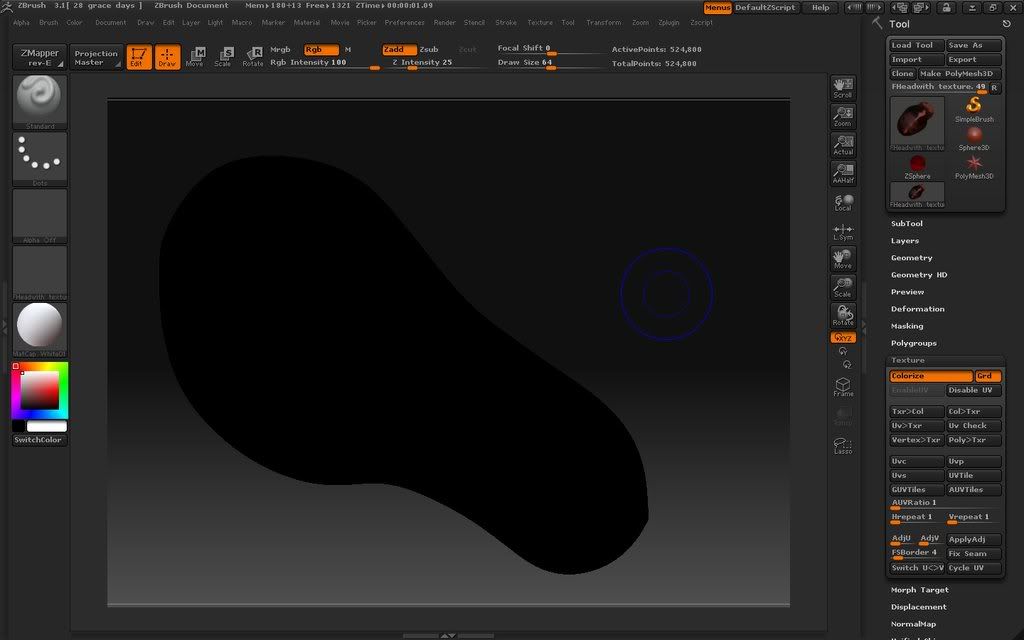 I described the problem to Vlad on his Shiny Life blog, and he suggested I start with a 32/33 Zbrush sphere he had--using his sphere, I did the same thing and this happened: 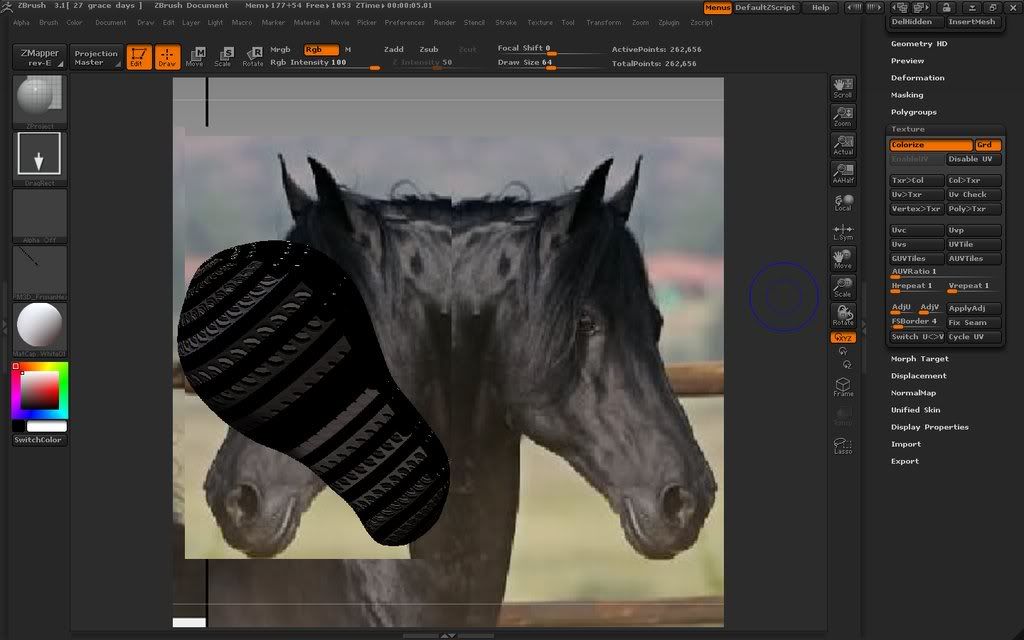 This is consistent--it's not a once in a while glitch :/ After a weekend of working with Zbrush, I am still completely incapable of creating a texture in it and exporting to Photoshop. My operating system is Windows XP professional, and my computer is an AMD Athlon(tm) 64X2 Dual Core Processor 3600+; 2.01 Ghz with 2.0 Gb RAM and a NVIDIA GeForce 7300GT video card HELP!!!!! I really really really want to use Zbrush!! (That wasn't overly pathetic was it?)
_____________________
 Horses, Carriages, Modern and Historical Riding apparel. Ride a demo horse, play whist, or just loiter. I'm fair used to loiterers. http://slurl.com/secondlife/Caledon%20Eyre/48%20/183/23/
|
|
2k Suisei
Registered User
Join date: 9 Nov 2006
Posts: 2,150
|
04-14-2008 12:05
Hiya Virrginia, I suggest you forget your horsey for now and test to see if you can polypaint a basic ZBrush sphere without using ZProject. If so, then test to see if you can polypaint on your horses head without using ZProject or importing a background. Keep adding more steps towards your target process until you find out exactly where it starts to go wrong. It looks to me like your UVs are being destroyed at some stage. The 'Disable UV' button is the usual the culprit behind this. Despite its name it actually destroys the UVs and doesn't just disable them. This means you can't just disable them and re-enable them as one might expect. So never ever hit that damn lying nasty filthy button. I'll report back to see how you get on. Just don't give up!  |
|
Virrginia Tombola
Equestrienne
Join date: 10 Nov 2006
Posts: 938
|
04-14-2008 12:30
Okies, made a sphere, edit/polymesh, painted it with the brush and the colour palette in the lower left corner, clicked Col>Txr. Black sphere.
I think I'm going to play with my doggie for an hour, have a late lunch and then come back to this :/
_____________________
Horses, Carriages, Modern and Historical Riding apparel. Ride a demo horse, play whist, or just loiter. I'm fair used to loiterers. http://slurl.com/secondlife/Caledon%20Eyre/48%20/183/23/
|
|
2k Suisei
Registered User
Join date: 9 Nov 2006
Posts: 2,150
|
04-14-2008 13:02
The dog wont help! Get back here!
But still, I think we've broken the problem right down.
Okay, restart ZBrush or select 'Init ZBrush' in Preferences.
Make a sphere
Click 'Edit'
Click 'Make Polymesh3D'
Click 'Texture/Colorize'
Disable 'ZAdd' so you don't actually change the shape of your object (You knew this!)
Pick a nice green from the color palette menu and paint a smiley face.
Finally click Texture/Col>Txr
The texture should then be created and applied to your object. If you need to paint some more then select 'Texture Off' in the texture panel and the underlying polypaint will still be there ready for more work.
If all worked according to plan you should now have two smiley faces.
(or three including the dog's)
|
|
Virrginia Tombola
Equestrienne
Join date: 10 Nov 2006
Posts: 938
|
04-14-2008 14:10
Well, my puppy is happy, at least.
I loaded the 32/33 sphere from Vlad as a tool, set the material to MatCap White01, drew the sphere>Edit>PolyMesh>Texture/Colorize
Painted directly onto the sphere, then went to texture. Col>Txr was greyed out. I clicked "Enable UV" and Col>Txr was enabled. I clicked it, and got a black sphere.
So, next time, I enabled UV after I clicked "Colorize", then painted. Also got a black sphere.
Is there another was to access Col>Txr without fiddling with the enable/disable switch?
_____________________
Horses, Carriages, Modern and Historical Riding apparel. Ride a demo horse, play whist, or just loiter. I'm fair used to loiterers. http://slurl.com/secondlife/Caledon%20Eyre/48%20/183/23/
|
|
2k Suisei
Registered User
Join date: 9 Nov 2006
Posts: 2,150
|
04-14-2008 14:54
Create the sphere by using the Sphere3D tool in the panel to the right and then follow the instructions I set out above. I assumed you was naturally going to use this method to create your sphere and not load Vlad's tool. Sorry!
Vlad's tool may not have UVs set for some reason, so we'll ignore that for now.
|
|
Virrginia Tombola
Equestrienne
Join date: 10 Nov 2006
Posts: 938
|
04-14-2008 15:26
There we go! The Col>Txr button was enabled from the start (I am gathering from what you were saying, that is because I create a UV when I draw/initialize the sphere?). One smiley face successful created.
Next, I shall try the Zproject brush and see what happens.
(Side note--is there an eyedropper function for the colour pallette?)
_____________________
Horses, Carriages, Modern and Historical Riding apparel. Ride a demo horse, play whist, or just loiter. I'm fair used to loiterers. http://slurl.com/secondlife/Caledon%20Eyre/48%20/183/23/
|
|
2k Suisei
Registered User
Join date: 9 Nov 2006
Posts: 2,150
|
04-14-2008 15:58
YAY!!! and yep, all ZBrush objects have UVs by default. In fact, the great thing about ZBrush is that most of its objects are totally sculpty friendly. There's no need to mess around importing objects from other programs. Anyway, so now that we've established the problem I need to remind you to make sure you initialize your sphere properly for sculpties. When you first create the sphere go into the 'Initialize' section (right side panel) and set the HDivide to 32 and VDivide to 33. Do this just before hitting the 'Make Polymesh3D'. button. A bit of info: The initial object you create in ZBrush is actually a parametic primitive like SL's prims. and like SL's prim they're generated from a small bunch of values. Not only can you set the number of polygons an object is made from, but you can also set things like "coverage" which is quite similar to SL's 'Cut Begin' and 'Cut End'. I'm telling you all this because for quite some time I never really understood why I had to keep hitting that bloody 'Make Polymesh3D' button every time. I was always like "JUST LET ME SCULPT THE DAMN THING ALREADY!!"  But once I realized that the initial object was parametric and that I could do fancy things with it just by changing a few numbers I then learnt to really appreciate and tolerate that lovely little 'Make Polymesh3D' button. and I lived happily ever after. The End |
|
Virrginia Tombola
Equestrienne
Join date: 10 Nov 2006
Posts: 938
|
Horsies with nice defined lips 04-15-2008 17:43
And thanks once again for all the help! I think I was losing the UV because I would reload the tool, then automatically click "polymesh", which seemed to make the "enable UV" button active again (and all the other texture buttons off). So much to learn with this program--but frankly, it seems to be to Wings3D what Photoshop is to MSPaint. I'm using mostly just the standard and move brush right now, and it's fairly amazing what one can do just with those simple tools and the deformations (and I LOVE the masking ability). Here's my current tutorial project (yes, I know, need to learn to paint onto a texture to clean this up, but it's a good start, I think): 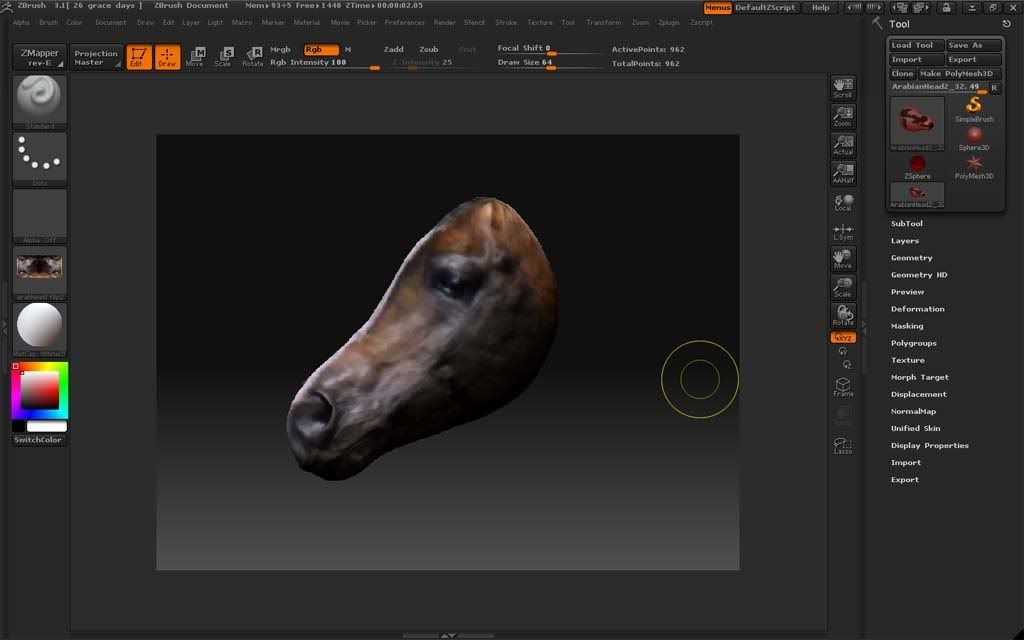
_____________________
Horses, Carriages, Modern and Historical Riding apparel. Ride a demo horse, play whist, or just loiter. I'm fair used to loiterers. http://slurl.com/secondlife/Caledon%20Eyre/48%20/183/23/
|
|
2k Suisei
Registered User
Join date: 9 Nov 2006
Posts: 2,150
|
04-16-2008 02:34
From: Virrginia Tombola
I think I was losing the UV because I would reload the tool, then automatically click "polymesh", which seemed to make the "enable UV" button active again (and all the other texture buttons off).
Oooh yeah, you're right. I just tried hitting 'Make Polymesh3D' button on a sphere that was already a poly mesh and the 'Enable UV' button became active. Eek! From: someone
So much to learn with this program--but frankly, it seems to be to Wings3D what Photoshop is to MSPaint. I'm using mostly just the standard and move brush right now, and it's fairly amazing what one can do just with those simple tools and the deformations (and I LOVE the masking ability).
and don't forget to enable Transform/Activate Symmetry when sculpting things like heads. I'm sure you know about this feature anyway. But for me it's one of main reasons why I use ZBrush and I'd be lost without it. From: someone
Here's my current tutorial project (yes, I know, need to learn to paint onto a texture to clean this up, but it's a good start, I think):
Looking good! So whose bed are you going to put it in? |