Can I use a 64x64 cylinder from wings3d? and how do i make one?
|
|
Coal Porter
Owner CP Motors
Join date: 26 Mar 2008
Posts: 37
|
03-28-2008 19:02
I need a cylinder that is 64x64. will this work in 2nd life? If so, how do i make one? I know how to do bend to wrap a grid around. but i don't know how to do the end faces. and when making a grid. what should i set its thickness to?
When i wrap the grid around, i get a seam where to two sides come together. I must be doing something a little wrong. can someone give me directions how to make it so it doesn't get this.
Thanks
Edited for last question
|
|
Lee Ponzu
What Would Steve Do?
Join date: 28 Jun 2006
Posts: 1,770
|
03-29-2008 12:01
I suggest looking for Wings3D information in the wiki.secondlife.com
In particular, you will find reference to the various "templates" that people use to make sculpties with Wings. On of them is a cylinder, with the seam you mention all fixed.
_____________________
So many monkeys, so little Shakespeare.
|
|
Coal Porter
Owner CP Motors
Join date: 26 Mar 2008
Posts: 37
|
03-29-2008 16:27
From: Lee Ponzu I suggest looking for Wings3D information in the wiki.secondlife.com
In particular, you will find reference to the various "templates" that people use to make sculpties with Wings. On of them is a cylinder, with the seam you mention all fixed. I've been looking for quite some time. Now im more interested in a plain grid. the ones i found for download seem to have the UV maps scattered. I've tried the one that Daniel has on his second tutorial. but UV map seems to get scattered. where as i need accurate texturing. hard to describe what that means. What im asking is how do you make your sculps in wings 3d that will work in SL such as plains and cylinders that have endfaces. |
|
Chosen Few
Alpha Channel Slave
Join date: 16 Jan 2004
Posts: 7,496
|
03-29-2008 17:33
Coal, I'm not a Wings user, but I might at least be able to be of some assistance on why you've been having trouble finding answers. It's not at all clear what you're trying to ask. I'll explain. From: Coal Porter I've been looking for quite some time. Now im more interested in a plain grid. What do you mean by "plain grid"? When you say "plain", do you actually mean "plane". I ask this because I notice you used "plain" instead of "plane" in another part of your post. At the end, you said "plains cylinders" when you should have said "planes and cylinders". There's a big difference in meaning between the two spellings. If you did indeed deliberately say "plain grid", how are you defining that term? What's your definition of "grid" in this context? Usually, when people talk about a grid in a graphics program, they mean the crisscrossing perpendicular lines against which objects and space are measured. You seem to be implying that you want to make a grid, which leads me to believe the word you should be using is "mesh", not "grid". A mesh is a singular surface made up of smaller polygons. I'm assuming that what you're actually trying to ask is how to make a planar mesh, meaning a surface made of polygons that is flat and rectangular. Is that what you mean, or am I reading you wrong? From: Coal Porter the ones i found for download seem to have the UV maps scattered. I've tried the one that Daniel has on his second tutorial. but UV map seems to get scattered. where as i need accurate texturing. hard to describe what that means. I'm not sure what you mean by calling the UV maps "scattered". I've never heard that term before in reference to a UV map. Sculpties require a perfect UV space, meaning a perfectly uniform gridwork of quads. That's what any object that has been set up properly to be a sculpty is going to have. I'm not sure how the word "scattered" could be interpreted to describe something so uniform. By the normal definition of the word, uniformity is about as unscattered as you can get. So what did you mean? As for accuracy in texturing, that just comes from understanding what you're looking at. Since the UV space is perfect on every sculpty, you never have to worry about strange parts of the texture corresponding with strange parts of the object. The relationship is 1:1, vertex for vertex. You couldn't ask for more simplicity towards accuracy. What is it you think is inaccurate? As for Daniel's tutorials, so you know, if you're looking to make angular sculpties in Wings, you couldn't ask for a better learning resource than Daniel's videos. Do what he says to do, the way he says to do it, and you'll never have a problem making objects similar to his examples. However, be aware that those objects are somewhat unorthodox. One-prim staircases and interlocking rings are not exactly what sculpties were intended for. You might want to start with something a little simpler. Learn the basic rules of sculpties before you experiment with the various ways in which people have figured out how to bend and stretch those rules. Some of the other tutorials on the wiki are a bit more traditional. From: Coal Porter What im asking is how do you make your sculps in wings 3d that will work in SL such as plains and cylinders. By default, all sculpties use spherical topology. Most of the time, that's all you need. However, if you really want to use them, there are three other topology types are accessible via script: plane, cylinder, and torus. These are not officially supported yet, which is why they're script-access-only right now, but they do work. Just be aware that if you use them, you do so at your own risk. When the time comes that they do go official, there's no guarantee that the way they currently work won't be changed. See the sculpty wiki for more details, including sample scripts for changing the sculpt type. From: Coal Porter I need a cylinder that is 64x64. 64x64 what? Meters across? Vertices? Quads? Tris? Something else? Please explain precisely what it is you're looking to do. From: Coal Porter and when making a grid. what should i set its thickness to? Again, what do you mean by "grid"? And what do you mean by "thickness"? By "grid", do you mean mesh? By "thickness", do you mean some aspect of the mesh's size? Please explain.
_____________________
.
Land now available for rent in Indigo. Low rates. Quiet, low-lag mainland sim with good neighbors. IM me in-world if you're interested.
|
|
Coal Porter
Owner CP Motors
Join date: 26 Mar 2008
Posts: 37
|
03-29-2008 17:57
Chosen Few:
Sorry, I meant planes, not plains. Daniels tutorial are great. But I just can't find the starting materials I need. What im looking for is a 64x64 plane. that can be imported into sl. Daniels tutorial #2 used a 32x32. Im looking for something like that, but 64x64 with quads.
the scattering effect im getting on textures is just odd. Imagine a grid of any size on a texture and take one small square of that and put another grid that is 4x4 on that. now imagine that every 4th square is somewhere else. But im not worried about that. Im hoping once i can make my own sculpties, the textures will be fine. thats only happening on some of the templates i've downloaded.
So what im looking for is help on how to make a 64x64 plane and 64x64 cylinder with quads. Been working at unwrapping a sphere, but cant figure it out.
and by thickness, i mean the 3rd dimension. if 64x64 are X and Y, then thickness equals z
Thanks
|
|
Omei Turnbull
Registered User
Join date: 19 Jun 2005
Posts: 577
|
03-29-2008 18:26
If you have a 32x32 sculpty bitmap you like, you can always expand it to 64x64 with your favorite 2D graphics program and then import it into Wings.
|
|
Coal Porter
Owner CP Motors
Join date: 26 Mar 2008
Posts: 37
|
03-29-2008 18:46
From: Omei Turnbull If you have a 32x32 sculpty bitmap you like, you can always expand it to 64x64 with your favorite 2D graphics program and then import it into Wings. What do you mean by expand it? just double its size. I have Gimp, texture maker, and ifranview. Edited, once i import a bmp, i get a messed up texture, see below |
|
Coal Porter
Owner CP Motors
Join date: 26 Mar 2008
Posts: 37
|
03-29-2008 19:19
This is what i mean by messed up texture. This seem to happen with some of the templates i downloaded, or when i import a sculpty bmp. 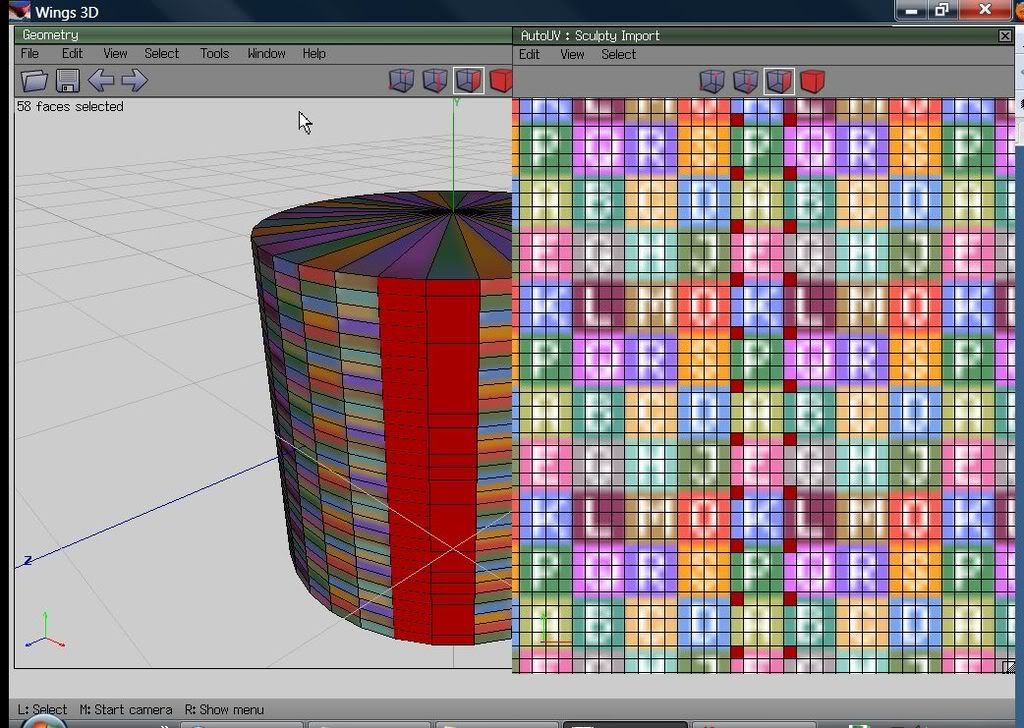 take a look at what is selected on the prim, and how jumbled the texture is. then look at how the selected faces appear in the UV mapping window. This why i just want to make my own rather than work off templates. it seems to do fine first time around. But it seems to be a secret as to how to make 64x64 planes and cylinders |
|
Omei Turnbull
Registered User
Join date: 19 Jun 2005
Posts: 577
|
03-29-2008 21:06
Ok, now I understand what you mean by a messed up texture. What has happened is that when you doubled (actually, it looks like you quadrupled) the dimensions, you asked for no interpolation. So what looks like a single vertex in the Wings window is really multiple points and you have lots of degenerate faces. The UV map is telling you that even though it looks like you have selected adjacent faces, you haven't really.
If you ask the Gimp to interpolate, all the vertices will be spread out.
As an aside, another way to create a cylinder that gives you more flexibility is to use one of the free sculpty generating tools like Tokoroten or SculptyPaint.
|
|
Chosen Few
Alpha Channel Slave
Join date: 16 Jan 2004
Posts: 7,496
|
03-29-2008 22:19
From: Coal Porter Chosen Few:
Sorry, I meant planes, not plains. Daniels tutorial are great. But I just can't find the starting materials I need. What im looking for is a 64x64 plane. that can be imported into sl. Daniels tutorial #2 used a 32x32. Im looking for something like that, but 64x64 with quads. All sculpties have the same number of polygons, 32x32 quads. You can't make one with 64x64. If you really need that amount, then you need four prims, not just one. From: Coal Porter the scattering effect im getting on textures is just odd. Imagine a grid of any size on a texture and take one small square of that and put another grid that is 4x4 on that. now imagine that every 4th square is somewhere else. But im not worried about that. Im hoping once i can make my own sculpties, the textures will be fine. thats only happening on some of the templates i've downloaded. I'm guessing this is maybe a Wings-specific quirk. I've never experienced behavior like that. From: Coal Porter So what im looking for is help on how to make a 64x64 plane and 64x64 cylinder with quads. Been working at unwrapping a sphere, but cant figure it out. You can make your mesh any size you want, including 64x64. But that won't mean your sculpties will have 64x64 quads in them. As I said, all sculpties are the same size. If you want your object in your modeling program to translate perfectly to a sculpty in SL, it must have the exact same mesh size size as the sculpty. That means a max of 32x32 quads. As I said, if you really need 64x64, then you need four objects. Out of curiosity, what is it you're trying to make that requires so many polygons? 1024 quads can go a long way. What shape do you feel requires all of 4096? And why are you reluctant to make that shape out of multiple prims instead of just one? From: Coal Porter and by thickness, i mean the 3rd dimension. if 64x64 are X and Y, then thickness equals z There's no such thing as thickness in this context. Topology is 2-dimensional. Surfaces happen to be wrapped in 3D space to formulate what we think of as 3D objects, but ultimately, they are just 2-dimensional rectangles. Think of it like wrapping a Christmas present. For all intents and purposes, the wrapping paper has no discernible thickness. It's just a flat rectangle. When you wrap it around the gift, it appears to take on the shape of a 3-dimensional object, but it's still just the same old rectangle it always was. From: Omei Turnbull If you have a 32x32 sculpty bitmap you like, you can always expand it to 64x64 with your favorite 2D graphics program and then import it into Wings. That may end up generating a 64x64 object in Wings, but it still won't give you a 64x64 sculpty. There's simply no such thing as that. All you'll end up with if you bring that map into SL is a 32x32 sculpty with a map that happens to be wastefully large.
_____________________
.
Land now available for rent in Indigo. Low rates. Quiet, low-lag mainland sim with good neighbors. IM me in-world if you're interested.
|
|
Isobel DeSantis
Rechargeable ...

Join date: 1 Jan 2007
Posts: 104
|
03-30-2008 18:20
From: Chosen Few
By default, all sculpties use spherical topology. Most of the time, that's all you need. However, if you really want to use them, there are three other topology types are accessible via script: plane, cylinder, and torus. These are not officially supported yet, which is why they're script-access-only right now, but they do work. Just be aware that if you use them, you do so at your own risk. When the time comes that they do go official, there's no guarantee that the way they currently work won't be changed.
I recently created a 32H x 33V cube in ZBrush, modelled it into a very rough shoe shape, used sculptymaker to create the sculpt map and uploaded it to sl. What I got in SL was a pretty perfect replica of my (very rough) shoe, just by applying the sculpt map without using a script. Chosen, from what you've said here, it seems that what I did shouldn't have worked? Or does a cube actually have the correct topology? I've tried to follow the discussions on "stitching" and although they kind of make sense to me, I can feel myself going into "deer frozen in headlights" mode! Thanks Isobel
_____________________
http://slurl.com/secondlife/West%20Sunset/208/126/22  http://www.angelsblog.net/ A great many people think they are thinking when they are merely rearranging their prejudices. ~ William James
|
|
Chosen Few
Alpha Channel Slave
Join date: 16 Jan 2004
Posts: 7,496
|
03-30-2008 21:01
Isobel, I'm guessing that while the apparent shape of the shoe is probably a pretty close match, if examine the actual wireframe you'll probably see that it's at least a little different. I'm not sure how Sculptymaker does it's sampling of the surface shape.
_____________________
.
Land now available for rent in Indigo. Low rates. Quiet, low-lag mainland sim with good neighbors. IM me in-world if you're interested.
|
|
Isobel DeSantis
Rechargeable ...
Join date: 1 Jan 2007
Posts: 104
|
03-31-2008 03:26
Chosen, thank you for the response. From: Chosen Few Isobel, I'm guessing that while the apparent shape of the shoe is probably a pretty close match, if examine the actual wireframe you'll probably see that it's at least a little different. I'm not sure how Sculptymaker does it's sampling of the surface shape. True, I didn't examine it that closely, I was too thrilled to get any kind of recognisable shoe shape!  I'm still confused as to how the cube topology created a workable sculpt map in sl though. From your previous post: From: someone That may end up generating a 64x64 object in Wings, but it still won't give you a 64x64 sculpty. There's simply no such thing as that. All you'll end up with if you bring that map into SL is a 32x32 sculpty with a map that happens to be wastefully large. In the light of this, how does the 64 x 63 sphere that Hypatia posted produce a usable sculpt map? Is that also "a 32x32 sculpty with a map that happens to be wastefully large"? Or is it in any way comparable to working in 2D at 2048x2048 for detail and resizing to 512x512 for upload? Sorry for the barrage of questions! I'm trying to get some understanding of what I'm doing rather than following blindly along but so far the actual generation of the sculpt map is still in the realms of "magic" for me  Thanks Isobel
_____________________
http://slurl.com/secondlife/West%20Sunset/208/126/22 http://www.angelsblog.net/ A great many people think they are thinking when they are merely rearranging their prejudices. ~ William James
|
|
Chosen Few
Alpha Channel Slave
Join date: 16 Jan 2004
Posts: 7,496
|
03-31-2008 07:54
From: Isobel DeSantis I'm still confused as to how the cube topology created a workable sculpt map in sl though. Without seeing the model, and without knowing how your program of choice does its surface sampling, I can't answer that intelligently. From: Isobel DeSantis In the light of this, how does the 64 x 63 sphere that Hypatia posted produce a usable sculpt map? Is that also "a 32x32 sculpty with a map that happens to be wastefully large"? Or is it in any way comparable to working in 2D at 2048x2048 for detail and resizing to 512x512 for upload? It's not wastefully large unless the map itself is bigger than it needs to be. 64x64 (pixels) is all you need for a sculpt map. I'd say the answer is more or less in your second question. The full detail won't be preserved.
_____________________
.
Land now available for rent in Indigo. Low rates. Quiet, low-lag mainland sim with good neighbors. IM me in-world if you're interested.
|