Sculpted Prim Modeler: Amorphium
|
|
Dzonatas Sol
Visual Learner

Join date: 16 Oct 2006
Posts: 507
|
05-24-2007 18:12
I highly recommend using the award winning Amorphium to model scuplted prims. The best thing about Amorphium is that it is only US$79! Download the trial for starters: http://www.eitechnologygroup.com/products/amorphium Quick tutorial follows: Start Amorphium. Select the Composer tab: Delete the first default sphere you see that it creates automatically (right-click on it ->delete) Right click on Mesh Sphere (left menu, greenish sphere with red dot next to it) Click on Synthetic. Set X to 64 Set Y to 63 Click OK Create the new sphere (Click->drag in Perspective) You'll see a new sphere. Click on the Tools tab. From here... any click on the sphere will mold the object by any of the tools you select on the right. On the left are the different methods to push, pull, pinch, grab, smudge, etc. Click on the Paint tab. Use the brushes on the left and the colors on the right to paint directly on your creation. When you done, you'll want to export your object and textures. Click File->Export Under Export Textures, select Targa. Select a size (128x12  Click Export Use one of the converters, Wings3D, obj2sculpt, or Blender, to create the final sculpt map from the exported OBJ file. There is a tentative plan to import OBJ files directly into SL. This will make it easy when the OBJ file already contains the UV map information, which Amorphium automatically adds for you. |
|
Elle Pollack
Takes internets seriously

Join date: 12 Oct 2004
Posts: 796
|
05-24-2007 20:28
Problem is, the sculpt prim export methoods for Blender aren't yet designed for handling arbitrary/imported meshes, at least not without a lot of manipulation. Still probably worth looking at though.
_____________________
*********************************************** "Ya'll are so cute with your pitchforks and torches ..." ~Brent Linden SL streams a world, can you also stream a mind?
|
|
Mickey McLuhan
She of the SwissArmy Tail

Join date: 22 Aug 2005
Posts: 1,032
|
05-24-2007 20:46
I haven't DLed Amorphium yet, but could this be a solution?
Get Wings and the exporter (which works great, by the way).
Make a SculpySphere of 64x63 in Wings and export as an .obj.
Import into amorphium and play there, then export to .obj, import into Wings and export as a sculpy tex.
I've been using ZBrush this way and it works great.
_____________________
*0.0*

Where there's smoke, there isn't always fire. It might just be a particle display. 
-Mari-
|
|
Dzonatas Sol
Visual Learner
Join date: 16 Oct 2006
Posts: 507
|
05-24-2007 21:02
I'll have to try that Wings3D trick and see if it works.
I believe being able to export to Blender, and have Blender create/render a UV map from the import is a good solution. I read there are scripters working on that with blender.
Being stuck with a 64x64 point sphere is very limiting to the flow of creation! In Amorphium, I twist, push, and pull endlessly. Worrying about face normals ruins the flow.
I've sent support request to the Amorphium author to make a direct sculpt and texture map export for us residents.
|
|
Anti Antonelli
Deranged Toymaker

Join date: 25 Apr 2006
Posts: 1,091
|
05-24-2007 21:04
That's exactly what I've been doing Mickey. As soon as more varied and stable exporters are available the field will open up, but for right now Omei's Wings exporter works great and the .obj format is a useful lingua franca for getting a properly formatted mesh in and out of your preferred modelling program to do the fun stuff.
|
|
Dzonatas Sol
Visual Learner
Join date: 16 Oct 2006
Posts: 507
|
05-24-2007 21:21
I was able to import the mesh made by Wings3D into Amorphium. It gives the option to import as a mesh or nurbs/tin. I choose mesh. It originally came up really really small and had to find it and zoom in to it.
|
|
Dzonatas Sol
Visual Learner
Join date: 16 Oct 2006
Posts: 507
|
05-24-2007 23:27
Attached is a sample screenshot of Amorphium that shows the paint-on features.
It is only using the 64x64 sphere mold to start with, so the chiseled hand is not as edgy. Maybe I should try a 128x128 sphere. =)
This was pretty simple to make in Amorphium. I made a hieghtmap out of the SL hand to demo this. Then I flattened one side of the sphere. Next, I applied the hand like a brush and pulled. Turned it around, flattened again. Turned it around and started to paint. Once painted I turned on the reflectivity to get a preview of what it would look like in SL.
Alas, it was only a demo of the hand... I can't upload it... lol.. don't wanna break TOS
|
|
Ripped Winkler
Registered User
Join date: 6 Feb 2007
Posts: 27
|
05-27-2007 07:10
This progam it was definatly worth the the $80.
I sculpt in rl and amorphine is the most taktile tool ive used on pc.
The only isue im having is trying to export the direct paint textures,any tips in that area would be apretiated.
|
|
Dzonatas Sol
Visual Learner
Join date: 16 Oct 2006
Posts: 507
|
05-27-2007 10:23
From: Ripped Winkler The only isue im having is trying to export the direct paint textures,any tips in that area would be apretiated. 1. Click on menu: File->Export 2. Select a format under Export Textures 3. Select the size of the texture 4. Click Export If you have more than one object, you'll have to select which object before step 4. |
|
Ripped Winkler
Registered User
Join date: 6 Feb 2007
Posts: 27
|
05-27-2007 16:12
Thanks Dzon
I had got that far, and can generate a mapped texture ok.
I just cant seem to get anything i make in the paint area to export.
|
|
Dzonatas Sol
Visual Learner
Join date: 16 Oct 2006
Posts: 507
|
05-27-2007 16:57
Do you use the obj2sculpt converter or Wings3d to get the sculpt map? I've noticed the scaling is different between the programs that import and export OBJ files.
This is what I've been wanting to automate, so one doesn't have to refix or rewarp the textures outside of the modeler if the UV map is already included in the OBJ file.
|
|
Ripped Winkler
Registered User
Join date: 6 Feb 2007
Posts: 27
|
05-27-2007 21:53
Ive been using wings ,havent had any succes with obj2sculpt yet, it keeps spitting my obj's back at my face  Wich one is giving better results for you ? |
|
Thunderclap Morgridge
The sound heard by all

Join date: 30 Sep 2006
Posts: 517
|
05-27-2007 23:30
Use Wings. Its fairly user friendly. Blender not so much.
_____________________
Gimp:
n : disability of walking due to crippling of the legs or feet
ie. lameness, limping, gameness, claudication
secondlife://Amaro/77/130/39
Come to Thunderclap: the gospel chapel
and Thunderburst: Mens clothes and more.
|
|
Dzonatas Sol
Visual Learner
Join date: 16 Oct 2006
Posts: 507
|
05-27-2007 23:39
If I start with a mesh created in Amorphium, the uv map is automatically scaled appropriately. Select the Composer tab: Delete the first default sphere it creates automatically (right-click on it ->delete) Right click on Mesh Sphere (left menu) Click on Synthetic. Set X to 64 Set Y to 63 Click OK Create the new sphere (Click->drag in Perspective) You can also start with a mesh created by Wings3D, but the uv map is not scaled automatically. The Wings3D thread shows how to create the 64x63 mesh. When you import the mesh from Wings3D, scale it up to a factor of 100. Here is Wings3D thread: /8/20/183764/1.html |
|
TOPGenosse Brouwer
Registered User
Join date: 4 Dec 2006
Posts: 16
|
05-28-2007 16:44
That sounds like a great quick tutorial Dzonatas, and Amorphium looks equally user friendly as Wings  But .. Is it right that the demo version doesn't save/export? Or did I manage to corrupt my installation in 1 day? Oh and another question: Does Amorphium support applying several texture maps (e.g. photographs) on 1 object? Or am I asking for too much now? |
|
Dzonatas Sol
Visual Learner
Join date: 16 Oct 2006
Posts: 507
|
05-28-2007 16:53
Thank you!
You'll have to buy it to get the save & export ability, as those are disabled in the demo.
|
|
SuezanneC Baskerville
Forums Rock!

Join date: 22 Dec 2003
Posts: 14,229
|
05-28-2007 18:21
I'm trying the Amorphium trial. Text in the dialog boxes is near to illegible, like it is grayed out text in the modern, make inactive options really hard to read as well as looking inactivated style, except that this is how it looks through the whole interface. Is this color scheme the way the interface is designed to look? 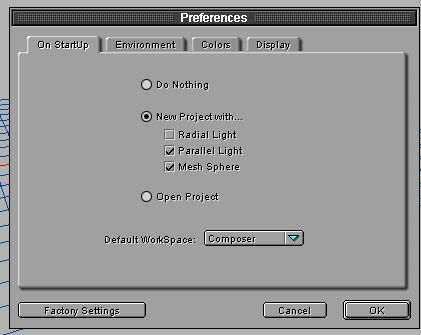 The picture above is clearer than the real thing, I suppose as a result of the jpg conversion.
_____________________
-
So long to these forums, the vBulletin forums that used to be at forums.secondlife.com. I will miss them.
I can be found on the web by searching for "SuezanneC Baskerville", or go to
http://www.google.com/profiles/suezanne
-
http://lindenlab.tribe.net/ created on 11/19/03.
Members: Ben, Catherine, Colin, Cory, Dan, Doug, Jim, Philip, Phoenix, Richard,
Robin, and Ryan
-
|
|
Ripped Winkler
Registered User
Join date: 6 Feb 2007
Posts: 27
|
05-28-2007 18:44
Thats how the interface looks Suezanne.I found the greyed out look a litle disconcerting at first, but you get used to it.
|
|
Dzonatas Sol
Visual Learner
Join date: 16 Oct 2006
Posts: 507
|
05-28-2007 18:58
The dialogs still follow the old UI scheme back when Macs were B&W. There has been several changes that make it more Windows like.
|
|
Lucinda Obviate
Registered User
Join date: 13 Dec 2006
Posts: 9
|
Detials on you Zbrush workflow
06-23-2007 16:27
From: Mickey McLuhan I haven't DLed Amorphium yet, but could this be a solution?
Get Wings and the exporter (which works great, by the way).
Make a SculpySphere of 64x63 in Wings and export as an .obj.
Import into amorphium and play there, then export to .obj, import into Wings and export as a sculpy tex.
I've been using ZBrush this way and it works great. Hello...you must speak slowly and simply...I am new at Zbrush. I love it so far, it's great tool. But can you walk me through what you talking about there or have you posted it else where? Thanks Lucinda |
|
Anti Antonelli
Deranged Toymaker
Join date: 25 Apr 2006
Posts: 1,091
|
06-23-2007 19:24
From: Lucinda Obviate Hello...you must speak slowly and simply...I am new at Zbrush. I love it so far, it's great tool. But can you walk me through what you talking about there or have you posted it else where?
Thanks
Lucinda This thread discusses Omei Turnbull's plugin for exporting sculptie textures from Wings3D: /8/20/183764/1.htmlIn order to work properly, you need to start with a sphere made with certain parameters, hence the reference to "SculpySphere of 64x63". Since then, Hypatia Callisto has offered for download some pre-made spheres of the correct type in this thread: /8/5f/188429/1.htmlBasically the idea is, if you start with a properly formatted sphere in Wings3D not only can you export a sculptie texture directly, but you can also export a .OBJ file which can be opened in any number of programs, including Amorphium and Zbrush. Then you can use the more advanced tools in these programs change the sphere into the shape you want, export a new .OBJ file that represents your sculptie prim, import the new .OBJ back into Wings3D, then use Omei's plugin to create a sculptie texture ready for uploading into SL. So you see, since programs like Zbrush and Amporphium do not have sculptie export plugins available, you use the common, portable format of .OBJ to move your creation back and forth and finally into Wings3D, which is free and *does* have a plugin (also free) thanks to Omei. The main restrictions there are you must start with one of the correctly-formatted spheres, and you cannot perform operations on them in Zbrush which add or remove vertices like cutting or extruding. I'm far from an expert in this sculptie stuff, but I recently worked through the process with Wings3D and Zbrush so I thought I could summarize it pretty clearly. Hope that helps some. |
|
Dzonatas Sol
Visual Learner
Join date: 16 Oct 2006
Posts: 507
|
06-23-2007 20:44
Amorphium creates the correct spheres to import/export with the need of Wings3D. It is still nive to have a few tools like Wings3D.
With the OBJ in-world importer, there is no need to export to Wings3D from Amorphium or like modelers.
Look at the jira issue VWR-1110 for the source and binary to try the in-world OBJ importer.
|
|
Katryna Jie
Registered User
Join date: 24 Jun 2007
Posts: 187
|
06-24-2007 18:47
Whoever it was that told us about Amorphium....
I hate you...
and love you...
I'm supposed to be a clothes designer... but this program is soooo fun. I can see myself spending hours with this. Now to figure out how I can afford the full version..
|