|
Ceera Murakami
Texture Artist / Builder

Join date: 9 Sep 2005
Posts: 7,750
|
11-28-2007 08:44
I am finally starting to do some work with sculpties. Many thanks to the people who have released tools like Sculptypaint and Tokoroten! Yay!
I have a question though regarding the collision box associated with a sculpty.
Right now, if I use Tokoroten to make a sculpty of a Japanese-style wall with a tile top cap, it sculpts a sphere into the extruded shape that I want. I was even able to use the texture template that DanielFox Abernathy provided, to accurately texture-map the wall. Yet the collision box for the finished 10 M long x 5 M high x 1 m thick wall section is still the unsculpted 10 M long, 5M diameter squashed sphere. So I can't get closer than about 2.5 Meters from the center of the wall, without making it phantom.
I recall someone wrote in the forums of a way to make sculpty stairs, or somethng similar, that started from a cube rather than a sphere, and that 'filled the collision box' for that actual shape. Does anyone have a clue how that is done?
I'd really like to be able to use a single sculpty for each 10 M of my wall, instead of the 3 prims per section it takes now. Making each sculpty phantom and adding a flat, invisible wall prim to each section rather defeats the purpose of bothering with the sculpties...
_____________________
Sorry, LL won't let me tell you where I sell my textures and where I offer my services as a sim builder. Ask me in-world.
|
|
DanielFox Abernathy
Registered User
Join date: 20 Oct 2006
Posts: 212
|
11-28-2007 08:50
If you want your sculpty to fill its bounding box as much as possible, import it into Wings. Create a 1m cube, select it, and go to Tools -> Save bounding box. Now delete the cube. Select your sculpty and go to Tools -> Scale to Saved Bounding Box -> All. Export your sculpty now (leave recenter unchecked) and stretch it back out in SL.
|
|
Ceera Murakami
Texture Artist / Builder
Join date: 9 Sep 2005
Posts: 7,750
|
11-28-2007 09:10
Thanks for the rapid response! Here is the wall I am making. The prim wall it is to replace is behind it. 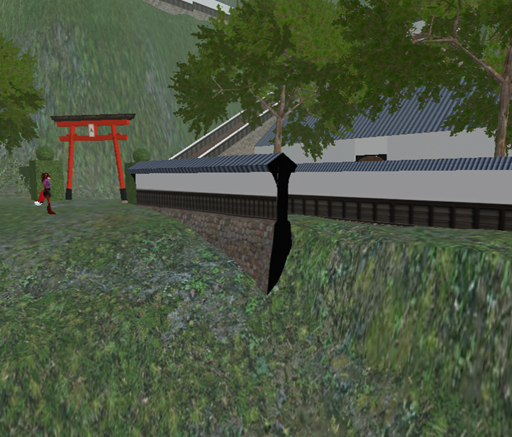 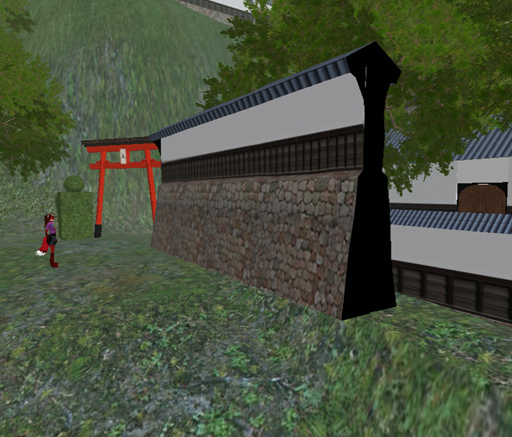 I made the sharp corners nice and crisp by using two verticies at each critical edge. One other glitch... look at the ends of the top cap on the wall. The mesh streaches across the end of the overhang sort of like a spiderweb, as it draws down to the pole at the end of the sculpty. If I have the object in Wings (which I have but haven't done much with as yet) would I also be able to eliminate that mesh glitch?
_____________________
Sorry, LL won't let me tell you where I sell my textures and where I offer my services as a sim builder. Ask me in-world.
|
|
Omei Turnbull
Registered User
Join date: 19 Jun 2005
Posts: 577
|
11-28-2007 13:52
Nice looking wall, Ceera. I can't see it clearly in the picture, but I think the "mesh glitch" you refer to is probably the result of all the ends being drawn together to a single pole, i.e. the spherical topology. If that's correct, then yes, you can correct it in Wings. You would do this by importing it with cylinder topology. After importing, it would look the same as it does now, but instead of there being just one vertex at each pole, there would be a separate vertex for each of the "meridians". You would then rearrange these to finish off the ends however you wanted.
Also, when you've imported the final bitmap into SL, you have to change the scuplty type to be a cylinder. Since there is no UI setting for this yet, you have to do it with a script.
|
|
Ceera Murakami
Texture Artist / Builder
Join date: 9 Sep 2005
Posts: 7,750
|
11-29-2007 07:31
Guess this will have to wait till I get my new computer, or at least until I have a weekend free to sit down and play with the tools. The version of Wings that can work with Sculpties worn't work with the older version of Mac OSX on my aging Mac Mini. And while I was able to load the Windows version on my work system, I wasn't able to figure out how to do more than get the sculpty itself to appear in the editing window. I have too many building projects demanding my time right now, so this bit of fun will have to wait a while longer. Thanks for the help and the kind comments.
_____________________
Sorry, LL won't let me tell you where I sell my textures and where I offer my services as a sim builder. Ask me in-world.
|