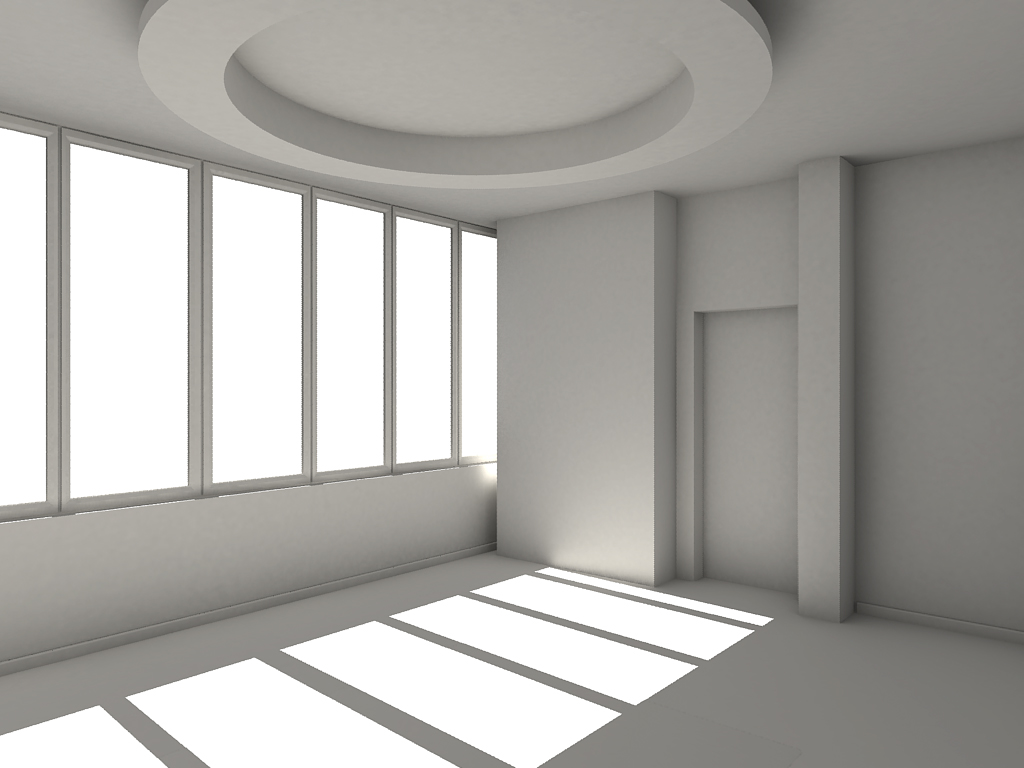
I've been trying to build some house-type structures and have been building walls with skirting boards around the bottom that are extruded slightly from the wall (ie, big cuboid wall prim, with a small cuboid with a tapered cuboid on top of it at the bottom for the skirting board)
But there's a problem - if the wall is blank textured, when I move back a bit and look at the wall directly (ie, straight on) it just looks like a single flat box. The fact that the skirting board at the bottom is protruding doesn't show up at all. If I make the skirting board a different colour then it just looks like a flat wall with a different coloured line painted on the bottom of it.
Are there any good techniques for creating a better effect of depth when something is looked at straight on?
Welcome to the Second Life Forums Archive
These forums are CLOSED. Please visit the new forums HERE
Making 3D objects look 3D |
|
|
Yumi Murakami
DoIt!AttachTheEarOfACat!
Join date: 27 Sep 2005
Posts: 6,860
|
10-06-2006 06:23
|
|
Cottonteil Muromachi
Abominable

Join date: 2 Mar 2005
Posts: 1,071
|
10-06-2006 06:36
The impression of depth can sometimes be achieved by darkening the areas that have faces close to each other. In games and 3D, this is called 'ambient occlusion'.
You can see this in RL, for example even in a brightly lit room, the corners where two walls come close to each other become darkened. They aren't shadows per se, but its the result of getting less ambient light when you get into smaller nooks and crannies, like edges of your skirting board, for example. http://www.ixbt.com/soft/images/ao/24.jpg |
|
Deandra Watts
F-Bombardier

Join date: 12 Aug 2006
Posts: 485
|
Worth a shot...
10-06-2006 06:42
Not that I'm any genius at this, but my first thought was to use the "select texture" option and choose the top part/sloped area of the skirt board and make that a darker color to mimic shading, then using the same color but a lighter shade, do the bottom part that's parallel to the wall.
This is all assuming the skirtboard looks like this from the side: .. \ __| Good luck with it  |
|
Martin McConnell
Registered User
Join date: 8 Sep 2006
Posts: 116
|
10-06-2006 11:53
Yumi, I understand what you are asking and it's commendable to put that much detail into a product but for something like a wallboard I would cast a vote for using a texture for the wall that includes a wall board.
The only reason I raise this objectable suggestion is because of something that happened to me recently. I created a beautiful,detailed building which I put a lot of time into. Then I started decorating it and I ran out of Prim's for my land. ACCCKK. There's nothing worse than having a vision in your head then running out of room to build it. So after deleting a bunch of necessary decorations that I really needed to pull off the atmosphere I was going for I finally decided to redo my building instead. A little creative texturing and WALLA, I had enough prims to decorate. And to tell you the truth, I think it looks much much nicer since I went with a higher quality texture. Anyway, that's my suggestion. Martin |
|
Ceera Murakami
Texture Artist / Builder

Join date: 9 Sep 2005
Posts: 7,750
|
10-06-2006 12:14
I have had very good luck using programs like DAZ|Studio to create a 3D wall or window, texture it, add lighting effects... and then render that and move it through Photoshop for scaling and cropping, to make a single texture that would take dozens or even hundreds of prims to do in-world. Apps designed to create 3D still pictures or simple animatiions can do far more detailed light and shadow rendering than Sl can hope to do. But you can use them to 'bake' textures to use inside SL, and the result looks almost as good. (Almost, because the shadows don't move with SL's sun angle, and because when seen from the side, you still see it is flat.)
_____________________
Sorry, LL won't let me tell you where I sell my textures and where I offer my services as a sim builder. Ask me in-world.
|
|
Shukran Fahid
Registered User
Join date: 15 Jul 2005
Posts: 17
|
simple andswer
10-09-2006 04:57
make a texture in photoshop that is white with a slight shade all around the edge or also just on the top and bottom. this will add the effect of those "ambiant shadows" in the smaller nooks. putting a little subtle shade at the edge of a prim gives a nice effect. hope that helps.
|
|
Johan Durant
Registered User
Join date: 7 Aug 2006
Posts: 1,657
|
10-10-2006 12:50
I have had very good luck using programs like DAZ|Studio to create a 3D wall or window, texture it, add lighting effects... and then render that and move it through Photoshop for scaling and cropping aargh, just when I thought I'd done the last of this workaround years ago, here comes SL with no built-in lightmapping tools. _____________________
 (Aelin 184,194,22) (Aelin 184,194,22)The Motion Merchant - an animation store specializing in two-person interactions |
|
Kim Anubis
The Magician
Join date: 3 Jun 2004
Posts: 921
|
10-10-2006 13:43
Gotta keep you from getting soft, Johan
 Some other things that work: Lights. I've had really good results with this. Just use the hardware lighting feature to make lightbulbs or whatever is appropriate to the setting (heck, you could use anything, even torches) and place a couple of lights in your build in realistic locations. Shiny. Shiny stuff usually has some added definition. Of course, not everyone visiting your build has these features enabled. You can do the lighting thingie (above), get screenshots of your walls etc., then make textures from those pictures and put them on the walls. Then those textures will have the lighting/shadows in sensible places in relation to the light fixtures. Fun! _____________________
http://www.TheMagicians.us
 |
|
Johan Durant
Registered User
Join date: 7 Aug 2006
Posts: 1,657
|
10-10-2006 13:48
Gotta keep you from getting soft, Johan Is this a comment about my figure? _____________________
(Aelin 184,194,22)The Motion Merchant - an animation store specializing in two-person interactions |
|
Kim Anubis
The Magician
Join date: 3 Jun 2004
Posts: 921
|
10-10-2006 14:34
Time to make a set of exercise animations! hehehe
_____________________
http://www.TheMagicians.us
|