|
Holocluck Henly
Holographic Clucktor

Join date: 11 Apr 2008
Posts: 552
|
07-05-2008 16:07
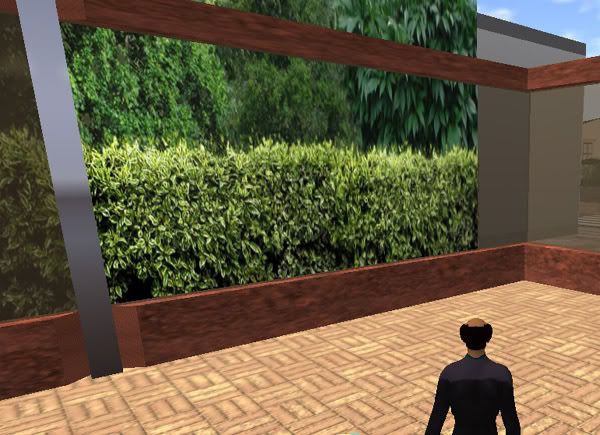
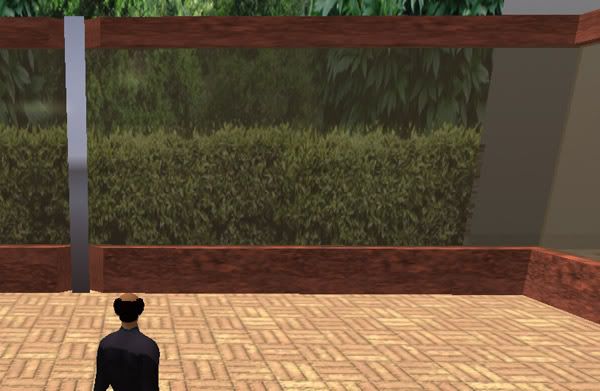
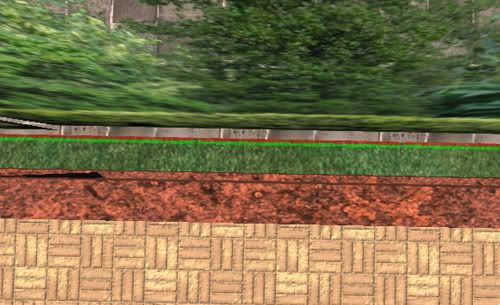
My neighbors on Mainland made a mall beside my modest gallery. In order to mute the goings on I added smoked glass so there would be less distraction for those viewing my art on plaza level. I was actually this close to planning a screen, but it seems they beat me to it. The only problem is their screen is messing with my glass, even though they arent touching. Case in point, picture 1, which was interesting to log into: http://i143.photobucket.com/albums/r136/holodocdr/BBS/screenerror1.jpgChanging the angle: http://i143.photobucket.com/albums/r136/holodocdr/BBS/screenerror2.jpgI have room between my building and the property line. I wanted that for anything I had planned myself. Here is a raw screenshot with lines: http://i143.photobucket.com/albums/r136/holodocdr/BBS/screenerror3.jpgWhat's going on here? I cant have those screens of theirs doing this. Any insight would be welcome.
_____________________
 Photostream: www.flickr.com/photos/holocluck Holocluck's Henhouse: New Eyes on the Grid: holocluck@blogspot
|
|
Chosen Few
Alpha Channel Slave
Join date: 16 Jan 2004
Posts: 7,496
|
07-05-2008 16:32
It's the alpha sorting glitch. When two or more surfaces with 32-bit textures on them overlap in close proximity, the renderer does not determine which one is "in front" and "in back" the same way a human observer would. It's determined primarily by which one's center point is physically closest to the camera, and secondarily by which one is most directly facing the camera.
The reason the two surfaces appear to flip-flop back and forth when you change your point of view is because you're moving your camera when you do that. You're changing the distances to the centers and the angles with every movement. So naturally, the relative placement of the two surfaces appears to change in response.
The way to solve the problem is to avoid it. Just don't ever let multiple 32-bit surfaces overlap like that.
Professional video game artists are well aware of the issue, so every level of every game is meticulously checked, rechecked, and triple checked to make sure no such overlapping occurs from any player's potential point of view. If any is found, that part of the level is redesigned.
In SL, though, you've got a million chefs in the kitchen, most of whom have no idea what they're doing, so it's impossible to keep any problem from surfacing, let alone alpha sorting issues. Even if you do everything you're supposed to do to avoid the glitch, your neighbor might not, and then you're back to square one.
You've got six options I can think of at this point:
1. Get rid of your screen, or ask your neighbor to get rid of theirs.
-OR-
2. Turn your screen opaque (24-bit texturing).
-OR-
3. Put a 24-bit-textured object in between each two corresponding center-points. Note, this will only work if your neighbor's screen is built very similarly to yours.
-OR-
4. Instead of using flattened cubes to form your screen, instead use 10x10x10's, to bring the centers 5 meters further inside your property line from where they are now. Then hollow the cubes by 95%, and cut them by 75%. Three of the four sides of each cube will get cut away, and you'll have what appears to be one wall that is just .5 meters thick. With the center being 5 meters further from the neighbor's wall, the sorting issues will be greatly reduced, although they won't disappear entirely. The downside is you'll have V-shaped indents where the cubes meet.
-OR-
5. Put invisprims between the two screens. Since invisiprims have the effect of hiding all 32-bit textures, your neighbor's screen should seem to disappear from your side of the border, and yours should seem to disappear from their side. This will have the added effect of making any avatars on their side also seem to disappear for you.
-OR-
6. Talk to your neighbor, and try to work something out. Perhaps you can both agree on a single screen you both like. Or maybe together, you can come up with a different idea that neither of you would have thought of on your own.
None of these solutions are ideal, obviously. Number 6 is what I would try first. If that doesn't work, experiment with the other options.
_____________________
.
Land now available for rent in Indigo. Low rates. Quiet, low-lag mainland sim with good neighbors. IM me in-world if you're interested.
|
|
Holocluck Henly
Holographic Clucktor
Join date: 11 Apr 2008
Posts: 552
|
07-05-2008 17:03
Invisiprims? So even putting a large flat cubes with alpha channels to make them clear will nullify the conflict if the alpha channel is a different bit size from the screen? Since I used transparent material color I cant control my window. Or maybe I dont understand what an invisiprim is.
The other question is how far away does their screen have to be in order for it to not conflict? If it's just a smidge back it could be an easy solution.
We're all looking forward to a favorable compromise.
Thanks!
_____________________
Photostream: www.flickr.com/photos/holocluck Holocluck's Henhouse: New Eyes on the Grid: holocluck@blogspot
|
|
Chosen Few
Alpha Channel Slave
Join date: 16 Jan 2004
Posts: 7,496
|
07-05-2008 17:20
From: Holocluck Henly maybe I dont understand what an invisiprim is. Invisiprims are prims with a special texture on them that serve to reverse the draw order of certain things. The effect is that 32-bit texures behind them disappear entirely from view. It was originally a bug, but it turned out to be useful, so it was deliberately not fixed. The most common use for them is to hide parts of avatars. For example, prim shoes useually have an invisiprim around them to hide any part of the avatar's foot that might protrude through the shoe. The invisiprim texture is only accesible via script. Search the scripting forum for the word "invisiprim", and you'll find it. From: Holocluck Henly The other question is how far away does their screen have to be in order for it to not conflict? If it's just a smidge back it could be an easy solution. There's no rule for how far apart they would need to be. It could well vary from video card to video card, but don't quote me on that. In any case, it's gonna be well more than a smidge. Basically, you need to ensure that from no point of view can the center point of any prim in the "back" wall end up closer to the camera than that of any prim in the "front" wall. That takes a good amount of distance. Even then, there's no guarantee, though. Remember, the angle of each surface relative to the direction the camera is pointing makes a difference too. Sometimes things that are quite far away appear to jump in front from certain angles, even though the centers are clearly quite distant.
_____________________
.
Land now available for rent in Indigo. Low rates. Quiet, low-lag mainland sim with good neighbors. IM me in-world if you're interested.
|
|
Holocluck Henly
Holographic Clucktor
Join date: 11 Apr 2008
Posts: 552
|
07-05-2008 17:43
So if I put my own screen with a different bit rate between us, then it will block the effects of the neighbors' screens and potentially prove innocuous to my windows?
The next question would still be: what is the bit rate LL is using on a transparent color vs an added texture? 16? 24? How can one find out?
Another one and one which may have been asked before: if I make a screen myself (alpha on the outside so they dont see the texture and it doesnt clash with theirs) on a megaprim, the center point is not likely to cross. I heard that megaprims can be used on the mainland as long as they are not close to or crossing a regional border. Is this true? because that would certainly be a great help for someone (me) with 512sqm and a dwindling prim allowance.
_____________________
Photostream: www.flickr.com/photos/holocluck Holocluck's Henhouse: New Eyes on the Grid: holocluck@blogspot
|
|
Chosen Few
Alpha Channel Slave
Join date: 16 Jan 2004
Posts: 7,496
|
07-05-2008 20:24
From: Holocluck Henly So if I put my own screen with a different bit rate between us, then it will block the effects of the neighbors' screens and potentially prove innocuous to my windows? Yes and no. The yes part is that it will solve the alpha sorting problem. The no part is that it won't be totally innocuous. 24-bit textures are opaque. Those opaque prims will obviously be visible through both screens, so you'd have to do something to give them an excuse to be there. Maybe they are lamp posts, or maybe they form a solid wall, or whatever else you can think of to make it look deliberate. From: Holocluck Henly The next question would still be: what is the bit rate LL is using on a transparent color vs an added texture? 16? 24? I'd suggest you read the stickies at the top of the texturing forum.  Here's very oversimplified rundown. In the type of imagery SL uses, anything with any amount of transparency in it is 32-bit. That includes any textures that were created with transparency already in them, as well as any to which you've added transparency in-world via the object editor. Opaque textures are normally 24-bit, but sometimes people screw up and create opaque-looking textures that are 32-bit. No other bit depths exist in SL. Everything is 24 or 32. That's it. From: Holocluck Henly How can one find out? There are several ways: 1. If there's transparency, then it's obvious. Again, anything with transparency is 32-bit. -OR- 2. Turn on Highlight Transparent. Anything 32-bit will be highlighted in red. -OR- 3. Select a surface and press ctrl-alt-shift-T. You'll see some green text appear on the screen, telling you whether the selected texture is opaque or alpha, as well as telling you its size and what side of the prim it's on. -OR- 4. You can open the texture console, and use it to examine all the textures within your field of view. You'll find it under the Advanced menu (ctrl-alt-D). From: Holocluck Henly Another one and one which may have been asked before: if I make a screen myself (alpha on the outside so they dont see the texture and it doesnt clash with theirs) on a megaprim, the center point is not likely to cross. If you use a megaprim, and the other guy is using a bunch of regular prims, there's a pretty good chance that the center of at least some of the regular prims will be closer to you than the center of the megaprim is, at all times. In that case, those regular prims would appear to jump in front of the megaprim. From: Holocluck Henly I heard that megaprims can be used on the mainland as long as they are not close to or crossing a regional border. Is this true? because that would certainly be a great help for someone (me) with 512sqm and a dwindling prim allowance. The unofficial answer is yes. Just be sure your megaprim doesn't extend into anyone else's property. Officially, megaprims are not supposed to exist, and could be removed from the system at any time. Use them at your own risk.
_____________________
.
Land now available for rent in Indigo. Low rates. Quiet, low-lag mainland sim with good neighbors. IM me in-world if you're interested.
|
|
Holocluck Henly
Holographic Clucktor
Join date: 11 Apr 2008
Posts: 552
|
07-05-2008 21:28
You answered the bit rate question. their screen uses a texture with transparency. My windows are transparent. 32s.
Will check out the texture forum at leisure tomorrow for more interesting tidbits.
Thanks again
_____________________
Photostream: www.flickr.com/photos/holocluck Holocluck's Henhouse: New Eyes on the Grid: holocluck@blogspot
|