I am eager to learn building the SL Way, but it is a different way from what I am familiar. So I want to be sure I am seeing this from the correct perspective:
1) Is it possible that once you upload a texture and apply it to a new article of clothing created in "Appearance..." that the texture properties can be edited and scaled up, down, rotated, etc.?
2) When making Torus, is it always the same thickness? It cannot be a tight fat puffy doughnut? Its radius cannot be squarish or distorted but always perfectly round? I'm referring to a cutaway of a regment of the prim and not the hole. How would one make a rounded flat wall then, or a diamond shape?
(Dont know how best to describe this, but my pt of reference is that in VRML one establishes that cutaway segment, then the prim aka node shape is applied to a form traveling 360 degrees to create a ring with that contour)
3) Where does one draw the line between carving a hole in another prim shape and using a torus or ring?
4) using the in-house building app, how does one get a view of top, bottom, and sides for more precise placement of prims to create an object?
5) Is it possible to download a skin texture created in "Appearance...," edit it in photoshop (to add a custom tattoo for example), then reupload it?
6) I was told of a beta server to test objects and textures for myself and my friend's avs and objects, but login fails on either account. Is there a requirement beyond basic member one must have in order to log in?
7) In VRML I was able to create a contour, then either build up from it straight or taper. How can this be achieved in LSL. This was called a scultped surface, but the "sculpties" seem to be very different. Something as simple as a horseshoe does not appear feasible with what I've seen.
Welcome to the Second Life Forums Archive
These forums are CLOSED. Please visit the new forums HERE
Building Questions |
|
|
Holocluck Henly
Holographic Clucktor

Join date: 11 Apr 2008
Posts: 552
|
04-16-2008 11:27
|
|
Keira Wells
Blender Sculptor
Join date: 16 Mar 2008
Posts: 2,371
|
04-16-2008 11:34
I am eager to learn building the SL Way, but it is a different way from what I am familiar. So I want to be sure I am seeing this from the correct perspective: 1) Is it possible that once you upload a texture and apply it to a new article of clothing created in "Appearance..." that the texture properties can be edited and scaled up, down, rotated, etc.? I've never found a way to, though I'd love to know if there is one I've missed as well 2) When making Torus, is it always the same thickness? It cannot be a tight fat puffy doughnut? Its radius cannot be squarish or distorted but always perfectly round? I'm referring to a cutaway of a regment of the prim and not the hole. How would one make a rounded flat wall then, or a diamond shape? Not sure what you mean. You can use the second 'hole' parameter to dictate the size of the center hole... 3) Where does one draw the line between carving a hole in another prim shape and using a torus or ring? Wherever one wishes.. less prims = less quality, more prims = more quality (Possible. Not always true of builds). We all have different building styles, just do what you feel is best. 4) using the in-house building app, how does one get a view of top, bottom, and sides for more precise placement of prims to create an object? Hold the alt key, and click the prim itself, and then move your mouse to rotate your camera left and right, and zoom in and out. Hold CTRL+ALT to be able to rotate your view up and down as well, with the loss of the zoom. 5) Is it possible to download a skin texture created in "Appearance...," edit it in photoshop (to add a custom tattoo for example), then reupload it? Not quite. There are skin templates and such that you can use, however, to find the right placement and such, and apply it as a skin, or as part of clothing. More info on this in the texturing forum. 6) I was told of a beta server to test objects and textures for myself and my friend's avs and objects, but login fails on either account. Is there a requirement beyond basic member one must have in order to log in? You need the beta viewer,which can be found by following the downloads page on secondlife.com 7) In VRML I was able to create a contour, then either build up from it straight or taper. How can this be achieved in LSL. This was called a scultped surface, but the "sculpties" seem to be very different. Something as simple as a horseshoe does not appear feasible with what I've seen. You can't create a line and then extrude it in SL. We're just no able to. You can use outside programs however, to create complex sculpted prims. If you'd like to learn more on that, there is quite a bit of info in this forum ^_^ Hope that I've been helpful! _____________________
Tutorials for Sculpties using Blender!
Http://www.youtube.com/user/BlenderSL |
|
Holocluck Henly
Holographic Clucktor
Join date: 11 Apr 2008
Posts: 552
|
04-16-2008 11:57
Pardon the crudeness, but I'm not home. I drew most of this freehand in Photoshop.
But it should give you the idea re the Torus question. I am not referring to the hole except maybe the distance the inner edge would be set. I mean the shape of the object itself: http://i143.photobucket.com/albums/r136/holodocdr/vrml/vrmlrotation.gif Does this make more sense regarding customized shape of a ring or torus? Thanks re some answers. I thought since I was able to reposition an object I bought so I held it properly that something I wore that I made myself would have more available editing properties. I did install the beta viewer. The login fails. |
|
Chosen Few
Alpha Channel Slave
Join date: 16 Jan 2004
Posts: 7,496
|
04-16-2008 12:10
1) Is it possible that once you upload a texture and apply it to a new article of clothing created in "Appearance..." that the texture properties can be edited and scaled up, down, rotated, etc.? No. Clothing and skin textures are UV-mapped directly to the avatar surface, as dictated by the templates. You cannot change the mapping. 2) When making Torus, is it always the same thickness? It cannot be a tight fat puffy doughnut? Its radius cannot be squarish or distorted but always perfectly round? I'm referring to a cutaway of a regment of the prim and not the hole. How would one make a rounded flat wall then, or a diamond shape? (Dont know how best to describe this, but my pt of reference is that in VRML one establishes that cutaway segment, then the prim aka node shape is applied to a form traveling 360 degrees to create a ring with that contour) The terminology you're looking for in place of "cutaway segment" is "profile". A torus is made by extruding a circular profile along a circular path. A tube is made by extruding a rectangular profile along a circular path. A cube comes from extruding a rectangular profile on a rectangular path, etc. In SL, you cannot change the shape of any prim's profile or path. A torus's profile is always circular. But it doesn't have to be a perfect circle. If you scale the profile, it becomes ovular. If you cut it, it can become a pacman shape, or a D shape, or a pie-wedge shape. If you taper the extrusion, you can make a horn shape. There are lots of possibilities. But what you can't do is change the circle itself into something else. So if you want a toroid whose profile shape is a rectangle with rounded corners, you would build it out several prims. For the rounded corners, you'd use cut toruses. For the vertical sides, you'd want either cylinder(s) or tube(s). For the horizontal sides, tube(s). At a minimum, you'd need six prims, eight if you want it to be hollow. Alternatively, you could use a sculpty. 3) Where does one draw the line between carving a hole in another prim shape and using a torus or ring? I don't understand the question? What do you mean? 4) using the in-house building app, how does one get a view of top, bottom, and sides for more precise placement of prims to create an object?[/qote] You don't. All you have is one perspective camera, so get at moving it fluidly while you work. Also, make use of the onscreen rulers, and their various modes. They're very powerful. High precision is easy, but it's a little different in SL from what you're used to. 5) Is it possible to download a skin texture created in "Appearance...," edit it in photoshop (to add a custom tattoo for example), then reupload it? If you have full permissions on the texture, yes. But if all you have is the skin itself, not its component textures, then no. Of course, unscrupulous people do steal textures all the time. There's no way to prevent that. But it's illegal, immoral, and every other kind of wrong you can think of. We don't discuss how such things are done here. 6) I was told of a beta server to test objects and textures for myself and my friend's avs and objects, but login fails on either account. Is there a requirement beyond basic member one must have in order to log in? You mean the test grid. It's not specifically for testing YOUR stuff, although sometimes you can use it for that. It's meant for testing of SL itself. Whether or not you can get into it depends on two things. First is whether it's currently open, which it isn't always. Second is timing. The test grid is not in any way connected to the main grid, and does not share its database. LL from time to time will take a database snapshot, to copy to the test grid. Only avatars who were in existence as of the latest snapshot will be able to enter the test grid. 7) In VRML I was able to create a contour, then either build up from it straight or taper. How can this be achieved in LSL. This was called a scultped surface, but the "sculpties" seem to be very different. Something as simple as a horseshoe does not appear feasible with what I've seen. Are you asking about extrusions? It sounds like that's what you mean. SL does not use extrusion modeling. It uses parametric solids, which are totally different. If you want to make a horseshoe, you could take the simple route and just cut a tube in half, or if you want more detail, you would construct it out of several prims. There are about a thousand different ways to do the latter, depending on what you want. Or you could model the shape in an external program (in accordance with certain rules for compatibility), and bring it in as a sculpty. Sculpties, as you noted, have nothing to do with the "sculpting" you mentioned. For more information on what sculpties actually are, see the sculpt prim wiki. wiki.secondlife.com/wiki/Sculpted_Prims _____________________
.
Land now available for rent in Indigo. Low rates. Quiet, low-lag mainland sim with good neighbors. IM me in-world if you're interested. |
|
Chosen Few
Alpha Channel Slave
Join date: 16 Jan 2004
Posts: 7,496
|
04-16-2008 12:13
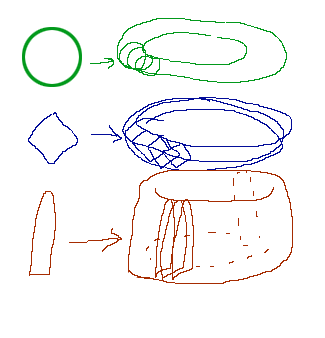 I took the liberty of changing your URL tags to IMG tags, so we could see the image right here in the forum. For the first example, obviously you'd use just a plain torus. For the second one, the diamond shape profile, the easiest thing to do is put a couple of rings together. For the third one, the arch-shaped profile, just profile-cut a torus in half. _____________________
.
Land now available for rent in Indigo. Low rates. Quiet, low-lag mainland sim with good neighbors. IM me in-world if you're interested. |
|
Keira Wells
Blender Sculptor
Join date: 16 Mar 2008
Posts: 2,371
|
04-16-2008 12:16
I've never used beta, so can't say anything about that, so sorry there..and can't view photobucket at school, but will be home in about an hour, so theres that.
Anyhow.. you do have quite a bit of control, it's just limited because of the technical limits of SL and the way it was built. Now..if you wanna make the hollowed shape different, you can make that a few different things..triangle, circle, square, and 'default' which think is usually/always one of those three (Think it's only three..maybe more, can't get in now to check) That's the best I can do for now, I'll take a look at your pic when I get home if your query hasn't been answered ^_^ ETA:: Looks like your query's been answered  _____________________
Tutorials for Sculpties using Blender!
Http://www.youtube.com/user/BlenderSL |
|
Holocluck Henly
Holographic Clucktor
Join date: 11 Apr 2008
Posts: 552
|
04-16-2008 12:30
Thanks - interesting but always more questions. Now I know how little I really get of it.
Chosen, I'll be honest. I am not a VRML coder. I use WYSIWYG clients to make the wrls. I did use extrusions and sculpted surfaces interchangeably for many shapes. Re Beta grid: I wouldnt even care if the same avs etc were on the testing server. it would just be to try techniques and import to see if something worked. I was informed by a mentor that it's common practice to confirm creations and effects there before investing in the real upload on the main grid. I know of the alt-mouse view, but is there a way to snap an overhead shot precisely etc? Even offline apps I've downloaded have these views. I think I could have stumbled through my first creation if I had a means to line everything up at the right angles (I moved prims at various angles at first but could not level them back up properly. Looking over one's shoulder is cumbersome and mouseview cancels with some adjusting maneuvers). |
|
Johan Durant
Registered User
Join date: 7 Aug 2006
Posts: 1,657
|
04-16-2008 12:47
I'm not aware of any way to do orthagonal views in SL, but moving objects along precise axes is easy. Just click on the arrows that appear when you are editing the object, instead of clicking on the object itself. When you click and drag on an arrow, movement is restricted to a line along that arrow.
_____________________
 (Aelin 184,194,22) (Aelin 184,194,22)The Motion Merchant - an animation store specializing in two-person interactions |
|
Holocluck Henly
Holographic Clucktor
Join date: 11 Apr 2008
Posts: 552
|
04-20-2008 05:30
Re the phantom prim keeping pool unlinked issue...
Okay I invested half my money on Rez Faux (hey I'm new). This is very nice but the box is still there. Someone has to have that box sitting in or next to my pool at all times? This is definitely not going to work. If the anchor was hidden unless edit was called up I'd have something other than a waste of resources. I guess for houses people stick this thing in their closet... I'm going to have to look into scripting I think. |
|
Wulfric Chevalier
Give me a Fish!!!!
Join date: 22 Dec 2006
Posts: 947
|
04-20-2008 05:57
Once you've rezzed and stored the packed build you can safely delete the Rezz-Faux box, so long as it's not no-copy.
|
|
Chosen Few
Alpha Channel Slave
Join date: 16 Jan 2004
Posts: 7,496
|
04-20-2008 06:40
As Wulfric said, after your customer has rezzed the build, he or she can safely delete the packager box. Another option is to make the box part of the build, so it's not in the way int he first place. Let's say you've packaged a house, for example. You can just make the packager part of the floor. It doesn't have to be just a plain box. You can shape it and texture it any way you want.
_____________________
.
Land now available for rent in Indigo. Low rates. Quiet, low-lag mainland sim with good neighbors. IM me in-world if you're interested. |