New GPU, New Issues.
|
|
Araiya Bomazi
A. Bomazi-Tomba. :)

Join date: 3 Dec 2004
Posts: 51
|
05-06-2005 23:36
This would be my third video card since I've come to SL. Second Life 1.6.4 (0) Apr 21 2005 12:22:28
CPU: AMD Athlon(tm) XP 2400+ (1994 Mhz)
Memory: 512 MB
OS Version: Microsoft Windows 2000 Service Pack 4 (Build 2195)
OpenGL Vendor: NVIDIA Corporation
OpenGL Renderer: GeForce4 MX 4000/AGP/SSE/3DNOW!
OpenGL Version: 1.5.2
Packets Lost: 0/58576 (0.0%)
Viewer Digest: ...
---------
(02:15) <@Ara-Bo> OS: Win2K Professional 5.0 Service Pack 4 (Build #2195)
CPU: AMD Athlon XP 2400+ (Thoroughbred) , 1.99 GHz
Video: Plug and Play Monitor on nVidia GeForce4 MX 4000 (1280x960x32bpp 70Hz)
Sound: Vinyl AC'97 Audio (WAVE)
Memory: Used: 248/512MB
Uptime: 9h 25m 23s
HD: [C:Shirahime] 8.41/18.64 GB [D:Trivial Warthog] 26.13/73.58 GB
Connection: VIA Rhine II Fast Ethernet Adapter @ 100.0 Mbps (Rec: 321.51MB Sent: 86.68MB) I run SL at 1024 x 768 fullscreen, with Objects set to one tick below full, Trees and Avatars set to half. Render distance is 64, fog is 1.0, particles are 256. Disable Far Clip is Off. Shiny Objects was turned off to see if it was the culprit (It wasn't). Avatar rendering was reduced to Bump Map from Bump Map + Cloth. Shadows have never been turned on. Avatar Vertex Program is unavailableAntivirus (avast!) is disabled before connecting, and there are no firewalls in play. All drivers are current except: nVidia GeForce4 MX 4000: Using version 66.93 as part of a stability test. Current available drivers are version 71.89. The problem lies in extremely sluggish response from Second Life. Currently, I can tap a key (WSAD), and have that hand off the keyboard and onto my Pepsi before I see myself move (roughly 1.5 seconds). I checked my running processes, and even killed programs I normally leave running during my SL experience (Skype, X-Lite) to see whether they may be affecting things. However!, running SL on my backup card (Geforce 2 GTS, 32 MB, AGP) earlier this day, and yesterday evening gave me marginally better results, with the following changes: Object rendering was set to full, Avatar rendering was set to one tick below full, Shiny Objects were enabled, Avatars had Bump Map + Cloth enabled. With this information, are there any suggestions that I can follow to speed up SL to make it playable again? I've already had to wait days to replace a broken card.  I'm in fear of having another SL withdrawal. *G*
_____________________
http://pxnet.pixelechoes.net/ - Who blogs anymore, really?
|
|
Thili Playfair
Registered User

Join date: 18 Aug 2004
Posts: 2,417
|
05-07-2005 10:23
i been there when i broke my last vid card, ran on a MX card, worst crap i ever have  Turn off bump mapping, Mx card bite enough as it is Turn particles completly off to, those are dreadfull for a mx (debug/render/particles) I croaked my machine when i ran on a poor mx460 once, now i can have them max with my other vid card and they wont bug me at all.  gl |
|
Zephria Zapata
Anit-Gorean & Slave
Join date: 7 Apr 2004
Posts: 299
|
05-07-2005 11:41
Plus the biggest thing lindens told me is to always check what type of powr supplly you have ... needs at least 300watt or better .... i had a 250 watt ... eww that bites was crashing all the time .. didnt have enought power to run my stuff almost brunt my vidoe card ...ewwe .... but now got and installed a 450 watt power supply and have no worries .... huge improvement i thanks Lindens for the best advise ever on this one my machine is even running quiter and better I WOULD LOVE TO GIVE LINDENS BIG HUGS AND BIG THANKS FOR THIS  |
|
Catherine Omega
Geometry Ninja

Join date: 10 Jan 2003
Posts: 2,053
|
05-07-2005 15:51
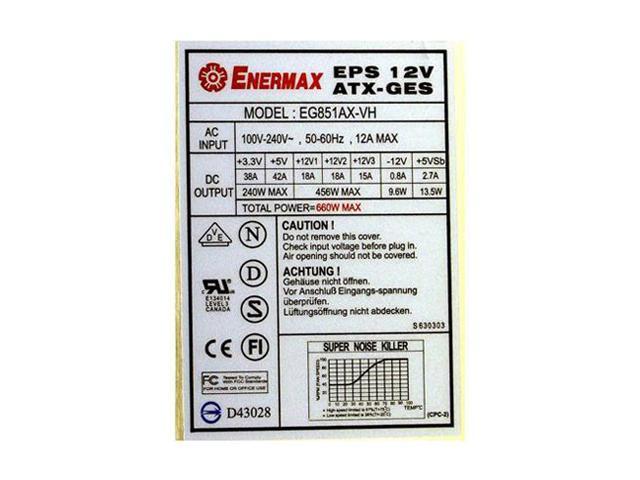
From: Zephria Zapata Plus the biggest thing lindens told me is to always check what type of powr supplly you have ... needs at least 300watt or better .... i had a 250 watt ... This is true, but what you really need to be sure of is the amperage of the +12 volt rail. Luckily, it's clearly labelled on the side. For example, in this image, (of this Enermax PSU) we see an impressive total of THREE seperate +12V rails, with 18A, 18A and 15A, respectively. If you're running a GeForce 6800 or higher, I wouldn't go with anything less than 20A total. This particular PSU is pretty amazing, even for Enermax, (it's rated at 660W!) but with most brands, you need to be aware of the actual amperages, not just the total wattage, because it can be misleading. The formula different manufacturers use to determine the total wattage can vary significantly based on how "flexible" they choose to be with their math. For instance, compare a low-end "350W" PSU with a high end one. Low-end: Turbolink LC - A350ATX: +3.3V@24A, +5@35A, +12V@12A. High-end: Antec SL350BLUE ATX 350W:+3.3V@28A,+5V@35A, +12V@16A. The difference between the 12 amp and 16 amp capacities can mean the difference between being able to boot or not with a video card better than a GeForce 5700 or so. |
|
Catherine Omega
Geometry Ninja
Join date: 10 Jan 2003
Posts: 2,053
|
05-07-2005 15:54
I realize my response to Zephria didn't help YOU at all, Araiya. The problem you're seeing doesn't seem to be related to rendering speed at all, nor power. It sounds like a networking problem. If you press Ctrl-Shift-1, in the "Basic" section, what is your ping time? What kind of internet connection do you have?
|
|
Araiya Bomazi
A. Bomazi-Tomba. :)
Join date: 3 Dec 2004
Posts: 51
|
05-07-2005 15:57
The power supply thing makes me want to scream "Bullshit!" at the top of my lungs (Especially when a card runs perfectly fine on said power supply, and then begins to manifest problems - seems the card was ready to die. ). I tried again at about 5 AM. My response times were actually acceptable and usable in SL. I'm still watching out, though. Damn, I miss shiny objects.
_____________________
http://pxnet.pixelechoes.net/ - Who blogs anymore, really?
|
|
Catherine Omega
Geometry Ninja
Join date: 10 Jan 2003
Posts: 2,053
|
05-07-2005 16:03
From: Araiya Bomazi The power supply thing makes me want to scream "Bullshit!" at the top of my lungs (Especially when a card runs perfectly fine on said power supply, and then begins to manifest problems - seems the card was ready to die. ). Oh, it's quite true; it just has nothing to do with your particular problem. Oh, one thing that it could be... you don't have any other housemates that use the same internet connection, do you? Do they like BitTorrent, or Gnutella? Any file-sharing? |
|
Roberta Dalek
Probably trouble

Join date: 21 Oct 2004
Posts: 1,174
|
05-07-2005 16:32
I'm using an inbuilt geforce4 mx and I know I'd get better performance from almost anything else. My problem is going to be getting one that fits in my shuttle. "Cards with a dual fan system (dual slot cards, or cards with an exceptionally large fan) will unfortunately NOT fit in the system. The only exception are P-series cases (such as the S81P.)" And then you look at the set of listed compatible cards and go "whaa!". http://global.shuttle.com/Support/SupportList.asp?Item=SN41G2%20V2Anyone know of a cheap graphics card that fits, and works with SL? |
|
Catherine Omega
Geometry Ninja
Join date: 10 Jan 2003
Posts: 2,053
|
05-07-2005 17:04
From: Roberta Dalek My problem is going to be getting one that fits in my shuttle.
Anyone know of a cheap graphics card that fits, and works with SL? I'm going to shock everyone who knows me by saying this, but the best cards for a small form factor system are probably going to be ATI. You should be able to fit something up to an ATI Radeon 9800 Pro in there just fine. With ATI's drivers these days, you're not going to have any trouble with SL, and ATI cards are nice and low-power too... at least compared to Nvidia's offerings. In terms of performance in SL, though, you won't see as large an improvement as you might think. SL 1.x is currently CPU-bound, meaning the most important factors in SL's performance are CPU, system bus and then system RAM. However, in future, this may change. We won't know until the end of the year at least, though. What CPU do you currently have? How much RAM? You might get better performance by upgrading one of those instead. Still, the onboard video's definitely something I'd replace, it just wouldn't necessarily be my first call if I only used my computer's 3d features for SL. If you do any games, you'll definitely want a better video card, and it WILL make a huge difference there. SL's kind of a weird exception to most rules.  |
|
Roberta Dalek
Probably trouble
Join date: 21 Oct 2004
Posts: 1,174
|
05-07-2005 17:28
Thanks - the only 3D use it gets is SL.
I've got an Athlon 2800+, and 512MB RAM. The onboard graphics is using 64MB of that.
I wondered whether I'd get noticible image quality improvements with something like a ATI 9000.
|
|
si Money
The nice demon.
Join date: 21 May 2003
Posts: 477
|
05-07-2005 19:39
I have an XFX 6600GT AGP which fits just fine in my Shuttle SB62G2.**
Anything that doesn't use 2 slots will fit fine, though with some of the larger fans you may have to do some shoving with the case.
On the powersupply comment, you have to remember that as powersupply components heat up, their efficiency drops, so it's actually not improbable for a power supply to manifest problems later on -- especially if dust begins to build up in said power supply, which will constantly raise the heat due to inability to properly vent.
** The card will not, however, ventilate properly with the standard case over it. There is an aluminum mesh case which does just fine, either that or you can poke some holes in your case, or leave it off entirely. The problem is that the fan sits too high up, and is above the vent grille in the side.
_____________________
Like a soul without a mind In a body without a heart I'm missing every part -- Progress -- Catherine Omega: Yes, but lots of stuff isn't listed. "Making UI harder to use than ever" and "removing all the necessary status icons" things.... there's nothing like that in the release notes.
|
|
Araiya Bomazi
A. Bomazi-Tomba. :)
Join date: 3 Dec 2004
Posts: 51
|
05-08-2005 17:37
From: Catherine Omega Oh, it's quite true; it just has nothing to do with your particular problem. Oh, one thing that it could be... you don't have any other housemates that use the same internet connection, do you? Do they like BitTorrent, or Gnutella? Any file-sharing? I fortunately live in a one-computer house, with a very strict rule: Touch Ara's computer, and find yourself missing the fingers that touched it. /me does not like her precious touched, yiiis... >.>; I can't figure out just what happened, that night. But I'm running on a brand new install of Windows 2000 SP4 today, and it's behaving. We'll see what happens. ^~^ Oh, and si? I don't allow dust to build up very often. /me usually has a can of air and dusts things out each month, knowing how dusty her house can get.
_____________________
http://pxnet.pixelechoes.net/ - Who blogs anymore, really?
|