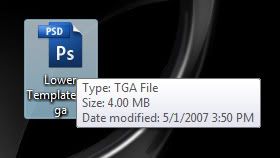
But all my PS icons/thumbnails are showing as PSD files.. (please see picture) It doesn't matter if it's a TGA they all say PSD, does anyone know how to fix it? Is anyone else having this same problem?
These forums are CLOSED. Please visit the new forums HERE
CS3 Help please? |
|
|
Sensual Casanova
Spoiled Brat

Join date: 28 Feb 2004
Posts: 4,807
|
05-02-2007 09:16
So I have CS3 and Vista, I am not sure if it is a Vista related problem or a CS3 problem, or MY problem, maybe I changed a setting I shouldn't have or didn't change something I should...
But all my PS icons/thumbnails are showing as PSD files.. (please see picture) It doesn't matter if it's a TGA they all say PSD, does anyone know how to fix it? Is anyone else having this same problem? _____________________
|
|
Relika Itamae
Registered User
Join date: 21 Jun 2006
Posts: 34
|
05-02-2007 09:39
I'm having the same problem with files other then PSD files showing as PSD files. I'm on a computer running Windows XP, so it is not operating system related. Not sure how to fix it though, it's not bothering me much at the moment. It's only irritating to me when opening something and it appears to be a different file format than you thought.
_____________________
Keep updated of my new releases at the Relika store weblog:
http://relikaitamae.blogspot.com Or join the ::Relika:: Update Group in-world |
|
Sensual Casanova
Spoiled Brat
Join date: 28 Feb 2004
Posts: 4,807
|
05-02-2007 10:48
hmm I tried looking at the forums on Adobe, and I don't see it even mentioned...
It's not the worse thing in the world, except a pain when you have long file names =/ _____________________
|
|
Chosen Few
Alpha Channel Slave
Join date: 16 Jan 2004
Posts: 7,496
|
05-02-2007 11:15
Here are some thumbnail plugins that may help. Adobe's been nurfing OS thumbnails ever since CS2 in order to force people to use Bridge. As if the concept itself weren't bad enough, it looks like their implementation of it was screwed up royally in CS3. Personally, I hate Bridge. Windows Explorer ain't broke; why they're trying to fix/circumvent it is beyond me.
Note, the plugins are intended for Explorer (My Computer) in Windows XP. The PSD one is known to work with PSD's created in CS2 and all earlier Photoshop versions, but hasn't been tested with CS3 PSD's, as I don't have CS3 yet myself. None of the plugins have been tested with Vista. I'm not planning on touching Vista until such time as most software makers have sufficiently adapted for it (probaby another year or so). Also, I didn't make these plugins myself, so if you need tech support, don't ask me. I don't know how they work, just that they do (at least in XP with CS2). Click to download thumbnail_plugins.zip (By the way, sorry that it takes 3 clicks for the download. That's just how PutStuff works. I figured this might be popular so I didn't want to eat up a ton of traffic from my own server.) _____________________
.
Land now available for rent in Indigo. Low rates. Quiet, low-lag mainland sim with good neighbors. IM me in-world if you're interested. |
|
Sensual Casanova
Spoiled Brat
Join date: 28 Feb 2004
Posts: 4,807
|
05-02-2007 11:20
Thanks Chosen
 I am not sure if it will work in Vista but I guess I can give it a try, I will post and let others know if it does, thanks again _____________________
|
|
Sensual Casanova
Spoiled Brat
Join date: 28 Feb 2004
Posts: 4,807
|
05-02-2007 13:44
Just an update... I haven't tried to install this yet, it requires changes made to the registry, and well, I am a bit scared I will mess up, so as soon as my hunny comes around, I will ask for his help and let you guys know
_____________________
|
|
MSo Lambert
Registered User
Join date: 16 Aug 2004
Posts: 101
|
05-02-2007 17:35
Thanks for the link Chosen
We tested those with Sensual and they all work in XP and Vista. The PSD thumbnail extension also works with CS3 without a problem, and even shows files that have 3D layers. When installing that PSD extension, if you have CS3, the folder "C:\Program Files\Common Files\Adobe\Shell" might not exist - in that case, simply create it. Also, for anyone using Vista and/or Office 2007 - Microsoft added a nice previewer feature that lets you, for example, view images and office files directly in Outlook. Other 3rd party developers have also started to release additional preview handlers, and someone is working on the PSD previewer, might be worth checking out - here . _____________________
MSo
|
