|
Oryx Tempel
Registered User

Join date: 8 Nov 2006
Posts: 7,663
|
04-28-2007 12:14
I have a photo of a foxtail. I want to stretch it (I guess?) so that when I lay that texture on the curved surface of a cylinder, it comes out looking like a real foxtail, not the funky stuff that I get. Should I do this in my editor (Gimp) or can I do it using the texture utilities in SL? Does my question make sense?
|
|
Lee Ponzu
What Would Steve Do?
Join date: 28 Jun 2006
Posts: 1,770
|
04-28-2007 13:56
Thus, the need for artists...and I am NOT one, I assure you.
Imagine a real fox tail. Skin it, and press the tail fur out flat. You need to use Gimp to make a picture that looks like that.
Take a picture of a straight fox tail (or even just some fox fur), cut off the edges of the picture, and then make it wider so you can wrap it around a round prim. it would be even better if you make it seamless.
|
|
Sylvia Trilling
Flying Tribe

Join date: 2 Oct 2006
Posts: 1,117
|
04-28-2007 13:57
It might be useful for you to post pics of your source photo and the "funky stuff" you are getting so that the experts who post to this thread can see what problems you are having and give you some help.
|
|
Infiniview Merit
The 100 Trillionth Cell
Join date: 27 Apr 2006
Posts: 845
|
04-29-2007 01:22
as long as its a quality photo you should not have to do anything special in pre-prep I am assuming that you have it on a transparent background, and Yes the texture tools are the best way to make it look right. Specifically the repeat pattern, offset and rotation tools. The challenge you run into with the cylinder is that the entire surface of it excluding the ends is considered one face, so the texture will appear stretched somewhat. Because the texture will be wrapped around the entire circumference of the prim. in these pics I have a texture on a rectangular cube next to a cylinder. 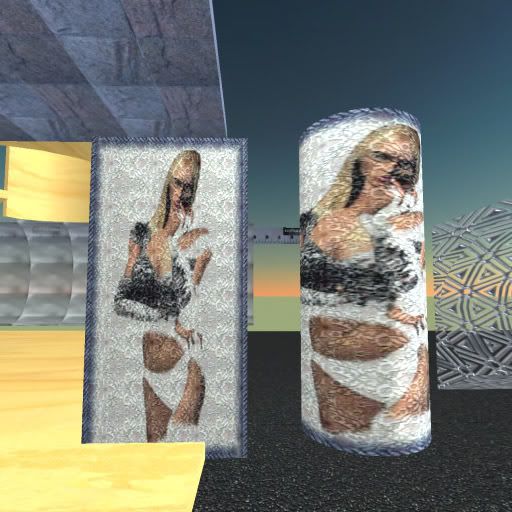 However... 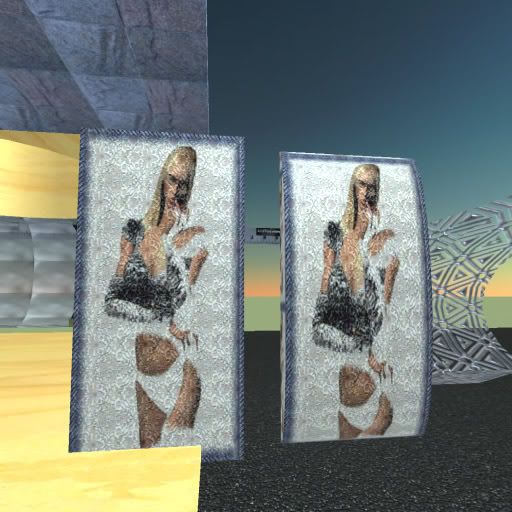 on this one I rotated the texture 90 degree and stretched the prim a bit, then used repeat face on both horizontal and vertical until it looked close by eye. Then I used offset to position the center of the image where I wanted it. You could prep the texture before upload however I think it would be more work than just using the tools in world in this case.  |
|
Oryx Tempel
Registered User
Join date: 8 Nov 2006
Posts: 7,663
|
04-30-2007 10:32
awesome, thanks! I did end up using a half-cylinder so that the texture didn't have to stretch ALL the way around the cylinder, and it definitely works better, and is just fine for what I'm doing. Thanks everyone!
|
