Hi up until now all the textures i have uploaded have been square shaped.
I have been working on a game and am almost finished so now i need to think about how it will look.
I once put a texture on a triangle shape and it didnt work so i want to know:
How do i create a texture that will fit my object? (ie the buttons will match where i have them placed)
Welcome to the Second Life Forums Archive
These forums are CLOSED. Please visit the new forums HERE
How do i create a texture that will fit my object? |
|
|
Rocketman Raymaker
Registered User
Join date: 4 Feb 2007
Posts: 530
|
04-21-2007 01:01
_____________________
"Proud member of the anti-ginko busy body committee"
|
|
Serenarra Trilling
Registered User
Join date: 14 Oct 2006
Posts: 246
|
04-21-2007 05:06
In the edit window, deselect the "stretch textures" option. Then use a texture with a triangle on it, and use the "offset" numbers to put the triangle texture in the right place.
I built lots of things before figureing that one out. It helps a LOT with textures, though I still forget to use it at times. Edit: I forgot, you will probably need to fiddle with the "repeats per face" settings to get it just right. |
|
Chosen Few
Alpha Channel Slave
Join date: 16 Jan 2004
Posts: 7,496
|
04-21-2007 08:12
There's no need to turn Stretch Textures off. In fact, I'd recommend keeping it on. Otherwise, if you resize the prim, you'll need to do all your repeat & offset work all over again.
Rocketman, planar mapping is your friend for this. Apply the texture to your triangular prim, and then change the mapping from default to planar. Now adjust the repeats and offsets until the texture fits on the surfaces the way you want. You may have to do this one surface at a time using Select Texture, depending on the shape of the object. Note that planar mapping uses repeats per meter, not repeats per face. For more on planar mapping, see this thread. _____________________
.
Land now available for rent in Indigo. Low rates. Quiet, low-lag mainland sim with good neighbors. IM me in-world if you're interested. |
|
Robin Sojourner
Registered User
Join date: 16 Sep 2004
Posts: 1,080
|
04-22-2007 04:44
The easiest way to do this, assuming that you have built something that you need to match perfectly, is to Attach a copy of it to the center HUD point, so you don't need to worry about perspective, and take a screen shot.
You can Edit things in the HUD, of course, so resize it, turn it around and take shots from each side, etc. if you need to. Then open those screen shots in your favorite graphics editor, and use them to draw the texture so that all the parts line up exactly the way you want. Once you have done that, you can upload it, and either use Default or Planar mapping, adjust the offset and repeats, or whatever you need to do. If you're just using a single texture, on one side of the prim, and you don't need to make a Texture Sheet, then the simplest way to do it is to crop the screen shot to the edges of the prim when you start to work on it. Once you have it finished, make a copy, flatten it, and resize it to the closest "power of two." Use that at 1x1 repeat, with no offset, and your texture will fit perfectly. Hope this helps! _____________________
Robin (Sojourner) Wood
www.robinwood.com "Second Life ... is an Internet-based virtual world ... and a libertarian anarchy..." Wikipedia |
|
Lee Ponzu
What Would Steve Do?
Join date: 28 Jun 2006
Posts: 1,770
|
God bless Robin
04-22-2007 08:27
...what an amazing tip. So obvious now, of course, that you describe it, bit I might have never found that on my own.
As for the original poster, I was going to offer the simple advice of uploading a texture that is basically a piece of graph paper. Then see how that looks when on your object, and that can be used to help create the needed texture. lee |
|
Heather Rau
Registered User
Join date: 7 Feb 2007
Posts: 100
|
04-22-2007 09:41
This whole thread has been incredibly useful. Thanks to all.
|
|
Ralph Doctorow
Registered User
Join date: 16 Oct 2005
Posts: 560
|
04-22-2007 11:44
I second Lee's suggestion for anything with curved surfaces. Build a grided texture with labels in the cells. I color the cells as well so I can see where ones that get shrunk wind up. It's pretty amazing the way textures get wrapped around deformed spheres, toruses, etc.
Robin's suggestion is the perfect complement to this technique to get good orthogonal views. |
|
Robin Sojourner
Registered User
Join date: 16 Sep 2004
Posts: 1,080
|
04-22-2007 12:24
Thanks, Lee!
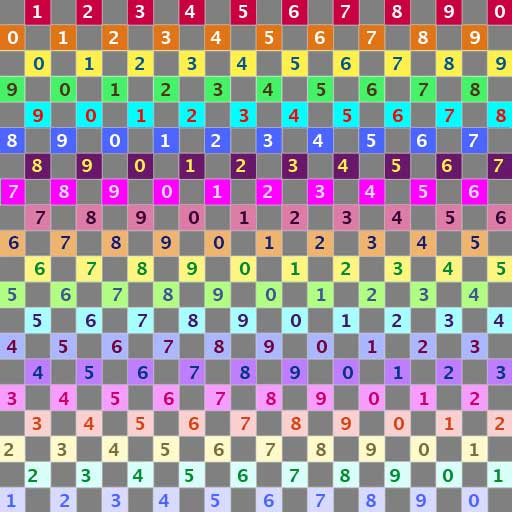
 Oh, yeah! I was thinking of a flat surface. My tip won't work very well for something that's curved (thanks again Lee and Ralph ). For that you really do need the grid texture.I have one I've been using for many years in my Texture Tutorials, in world. You can go there, and grab it for free. It's basically a checkerboard, with gray squares interspersed with squares that have a color and number on them, so it's easy to see that your texture doesn't need to be flipped, and also easy to see exactly where you are on the grid. You use it by placing it on the model, and then opening a copy of the same texture in your graphics program, so you can see exactly what is where. (You can get a .jpg for that from my site here.) It's also very useful for matching up texture across prims, since you can see where you are, and whether you need to offset right or left, up or down, very easily. Hope this helps! _____________________
Robin (Sojourner) Wood
www.robinwood.com "Second Life ... is an Internet-based virtual world ... and a libertarian anarchy..." Wikipedia |
|
Rocketman Raymaker
Registered User
Join date: 4 Feb 2007
Posts: 530
|
04-23-2007 03:02
Thank you all so much for the information. Very helpful!!
 _____________________
"Proud member of the anti-ginko busy body committee"
|