I just started, and am looking for a skin. I came across this news article, http://www.alphavilleherald.com/archives/000449.html , and just wanted to know something about it.
It speaks of 400$ skins there. Is that real money or the ingame money?
And if it is ingame money, where can I buy one?
Any help will be greatly apreciated. I am sorry if this does not belong here, but as I said. I am new.
Welcome to the Second Life Forums Archive
These forums are CLOSED. Please visit the new forums HERE
Help, I am a newbie. |
|
|
Ardy Goodliffe
Registered User
Join date: 1 Jan 2006
Posts: 3
|
01-02-2006 00:16
|
|
MJ Hathor
Purple Butterfly

Join date: 17 Mar 2005
Posts: 901
|
01-02-2006 00:47
Hi Ardy
 Welcome to SL and the forums. Here is a link to the Classified/New Product/Body Shop Forum. Welcome to SL and the forums. Here is a link to the Classified/New Product/Body Shop Forum.This is where skin designers will post the latest skins/hair/makeup ect. Most will post their locations in their ads. The 400$ you saw is in Linden Dollars (IW money). Hope this helps. MJ _____________________
|
|
Broken Templar
Registered User

Join date: 14 Aug 2004
Posts: 139
|
01-02-2006 00:51
Typically it's in-game money or "lindens" sometimes denoted in the following way: $400L Everything you'd buy using the client is in $L. Your balance is in the top right corner of the screen by the time.
You can buy more lindens by going to https://secondlife.com/currency/ Around $250L = $1.00USD (US Dollars) If it's a $400USD Skin it should make you look good in Real Life too. Try going here, don't know if they have exactly what you're looking for, but it appears to be the creator's store: secondlife://Kane/76/21/47 Good luck & welcome to SL! |
|
Ardy Goodliffe
Registered User
Join date: 1 Jan 2006
Posts: 3
|
01-02-2006 00:57
Thank you both. You have helped a great deal.
|
|
Ardy Goodliffe
Registered User
Join date: 1 Jan 2006
Posts: 3
|
01-02-2006 01:32
Ok. I got it, but now how do I use it?
Here is an image of how it is. The only other skin I bought was in a folder, not a file. 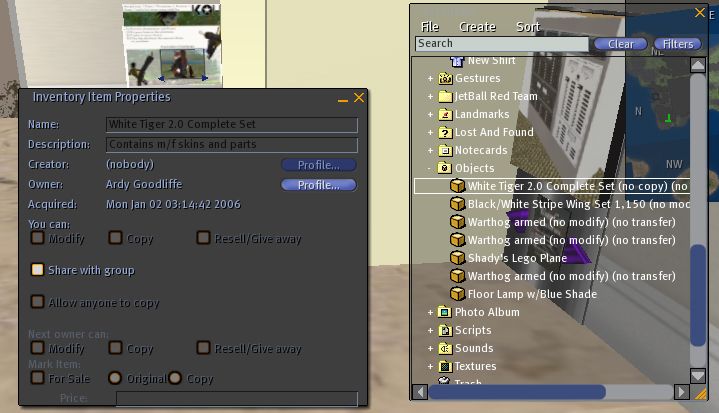 Ok. I got it. Thanks for your help everybody. |
|
Ciri Olafson
Viking Biking

Join date: 1 Feb 2005
Posts: 208
|
01-02-2006 02:29
Hi Ardy, welcome to SL.
The object you have purchased came in a box, so all you need to do is to rezz it on the ground, edit it and go to the contents tab. Drag the contents to your inventory and there you will be able to see what they are. Hope it helps. _____________________
|
|
Torley Linden
Enlightenment!

Join date: 15 Sep 2004
Posts: 16,530
|
01-02-2006 03:07
A warm welcome to SL, Ardy! Kewl, Kathmandu's creations are featured in that article.
Hi Ardy, welcome to SL. The object you have purchased came in a box, so all you need to do is to rezz it on the ground, edit it and go to the contents tab. Drag the contents to your inventory and there you will be able to see what they are. Hope it helps. Or new and even easier in SL... rez a box by dragging it from your Inventory to buildable ground, then right-click on it and select OPEN. (This process could be further facilitated in the future if there was a "Transfer to Inventory" button in that window that pops up. Click it and all the goodies are sent to your inventory.) _____________________
|
|
Garnet Psaltery
Walking on the Moon

Join date: 12 Apr 2005
Posts: 913
|
01-02-2006 08:32
Aaahh .. another one whom we did not trap on Help Island.
_____________________
|