Hello,
I know how to edit appearance, and how to use it to edit my 'shape'.
I sometimes see some fabulous 'shapes' for sale (expensive).
My question is ---- can the shapes I see for sale be achieved for free by using the edit appearance option, or are there tricks I don't understand ?
Thanks
oxy
Welcome to the Second Life Forums Archive
These forums are CLOSED. Please visit the new forums HERE
Shapes, - editing appearance |
|
|
Oxymoron Parx
Registered User
Join date: 11 Nov 2008
Posts: 43
|
04-23-2009 09:28
|
|
Briana Dawson
Attach to Mouth

Join date: 23 Sep 2003
Posts: 5,855
|
04-23-2009 09:35
Hello, I know how to edit appearance, and how to use it to edit my 'shape'. I sometimes see some fabulous 'shapes' for sale (expensive). My question is ---- can the shapes I see for sale be achieved for free by using the edit appearance option, or are there tricks I don't understand ? Thanks oxy Yes, you be beautiful on your own without paying for it. I have a wonderful proportion tool so you don't end up looking like a giant as well. _____________________
|
|
Briana Dawson
Attach to Mouth
Join date: 23 Sep 2003
Posts: 5,855
|
04-23-2009 09:37
Hello, I know how to edit appearance, and how to use it to edit my 'shape'. I sometimes see some fabulous 'shapes' for sale (expensive). My question is ---- can the shapes I see for sale be achieved for free by using the edit appearance option, or are there tricks I don't understand ? Thanks oxy Yes, you be beautiful on your own without paying for it. I have a wonderful proportion tool with a chart and guide so you don't end up looking like a giant as well. _____________________
|
|
Naz Fride
21st Century Faux

Join date: 8 May 2007
Posts: 341
|
04-23-2009 10:35
Hello, I know how to edit appearance, and how to use it to edit my 'shape'. I sometimes see some fabulous 'shapes' for sale (expensive). My question is ---- can the shapes I see for sale be achieved for free by using the edit appearance option, or are there tricks I don't understand ? Thanks oxy Yes and no. If the shape you buy is modifiable, just go in and write down all the slider numbers, then start your own shape and use the same numbers. Then, Bob's yer uncle. Which is why most premium shapes are not modifiable. If they're no-mod, there's no way to access those numbers. |
|
Looli Vella
( ~^_^)~

Join date: 9 Feb 2007
Posts: 148
|
04-23-2009 10:37
I think it also probably depends on what you mean by fabulous shapes. If you mean very beautiful human shapes, then yes. But if you are loving fabulous non-human shapes, you can push the sliders all over the place, but you're never going to look like a bunny. Those you have to build or buy.
|
|
Melita Magic
On my own terms.

Join date: 5 Jun 2008
Posts: 2,253
|
04-23-2009 10:42
It isn't easy to make a beautiful (human - let alone animal) shape, and that's why some shapes are for sale.
There are also shapes obtainable for free in freebie shops or even as lucky chair prizes, or offers for people under 30 days old, in posher shops. Where most ('amateur shapes' for want of finer wording and even many for sale) fail is in the facial features - zoom in on some avs, or from some angles - and see what I mean. Some people go nuts with sliders and then you see the guys who swallowed every steroid in existence and women who seem about to topple forwards. (Of course, if they are happy with it and feel they look good, that's different. I just look at it as an art form and not everyone is equally able, as with any skill.) Others fail to zoom out and their body proportions are all wrong - unless they wanted to look like they'd been in a taffy pull. Or, their head is too big or small for their shoulders or body. Keep your head size 50 or a bit less or more, since 50 is what most hair makers use as default. Keep your shoes at size 0 if you are female. I think it's 10 if a male, not sure. Size 0 shoes are default for most (female shoes) shoe makers. Good luck. |
|
Whimsycallie Pegler
Registered User
Join date: 28 Apr 2006
Posts: 1,003
|
04-23-2009 10:47
Just play with it and have fun. Start from the different Linden shapes in the library and adjust them.
I have bought a shape once because I realized all my shapes were starting to have simularities.. like a family likeness. I bought a mod shape to break out of my pattern. Other then that I have created several individual looks that I love. Keep in mind that skin changes the look of a shape a lot. It is like the shading in a drawing. |
|
Zim Gunsberg
Just some guy...

Join date: 16 May 2008
Posts: 211
|
04-23-2009 10:47
It isn't easy to make a beautiful (human - let alone animal) shape, and that's why some shapes are for sale... This... Anyone can make a basic shape. Getting it to look the way you really want it to is another matter. I'd encourage you to start with a basic default shape and experiment. If you decide making a shape on your own is not for you, then by all means, don't hesitate to check out what shapemakers have to offer, however I would encourage you to shop around as there are some shapemakers out there who are wildly overpriced for what they offer. _____________________
|
|
Melita Magic
On my own terms.
Join date: 5 Jun 2008
Posts: 2,253
|
04-23-2009 10:54
Nods. I agree with Zim.
I've seen shapes for sale that looked fairly good in the poster but when I tried a demo - not the same at all. (And yes, I know hands/feet are oversized in demos; I am talking about faces.) Photoshop and lighting is all I can pin down for the disparity there. There is a very well known skin/shape shop whose skins I feel are gorgeous but I would never use one of their shapes. The bodies are just a bit off proportion usually - but the heads are always too big or too small for the body when you zoom away a bit. I'm sure they sell a lot as some people hate to shop and buy the package deal. Some of those not so great shapes in shops are quite expensive and some of the free ones really are not bad. Whimsycallie made a good point about skin, too. If you don't want to buy a skin right now then wear your current favorite when you shop for shapes. Both can change the other quite a bit at times. I actually changed my av's face somewhat so that I could buy a skin set I loved. It had the most skins included in the pack for the money was part of it. But the changes improved my av anyway. I started (originally) with the basic Linden shape and changed it quite a bit. Changed more to suit the skin set I wanted to get and it worked out fine. |
|
Yumi Murakami
DoIt!AttachTheEarOfACat!
Join date: 27 Sep 2005
Posts: 6,860
|
04-23-2009 11:02
Making a shape can be quite tricky. The usual trick is to start by getting a good skin - bad skins will generate horrible seams around the nose area if you don't have the face set exactly as the skin designer intended, and they never telling you how that is (skin designers, please include the shapes you tested on? please?).
Also make sure to use a facelight when editing if you're going to use one, as it's really hard to make a face that doesn't look different (and uglier) in the wrong lighting conditions. One trick I did find that's useful: search for the "Marquart Beauty Mask" and download it. If you attach this to a transparent prim and wear it on your face, you can use it when adjusting your shape. (I would give you a copy of the one I adjusted, but the Mask itself is copyrighted on a "you can use this but don't give it to others" basis so I can't.) It generally gives good guidelines for creating a realistic but attractive face. Another part that's tricky to get right is the hips, mainly because LL uses some fairly uncomplimentary terms (does it sound like you want your avatar to have "Saddle Bags"?) for things which can actually look extremely good if adjusted right. Any time I've bought a shape it's always broken up completely with my skin or in pretty much any lighting conditions other than the one the model was in, so I tend to steer clear of shape shopping. |
|
Ceera Murakami
Texture Artist / Builder

Join date: 9 Sep 2005
Posts: 7,750
|
04-23-2009 11:14
As far as Human shapes go, yes, the sliders are all there is to it. But that is rather like saying that anyone should be able to buy a lump of clay and sculpt like Rhodan or Da Vinci or Michaelangelo. Anyone can move sliders. Knowing WHERE to move them and in what combinations is an art form.
On top of that, the skin you wear can make a world of difference in how good you look. Want a great example of that? Take a Human avatar with a nice skin that looks pretty decent to you. Now replace the three skin "Tattoo" layers with a plain blue solid texture. How does the raw shape look now? Not as good. We take a LOT of visual cues from the surface details that we see, and interpolate a lot of extra detail that is, in reality, only on the skin. So a really good Human appearance is a work of art, combining both slider settings and skin design. Non-Humans, like my favorite anthro fox form, add an entire new domension to the puzzle, requiring the ability to make good-looking prim and sculpty attachments, and often also requiring scripting skills. Again, this is an art form, requiring artistic judgement and superb texturing to get the best results. A pro Builder who specializes in architecture might not be able to make a fluffy bunny avatar at all... _____________________
Sorry, LL won't let me tell you where I sell my textures and where I offer my services as a sim builder. Ask me in-world.
|
|
Conifer Dada
Hiya m'dooks!
Join date: 6 Oct 2006
Posts: 3,716
|
04-23-2009 11:29
My tip, if you're doing your own shape, is to choose one of the basic LL shapes - as suggested above - and make just subtle modifications - a little goes a long way.
As an aside, I listed all my slider settings as a precaution in case something went wrong in-world. But the list came in useful for when I wanted to join a couple of the Open Sim based grids. I just fed in all my vital statistics and. presto, I was the same shape as in SL! _____________________
|
|
Ceera Murakami
Texture Artist / Builder
Join date: 9 Sep 2005
Posts: 7,750
|
04-23-2009 12:24
My tip, if you're doing your own shape, is to choose one of the basic LL shapes - as suggested above - and make just subtle modifications - a little goes a long way. As an aside, I listed all my slider settings as a precaution in case something went wrong in-world. But the list came in useful for when I wanted to join a couple of the Open Sim based grids. I just fed in all my vital statistics and. presto, I was the same shape as in SL! And yes, it also allowed me to re-create my exact look in one of the other Grids, when I experimented with access there. Manually entered the shape data, and used a skin and hair that was "close enough" from what was available in that world, and imported eyes and clothes that I had designed. _____________________
Sorry, LL won't let me tell you where I sell my textures and where I offer my services as a sim builder. Ask me in-world.
|
|
Milla Alexandre
Milla Alexandre

Join date: 22 Jan 2007
Posts: 1,759
|
04-23-2009 12:31
Uh oh...another shapes thread.....
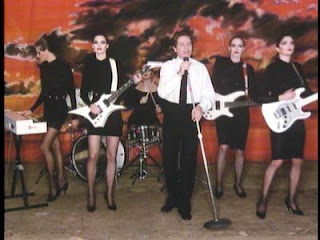
Wasn't there a HUGE shape making debate a while back LOL Anyay.....yes, as everyone has said.....the human shapes you see for sale are all made with the sliders. That is the ONLY way to create a male or female shape in SL. But, like any art form.....some are better at it then others. For me, I love it. It's very much like sculpture and tho the sliders might seem simplistic at first....there's really quite a bit you can do to make your look unique. One thing I would recommend..... Find a 'skin' you really like first....and then develope your shape with the sliders, once you are wearing it. The way the skins are painted can make a profound difference on a shape....especially the face! Often times....at a glance.....all avatars seem to look like clones..... Sort of like the girls in this old Robert Palmer video.... http://4.bp.blogspot.com/_ZM36Ri7YCnI/SbQfTvnPV2I/AAAAAAAABD0/oFEwa-J6Kbg/s320/Addicted+to+love+girls.jpg But.....all those girls have very different and distinct features.....throw the same makeup job on them and they resemble each other......this is what happens in SL....But.....just like IRL.....some faces are going to look really terrible with certain makeup jobs. That's why I say, get the skin you like first.....morph your face to suit it. It will take practice......I remember when I first got started, playing with the head and face sliders drove me batty.....Then, the artist in me finally took over and I started looking at real faces and paying close attention to the effects each slider had......now I do custom work all the time and am constantly creating new avatars to look like people....some just folks I know....others, celebs or models. But it's a really fun challenge. The other thing that needs to be pointed out too......is while I understand where everyone gets this perception of balance and symetry .... the real human body is anything but! Have you ever taken a good look at the singer Blondie? Her head is way big on her tiny shoulders.....Pat Benatar too, actually. My point is.....you need to decide what appeals to YOU and yeah, you gotta have a good grasp of balance and form....but that doesn't mean some people don't actually have really long arms (my cousin does, to this day she's never had a coat that fits her correctly)....and some women have longer hips (I read Playboy every month.....for all of you who think the human body conforms to some sort of ideal....I beg to differ....if you study it....you'll find we come in an amazing variety of shapes) Anyway.....don't spend money on a shape!!! LOL If you want a nice starter to mess with .... I'll throw a few your way.....I have a closet full that I've created and I only do it for fun~! |
|
Dana Hickman
Leather & Lace™

Join date: 10 Oct 2006
Posts: 1,515
|
04-23-2009 20:37
Just play with it and have fun. Ok, I know that's not what you meant, but LMAO  |
|
Clarissa Lowell
Gone. G'bye.

Join date: 10 Apr 2006
Posts: 3,020
|
04-23-2009 21:57
Tee hee, Dana.
I love making shapes too. It's like clay without the mess. Sometimes I've pounded down the head and started over, so to speak. Just like play-doh. Saddle bags can add some very subtle curves; so can a bit of belly. It's all in finding the right combination - problem is there are only about five million or so. ;p (I'm guessing) I keep offering and no one takes me up on it so far - but at least in female shapes - if anyone wants something they can't find out there, let me know, I will give it a try. I haven't (seriously) tried male shapes yet. I haven't seen a way to get around the moobs issue yet. And the faces are not nearly as easy for me, but then I always drew women too rather than men, when I sketched. I dunno why. But then my art teacher used to say "a curved line is much prettier than a straight one." _____________________
|
|
Tabliopa Underwood
Registered User
Join date: 6 Aug 2007
Posts: 719
|
04-24-2009 01:29
Some of the labels really dont help when you're first start working with shapes. The icky labels, like Saddlebags !!! I havent got those. 0. Fat !!! Dont think so !!! 0. Belly arg !!! 0. Thickness !!! are you suggesting Im fat. 0. And so on.
Result, a severely undernourished 3 metre tall stick creature avatar with an over-sized bosom no matter what you do with all the other sliders. I found the icky ones turned out to be my friend when it comes to shaping form. They add subtle curves and rounding in all the right places. And with faces, like everyone else already said. Start with the skin. Tiny little changes in the head and facial sliders can make even the plainest skin look really good. And tweaked in the opposite direction can make even the expensive skin look like its still recovering from the night out before =) |