|
FlamingStar Ceriano
Registered User

Join date: 27 Sep 2008
Posts: 61
|
02-05-2009 00:58
How do I find my IM chat history in Windows XP?
|
|
Georg Stonewall
Husband of Nikki

Join date: 21 Jan 2007
Posts: 211
|
02-05-2009 01:10
Have a look in the preferences Menue. In the tab Communication you find below the path.
Default is something like (I have only the german version, so i dont remember really)
C:\Document and Settings\your Username\Programs\SecondLife
_____________________
G&N Quality Design SLURL  Blog  Flickr  XStreetSL 
|
|
Cinders Vale
Registered User
Join date: 2 Dec 2006
Posts: 272
|
02-05-2009 01:26
Do you mean how to see your chat history in-world? I am not sure what you are asking here?
|
|
FlamingStar Ceriano
Registered User
Join date: 27 Sep 2008
Posts: 61
|
02-05-2009 01:27
I would like to know how to find my chat history on my computer when not inworld.
|
|
Kelderek Kilda
Registered User
Join date: 22 Jun 2008
Posts: 53
|
02-05-2009 01:46
The place to find it in Windows XP is:
C:\Documents and Settings\[your user name]\Application Data\SecondLife\[avatar]
However, you need to turn IM logging on in the preferences in SecondLife first, it's off by default.
|
|
FlamingStar Ceriano
Registered User
Join date: 27 Sep 2008
Posts: 61
|
02-05-2009 08:28
OK I have it set up to save to my hard drive but now need someone to tell me just where I type all of that in at XP.
|
|
Ceka Cianci
SuperPremiumExcaliburAcc#

Join date: 31 Jul 2006
Posts: 4,489
|
02-05-2009 08:31
From: FlamingStar Ceriano OK I have it set up to save to my hard drive but now need someone to tell me just where I type all of that in at XP. just do this..go to my documents and in that bar where is will say like C:mydocuments just paste in. C:\Documents and Settings\[your user name]\Application Data\SecondLife\[avatar] and it will take you right there |
|
Ghosty Kips
Elora's Llama

Join date: 2 May 2008
Posts: 2,386
|
02-05-2009 09:55
From: Ceka Cianci just do this..go to my documents and in that bar where is will say like C:mydocuments just paste in.
C:\Documents and Settings\[your user name]\Application Data\SecondLife\[avatar]
and it will take you right there Now, after youve gotten there, shrink your explorer window a little, then drag the icon to your desktop so you don't have to go through all that again: 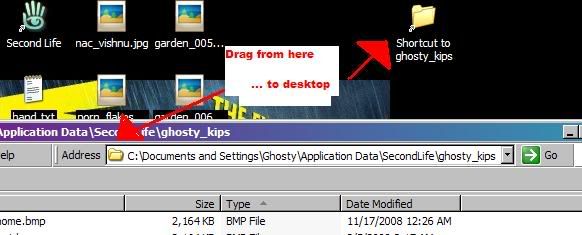
_____________________
--
Why aren't you doing something more useful, like playing WoW?
|

