Can we modify our interface?
I went here:
D:\SecondLifeReleaseCandidate\skins\xui\en-us
In this folder resides many XML files that look like they define the interface. What I would like to do is change the width of the "floater_inventory_item_properties" dialog. I assume this is the dialog that you see when you right click and item and choose Edit. This ui element is only 270 pixels wide so if something has a long name its difficult to read it all (you have to place your cursor in the field and go right).
*I assumei would have to change the width of the form as well as the width of the individual "name" control.
No matter what I change on this XML document the changes dont seem to reflect ingame.
Is what I would like to do possible? Am I doing it incorrectly?
Welcome to the Second Life Forums Archive
These forums are CLOSED. Please visit the new forums HERE
Modify the SL User Interface via the XML Skins |
|
|
Kipp Kaul
Can I get bacon on that?
Join date: 8 May 2008
Posts: 5
|
05-08-2008 19:31
|
|
SuezanneC Baskerville
Forums Rock!

Join date: 22 Dec 2003
Posts: 14,229
|
05-08-2008 21:29
I think the file you mentioned is the dialog box that appears when you right click an object in inventory and select Properties. That dialog is titled Inventory Item Properties.
If you mean the one with the General, Object, Features, Texture, and Content tabs, then I think you want floater_tools.xml. There's a value name can_resize in floater_tools.xml . Change the value from false to true and you will be able to make the Tools dialog wider. You can do Advanced, XUI, Edit UI, and you a box that lets you edit particular parts of the interface. Click in the fields that display Object Name and Object Description, and you can use the Edit User Interface dialog box to make those fields wider. You can do Advanced, XUI, Show XUI Names and you will get an annoying but informative popup with info on what files interface elements come from or then name of the name of the particular element your cursor is on. The file floater_tools.xml has a section with: <line_editor bevel_style="in" border_style="line" border_thickness="1" bottom="-26" follows="left|top|right" font="SansSerifSmall" height="16" left="88" max_length="63" mouse_opaque="true" name="Object Name" select_all_on_focus_received="true" width="260" /> <text bg_visible="false" border_drop_shadow_visible="false" border_visible="false" bottom="-40" drop_shadow_visible="true" follows="left|top" font="SansSerifSmall" h_pad="0" halign="left" height="10" left="10" mouse_opaque="true" name="Description:" v_pad="0" width="78"> Description: </text> <line_editor bevel_style="in" border_style="line" border_thickness="1" bottom="-46" follows="left|top|right" font="SansSerifSmall" height="16" left="88" max_length="127" mouse_opaque="true" name="Object Description" select_all_on_focus_received="true" width="260" /> My example shows a width of 260 because I widened the fields, I think they were 127 to start with. Here's my extra wide tools dialog (what I call the edit box at times) with extra wide object name and description fields: 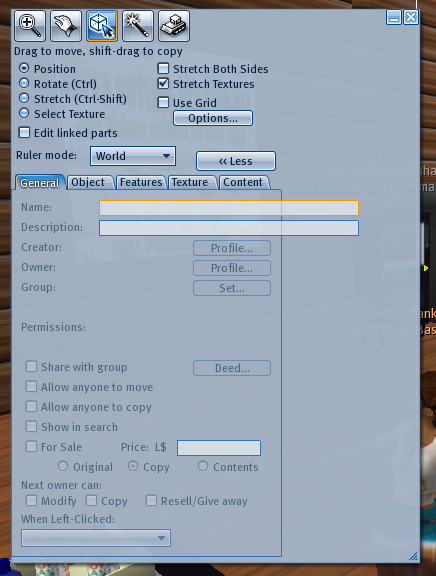 Good Luck, I'm sure I'll end up reinstalling the program now. _____________________
-
So long to these forums, the vBulletin forums that used to be at forums.secondlife.com. I will miss them. I can be found on the web by searching for "SuezanneC Baskerville", or go to http://www.google.com/profiles/suezanne - http://lindenlab.tribe.net/ created on 11/19/03. Members: Ben, Catherine, Colin, Cory, Dan, Doug, Jim, Philip, Phoenix, Richard, Robin, and Ryan - |
|
Johnnie Carling
Registered User
Join date: 17 Aug 2007
Posts: 174
|
05-09-2008 00:10
Here you go.
http://wiki.secondlife.com/wiki/Skinning_HowTo/Basics and some current skins http://wiki.secondlife.com/wiki/Viewer_Skins/Retro http://wiki.secondlife.com/wiki/Viewer_Skins/Dark_Skin http://wiki.secondlife.com/wiki/Viewer_Skins/Classic_Look http://wiki.secondlife.com/wiki/Viewer_Skins/Dazzle_Glass and some more info http://wiki.secondlife.com/wiki/Skinning_HowTo/Revert_1.20_to_a_Classic_look http://wiki.secondlife.com/wiki/Skinning_HowTo/Increase_the_transparency_of_unfocused_Chat_windows And we can not forget the roadmap http://wiki.secondlife.com/wiki/Skinning |
|
Kipp Kaul
Can I get bacon on that?
Join date: 8 May 2008
Posts: 5
|
05-09-2008 01:40
I think the file you mentioned is the dialog box that appears when you right click an object in inventory and select Properties. That dialog is titled Inventory Item Properties. If you mean the one with the General, Object, Features, Texture, and Content tabs, then I think you want floater_tools.xml. There's a value name can_resize in floater_tools.xml . Change the value from false to true and you will be able to make the Tools dialog wider. You can do Advanced, XUI, Edit UI, and you a box that lets you edit particular parts of the interface. Click in the fields that display Object Name and Object Description, and you can use the Edit User Interface dialog box to make those fields wider. You can do Advanced, XUI, Show XUI Names and you will get an annoying but informative popup with info on what files interface elements come from or then name of the name of the particular element your cursor is on. The file floater_tools.xml has a section with: My example shows a width of 260 because I widened the fields, I think they were 127 to start with. Here's my extra wide tools dialog (what I call the edit box at times) with extra wide object name and description fields: Good Luck, I'm sure I'll end up reinstalling the program now. Worked great, thanks! |