Last week I enjoyed my first seemingly bug-free weekend in SL. Everthing was working almost as well as when I joined over a year ago. Then I did the required update. Now I crash after 2 minutes in-world. I keep getting message:
"SmartHeap Library"
Please free some memory then try again.
I've neer gotten this warning before and can log in to other games with no prblem.
I defragged twice (which took hours) and show 40 per cent free space.
Windows XP
AMS Athlon XP 3000+
2.17GHz, 384 MB of RAM (with 40% free space on system)
Can't find graphics card info, but it's newer NvIdia
Is this the end of my second life> Help!
Welcome to the Second Life Forums Archive
These forums are CLOSED. Please visit the new forums HERE
Help - SL terminal after update! |
|
|
Jax Huskerdu
Registered User

Join date: 28 Jun 2006
Posts: 250
|
03-02-2008 06:29
_____________________
omigodileftthebabyonthebus!
|
|
3Ring Binder
always smile

Join date: 8 Mar 2007
Posts: 15,028
|
03-02-2008 06:50
i don't think it's actually "required".
can you go back to the old version you were using before? _____________________
it was fun while it lasted.
http://2lf.informe.com/ |
|
Jax Huskerdu
Registered User
Join date: 28 Jun 2006
Posts: 250
|
03-02-2008 07:36
Thanks 3Ring,
still dumping! I've been trying to retexture a shoe for two days. Everytime I try to pull upp inventory it dumps. Is there a new cache sytem. It shows up at 0 items and has to rebuild everytime. I tried clearing cache and it's doing the same thing. I've gotten up to 10,000 items, but it dumps then and my texture still isn't up. Any other ideas? _____________________
omigodileftthebabyonthebus!
|
|
Ray Musketeer
Registered User
Join date: 22 Oct 2005
Posts: 418
|
03-02-2008 07:44
you might want to update your video card. go to control panel to maintanance & performanc e > comuter management on the left side choose device manager on the right after device manager is open click the "+" beside display get the exact video card data you have there. then go to the site for display drivers (can be found at secondlife.com support page (downloads ) update display drivers. You can also try to overclock your card (adds virtual ram used from cache space) To do that click start right click computer go to properties>advanced>under performance options advanced >virtual memory not sure how much you can jack it might want to read up a little on that first, your ram is rather slieght not prohibitive but would be good to add some ram (512 or above preferable). Ohter things to do clear all caches (network) in Preferences before each log in also clear the cookies and temp internet files. I will also repair my internet connection between log ins. Makes sure to have most recent Direct x, if using sound blaster update those drivers as well, use the lastest quicktime. Also use a registry cleaner there are a few free ones just be sure to make a back up first in case, Hope this helps
|
|
SuezanneC Baskerville
Forums Rock!

Join date: 22 Dec 2003
Posts: 14,229
|
03-02-2008 10:17
Have you tried reinstalling the version you were using succesfully?
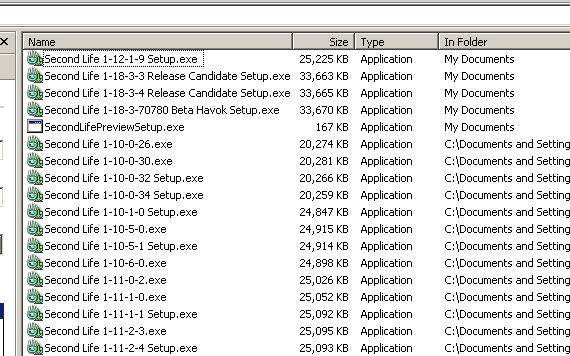
Unless you deliberately deleted the installation file you used to install the version you had that was working, the installation file is probably still on you computer. Almost all my old Second Life installation files are still on my computer. You can generally find the installation files by doing a search in C: for Secondlife*.exe . You should most likely see some files in the results with names that look like the ones at his link: http://i198.photobucket.com/albums/aa245/SuezanneC-Baskerville/Second%20Life/SecondLife-SecondLIfeinstallationfi.png If you don't still have the old installation file, you can probably reacquire it from the SL download page. The url for the current regular Second Life client is http://download-secondlife-com.s3.amazonaws.com/Second_Life_1-19-0-5_Setup.exe Adjust the numbers in that url to fit the version number that you want and that often works. As an example, I just changed the numbers in that url to match what my memory said was a version you might be wanting: http://download-secondlife-com.s3.amazonaws.com/Second_Life_1-18-5-3_Setup.exe That version of SL is still available. ---- That heap error concerns RAM, not hard drive space, so no need to worry about doing stuff to your hard drive when you see a heap error. _____________________
-
So long to these forums, the vBulletin forums that used to be at forums.secondlife.com. I will miss them. I can be found on the web by searching for "SuezanneC Baskerville", or go to http://www.google.com/profiles/suezanne - http://lindenlab.tribe.net/ created on 11/19/03. Members: Ben, Catherine, Colin, Cory, Dan, Doug, Jim, Philip, Phoenix, Richard, Robin, and Ryan - |