I posted this elsewhere, i think it was an improper location for the question so.......
I'm not a furniture maker myself, but I'd recently discovered something in a sculpty sandbox and thought wow this could really be a bit step forward in the furniture department. It was only a demo program and only usable in the sandbox i was using. It was a tool that basically let you link multiple prims to turn them into 1 prim using a bit of an interface system that I think i got the gist of fairly quickly. It basically seemed to take whatever prims fit into a 10 foot cube, as long as all had a face touching another prim. We all know prim counts on land can be precious. I'm wondering why I'm not seeing more of this in world, like in long time furniture makers upgrading their products to this manner of design.
Is there a downside?
Welcome to the Second Life Forums Archive
These forums are CLOSED. Please visit the new forums HERE
sculpted furniture, is there a downside? |
|
|
Galen Lewsey
Registered User
Join date: 22 Sep 2007
Posts: 24
|
09-16-2009 12:08
|
|
Inbred Texan
Registered User
Join date: 5 Feb 2009
Posts: 88
|
09-16-2009 12:15
The only problem I have with some sculpty furniture is the bounding box to them.
A lot don't have a bounding box issue in this day and age but some people are still making old style sculpts I guess. An invisible bounding box is the invisible part of the box that doesn't seem to be used but you can bump into it. For instance you have a couch that seems is about 2 meters high and 4 meters wide but it seems to cover an invisible 10x10 meter area. There is a way around it by making your objects phantom. The only problem with that is people can walk through all your furniture or you need to add another hidden prim without linking it so it "seems" solid again. I am not aware of the program you are mentioning but if they don't have a large bounding box issue when completed then it sounds alright. |
|
Cheree Bury
ChereeMotion Owner
Join date: 6 Jun 2007
Posts: 666
|
09-16-2009 12:37
The downsides are rez time, Level-Of-Detail, and textures.
A sculpty rezzes slower than standard prims, usually looking first like a grey ball until its sculpty map gets downloaded. Level-Of-Detail (LOD) causes sculpties to lose more and more details depending on the distance it is from your camera. Good sculpty makers know this and try to deal with it the best they can. However, the more details they put into one sculpty, the harder it is to overcome. This is why you will see things like chair legs folding in on themselves as you back away from them. There is a debug setting you can change to overcome this problem, but most people who do not make sculpties do not know about it. Also, from a sculpty maker's point of view, sculpties are exponentially harder to texture than standard prims. All that detail you combine into one sculpty must now be textured into one texture. That means that every sculpty must have a custom texture made for it. I have plans to open a low-prim furniture store someday. I already have many items ready but am waiting for the Zindra buzz to die down and land prices to stabilize. After reading about Stroker's lawsuit this morning, I'm not even sure I will ever open the store. Only time will tell. _____________________
Visit ChereeMotion - Life's Best Pinup Poses
http://slurl.com/secondlife/Wild%20Rice/38/230/51 |
|
Cheree Bury
ChereeMotion Owner
Join date: 6 Jun 2007
Posts: 666
|
09-16-2009 12:40
The only problem I have with some sculpty furniture is the bounding box to them. A lot don't have a bounding box issue in this day and age but some people are still making old style sculpts I guess. An invisible bounding box is the invisible part of the box that doesn't seem to be used but you can bump into it. For instance you have a couch that seems is about 2 meters high and 4 meters wide but it seems to cover an invisible 10x10 meter area. There is a way around it by making your objects phantom. The only problem with that is people can walk through all your furniture or you need to add another hidden prim without linking it so it "seems" solid again. I am not aware of the program you are mentioning but if they don't have a large bounding box issue when completed then it sounds alright. My sculpties do not have this problem, so I did not add it to my list, but you are right, lots of sculpties have this bounding box problem. _____________________
Visit ChereeMotion - Life's Best Pinup Poses
http://slurl.com/secondlife/Wild%20Rice/38/230/51 |
|
Czari Zenovka
I've Had it With "PC"!
Join date: 3 May 2007
Posts: 3,688
|
09-16-2009 12:47
I personally still prefer prim furniture for the above reasons. I am also not fond of sculptie shoes. On my viewer all sculpties look like big round blobs until they rez in, which takes quite awhile and I'm not going to purchase higher end computer equipment just to see sculpties rez in faster.
*waves to Cheree* _____________________
*Czari's Attic* ~ Relive the fun of exploring an attic for hidden treasures!
http://slurl.com/secondlife/Rakhiot/82/99/111 During times of universal deceit, telling the truth becomes a revolutionary act.- George Orwell |
|
Cheree Bury
ChereeMotion Owner
Join date: 6 Jun 2007
Posts: 666
|
09-16-2009 12:52
I personally still prefer prim furniture for the above reasons. I am also not fond of sculptie shoes. On my viewer all sculpties look like big round blobs until they rez in, which takes quite awhile and I'm not going to purchase higher end computer equipment just to see sculpties rez in faster. *waves to Cheree* *waves back* But those big grey spheres covering your feet are so becoming.  _____________________
Visit ChereeMotion - Life's Best Pinup Poses
http://slurl.com/secondlife/Wild%20Rice/38/230/51 |
|
Alisha Matova
Too Old; Do Not Want!
Join date: 8 Mar 2007
Posts: 583
|
09-16-2009 12:59
My sculpties do not have this problem, so I did not add it to my list, but you are right, lots of sculpties have this bounding box problem. That is because... You are a sculptie Goddess!!  Awesomeness example! 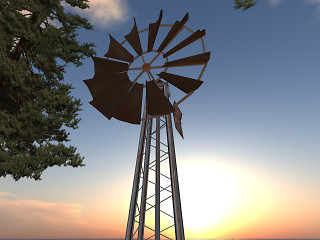 |
|
Cheree Bury
ChereeMotion Owner
Join date: 6 Jun 2007
Posts: 666
|
09-16-2009 13:14
That is because... You are a sculptie Goddess!! Awesomeness example! Awww, thank you. And I hadn't seen that picture of our 3-prim windmill. _____________________
Visit ChereeMotion - Life's Best Pinup Poses
http://slurl.com/secondlife/Wild%20Rice/38/230/51 |
|
Galen Lewsey
Registered User
Join date: 22 Sep 2007
Posts: 24
|
09-16-2009 13:14
thanks for the input everyone
I definitely understood that there had to be a downside to this, just wanted some more experienced builders to put their 2 cents in here. I did figure out the debug fix, a store i found that does offer single prim furniture items has a sign describing the work around. I can definitely understand the texture issue, yeah sounds like a major pain to deal with. I found a pretty decent sofa and chair each single prim, but yeah the selection as yet is pretty bleak. I'm just hoping a few designers will maybe delve into this medium a bit to help the prim counters. |
|
Kelli May
karmakanic

Join date: 7 Oct 2006
Posts: 1,135
|
09-16-2009 16:18
Is the 'debug fix' mentioned useful only to sculptie makers, or to everyone else? It's not something I've heard of before now, and if it's useful to me as a sculptie wearer/viewer then info please?
_____________________
Do worried sheep have nervous ticks?
Karmakanix@Sin-Labs http://slurl.com/secondlife/Circe/170/197/504 Karmakanix on SLX http://www.slexchange.com/modules.php?name=Marketplace&MerchantID=61062 |
|
Galen Lewsey
Registered User
Join date: 22 Sep 2007
Posts: 24
|
09-16-2009 16:25
i saw this in a furniture store, and it worked for me
To see sculpted prims properly do this: 1) Bring up advanced menu tab, Ctrl +Alt+D 2)Select Debug Settings, near the bottom 3) in the blank type or copy, RenderVolumeLODFactor 4) in the box below, set the number setting this to 4 should show most every sculpted prim in world correctly. |
|
Kornscope Komachi
Transitional human

Join date: 30 Aug 2006
Posts: 1,041
|
09-16-2009 17:18
The bounding box issue has been solved in OpenSim for some time now. With stairs, Avatar can walk AND stand on each tread, sculpts do not have to be phantom.
I'm still waiting for the "creators" of sculpts do make it so. [mindbogling] _____________________
SCOPE Homes, Bangu
----------------------------------------------------------------- |
|
Dana Hickman
Leather & Lace™

Join date: 10 Oct 2006
Posts: 1,515
|
09-16-2009 17:20
It was a tool that basically let you link multiple prims to turn them into 1 prim using a bit of an interface system that I think i got the gist of fairly quickly. It basically seemed to take whatever prims fit into a 10 foot cube, as long as all had a face touching another prim. Sounds an aweful lot like the world volume "intersect" and "deintersect" functions of UnrealEd, the building tool for the Unreal engine. They function as an "add sum of objects" to make a single object or selection (in negative space), or a "remove sum of objects" to make a single hollowed out area in something with volume (in positive space). The difference here being that Unreal has true mesh support and supports mesh import/export, while currently SL only has sculpties which are not that advanced or flexible. _____________________
~Friendship is like peeing your pants... ~
~Everyone can see it, but only you can feel its true warmth~ |
|
Shambolic Walkenberg
Registered User
Join date: 24 May 2008
Posts: 152
|
09-16-2009 17:59
T Also, from a sculpty maker's point of view, sculpties are exponentially harder to texture than standard prims. All that detail you combine into one sculpty must now be textured into one texture. That means that every sculpty must have a custom texture made for it. I suspect the OP is talking about Sculptie O Matic - Which means unless the creator of that tool (Contagious Republic I think) has finally made the "Texture O Matic", texturing to any real level is pretty much impossible. I know there are plans for a texturing tool that will change the situation, but I don't know if it's been finished yet. I've used S-O-M for a few things, and it's brilliant for what it is. But the things I've made that I'm anything like happy about (in terms of finished, textured product) have been structures (a portcullis and a cage). By lots of faffing I've been able to make them solid instead of phantom, and the portcullis is on a 15m mega which removes a lot of the issues with it breaking up or going ball like from a distance. Metal bars (which is what in effect my items are) are pretty easy to texture half decently, but if I was trying to make furniture I'd want a lot more control over the texture than is available at present. I do think as soon as (and this is meant to be a when rather than if from conversations I've had) texturing properly is possible, this tool will be beyond priceless for those of us who want prim saving, nice looking sculpties, but who find the likes of Blender a black art that involves soul selling and goat blood to get working. |
|
Marcel Flatley
Sampireun Design

Join date: 29 Jul 2007
Posts: 2,032
|
09-17-2009 02:07
i saw this in a furniture store, and it worked for me To see sculpted prims properly do this: 1) Bring up advanced menu tab, Ctrl +Alt+D 2)Select Debug Settings, near the bottom 3) in the blank type or copy, RenderVolumeLODFactor 4) in the box below, set the number setting this to 4 should show most every sculpted prim in world correctly. Could have been my store This setting really makes a lot of difference!Mostly I use sculpted work of others (full permission packs), which I combine, script, texture, to make unique products. And I do choose my sculpts very well, as there is much diversity in quality. But in the end, furniture based on sculpts can look way better then prim furniture, and of course it is very low in prims. At the moment I am learning how to create sculpties myself, with an in-world tool. And I read a lot about how things actually work, so I can make good products. And as soon as you know how sculpties work, you also know that a tool that makes a sculpt out of a handful of prims slapped together, can never make a good sculpt. No matter how bright it was made. Though I am amazed that it actually does work (I investigated a few sculpt tools), the level of optimization is simply too low. After getting to know a tool, whether it is an in-world tool or an external one like Blender, everybody can learn to create sculpts. But a sculpt in Blender is not a sculpt in Second Life. Optimizing the LOD, and optimizing the loading time, are two important factors. On my sim I have >1000 plants that use the same sculptmap, which rezzes fast. Plus 1/4 sim worth of furniture, which also rezzes quite fast. Because the sculpts are good. And lately I visited a few places that also used many sculpts. At one place everything rezzed very fast, while the sculpts were simply amazing. One talented creator. And all this happened on a homestead sim (two actually). The other place was packed with sculpts, and had used 5000 of the available 15000 prims (estate sim). As if I was landing in a bowl of soup... after 10 minutes hardly half of the stuff had taken its shape, and I barely could move. So there is quite a difference to be experienced. Sculpts are the future for furniture (and other products), but creators need to be aware of the limits. _____________________
New in town: Floating furniture!
http://www.sampireundesign.com http://www.slurl.com/secondlife/Gaori/44/66/603/  |
|
Qie Niangao
Coin-operated

Join date: 24 May 2006
Posts: 7,138
|
09-17-2009 02:48
[...]On my sim I have >1000 plants that use the same sculptmap, which rezzes fast. Plus 1/4 sim worth of furniture, which also rezzes quite fast. Because the sculpts are good. [...] As far as I know, the only way to make sculpties consistently rez quickly is to use very few different scultpmaps, along with surface textures that are strictly limited in size and number across the entire scene. Is there some other trick to make them download quickly by making them "good"? (Or... could it be that some graphics cards are actually slow at *rendering* sculpties, not just at downloading the sculptmaps? I never noticed that, but then some sculptmaps might be better or worse for those cards, I guess.) _____________________
Archived for Your Protection
|
|
Marcel Flatley
Sampireun Design
Join date: 29 Jul 2007
Posts: 2,032
|
09-17-2009 04:53
I don't understand this, or maybe I don't understand "good" in this context. Sculptmaps can differ in a lot of ways, but I'm not sure what could make them download more quickly. I guess on some machines, this would mean never using oblong sculptmaps. Or perhaps "rezzes quite fast" just means that the lowest LOD is still recognizable, so it doesn't have to rez all the way to look sort of like its final shape? As far as I know, the only way to make sculpties consistently rez quickly is to use very few different scultpmaps, along with surface textures that are strictly limited in size and number across the entire scene. Is there some other trick to make them download quickly by making them "good"? (Or... could it be that some graphics cards are actually slow at *rendering* sculpties, not just at downloading the sculptmaps? I never noticed that, but then some sculptmaps might be better or worse for those cards, I guess.) My technical knowledge does not go far enough to answer this Qie, I do read as much as possible about sculpts but I am still learning. Yet I have seen with my own (virtual?) eyes the difference between for example 2 plant shapes (3 planes that cross). The best optimized one rezzed much faster then the less optimized one. What I do know is that there are many different ways to create the same shape, and probably some ways result in meshes that are faster to rez then others, but I do not know if that is the case. Experienced sculpters might be able to clarify on that part. Using many of the same sculptmap indeed works like a charm, I experience that with my plants. Many textures, but only 1 sculptmap. And with furniture, it is often smarter to try and resize/rotate a sculpt already used, then create a couch out of a few different maps. And often the result is the same anyway (except for loading time!) _____________________
New in town: Floating furniture!
http://www.sampireundesign.com http://www.slurl.com/secondlife/Gaori/44/66/603/ |