Default Camera Position?
|
|
Klunitz Aeon
Goon For Hire
Join date: 10 Dec 2007
Posts: 99
|
06-19-2009 09:49
Okay, 404 errors are now fixed. Now I have a question that I can finally submit! Question: Is there a viewer that allows you to change, and lock, the default camera position? I could have sworn I read it somewhere, and I'm almost positive I even downloaded and used it once. Either that, or I dreamt the whole thing. I've googled and tried searching the forums. Apparently I'm not good at either one. Thanks!  |
|
Klunitz Aeon
Goon For Hire
Join date: 10 Dec 2007
Posts: 99
|
06-19-2009 11:07
Well ... I found some camera lock thing. Bought it ... and ... no, not what I want.
Anybody have any ideas or suggestions?
|
|
Qie Niangao
Coin-operated

Join date: 24 May 2006
Posts: 7,138
|
06-19-2009 11:55
May need some more info about what you're trying to do. You can certainly change the offset of the cam from your avatar (it defaults to some ways above and behind, but I'd have to check some scripts to figure out exactly how much). Or you can fix the cam to an absolute location in space and then walk around with it tracking you. So I'm not sure which of these you're after.
Torley has accumulated some of the cam control scripts... I imagine they're still on his island somewhere.
|
|
Klunitz Aeon
Goon For Hire
Join date: 10 Dec 2007
Posts: 99
|
06-19-2009 12:17
Okay, this is what I'm looking for. I want to change the default position of the camera. It's normally behind the head and up a bit, yeah, but what I want is for it to be more centered toward my midsection and closer in. I played with the debug settings and got this: 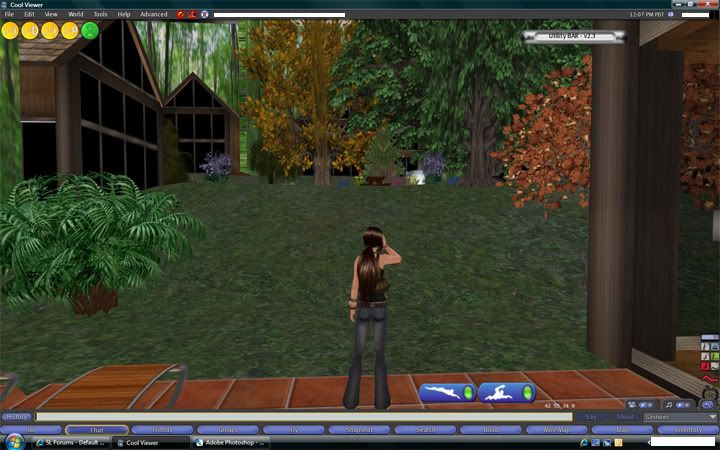 But, what I want is something more like this: 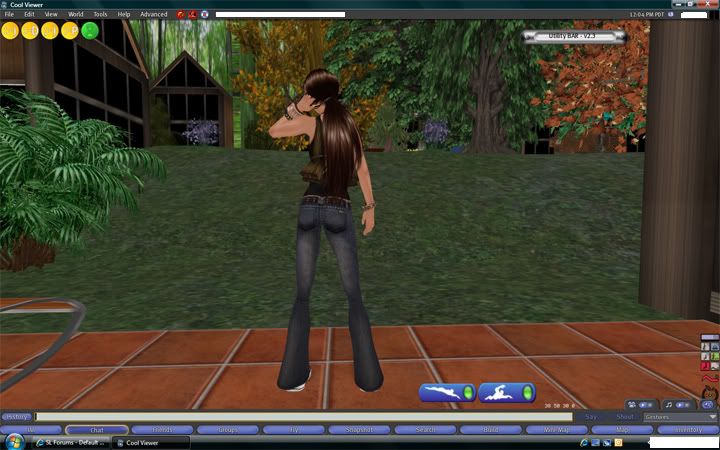 Does that clear it up any? I thought there was a viewer that allowed you to set the camera position in Prefs, but I don't really remember. It's the default camera ... the one that follows you when you move and what-not. |
|
Klunitz Aeon
Goon For Hire
Join date: 10 Dec 2007
Posts: 99
|
06-19-2009 12:45
Thanks for the info about Torley. I found his sim and checked out the Follow Cam, and it's default camera setting really close to what I was looking for (in script format), only, the camera follows you at a much slower rate than normal, and makes movement a little difficult.
If I have to resort to a script, I will, but I was kind of hoping it could just be a client-side fix.
|
|
Sindy Tsure
Will script for shoes
Join date: 18 Sep 2006
Posts: 4,103
|
06-19-2009 12:50
Not quite an answer but (maybe) interesting trivia: unless an LSL script has taken control of your camera, the sim is actually the one that does your camera positioning - it's not in the viewer..
edit: and, before anybody asks, I believe it was done that way because Havok is pretty decent at stuff like ray tracing, which is needed to correctly position the camera. They could move it to the viewer (and save a bunch of sim-fps on busy regions) but that would mean a decrease in client-fps.
_____________________
Sick of sims locking up every time somebody TPs in? Vote for SVC-3895!!! - Go here: https://jira.secondlife.com/browse/SVC-3895- If you see "if you were logged in.." on the left, click it and log in - Click the "Vote for it" link on the left
|
|
Argent Stonecutter
Emergency Mustelid

Join date: 20 Sep 2005
Posts: 20,263
|
06-19-2009 12:54
That's just about what my Tinycam does (see links in my signature for my stores).
Attach the Tinycam, click the camera icon, it will adjust the default camera to just about the position you seem to want.
|
|
Klunitz Aeon
Goon For Hire
Join date: 10 Dec 2007
Posts: 99
|
06-19-2009 16:42
@ Sindy: Good to know lol. Is it possible that this viewer I had used ran an internal script via the server? Like uh .... how some viewers have radar integrated? Again, it's entirely possible that I'm absolutely wrong, I wish I could remember how the hell I got this idea in my head.
@Argent: Thanks! I hopped over to your store and picked up your TinyCam. While it's very close, it still has that "over-the-shoulder" viewpoint that I'm trying to get rid of. However, it shows promise that I might be able to find something out there that fits my needs!
|
|
Sindy Tsure
Will script for shoes
Join date: 18 Sep 2006
Posts: 4,103
|
06-19-2009 17:02
From: Klunitz Aeon Is it possible that this viewer I had used ran an internal script via the server? Like uh .... how some viewers have radar integrated? Again, it's entirely possible that I'm absolutely wrong, I wish I could remember how the hell I got this idea in my head. Dunno but I sort of doubt it. Unless somebody really, really hated the way sims do camera control, it seems like it would be a whole lot of work for little benefit.
_____________________
Sick of sims locking up every time somebody TPs in? Vote for SVC-3895!!! - Go here: https://jira.secondlife.com/browse/SVC-3895- If you see "if you were logged in.." on the left, click it and log in - Click the "Vote for it" link on the left
|
|
Argent Stonecutter
Emergency Mustelid
Join date: 20 Sep 2005
Posts: 20,263
|
06-19-2009 17:35
From: Klunitz Aeon
@Argent: Thanks! I hopped over to your store and picked up your TinyCam. While it's very close, it still has that "over-the-shoulder" viewpoint that I'm trying to get rid of. However, it shows promise that I might be able to find something out there that fits my needs!
Open up the script in TinyCam and play with the angles. |
|
Klunitz Aeon
Goon For Hire
Join date: 10 Dec 2007
Posts: 99
|
06-19-2009 18:07
Ok, I know nothing about scripts ... however ... I looked it over, played around with some values ... annnnnd ... I got it!!!!!
A neat bonus to this: Since I already changed my default position the best I could with the debug settings, I now have 2 seperate viewpoints! (one with TinyCam and one without) Without is still the same angle, but a zoomed out (and up) version, and with the script, it's zoomed in to exactly where I want it!
Thank you, thank you, thank you!!!!
|
|
Argent Stonecutter
Emergency Mustelid
Join date: 20 Sep 2005
Posts: 20,263
|
06-19-2009 18:25
From: Klunitz Aeon Ok, I know nothing about scripts ... however ... I looked it over, played around with some values ... annnnnd ... I got it!!!!! Good, my devious plan to suck people into scripting is working! |
|
SuezanneC Baskerville
Forums Rock!

Join date: 22 Dec 2003
Posts: 14,229
|
06-19-2009 18:27
The debug settings that govern the camera position and focus position are CameraOffsetDefault and FocusOffsetDefault .
FocusOffsetDefault responds instantly as you adjust it in the Debug Settings.
CameraOffsetDefault annoyingly enough requires you to restart SL in order to see the change.
The X direction is front and back.
The default CameraOffsetDefault X value is -3, which means the camera is by default 3 meters behind your av's pelvis.
The Z direction is up and down. The default CameraOffsetDefault Z position is .75, which means the camera is .75 meters above your av's pelvis.
It seems from your picture you want your CameraOffsetDefault to be perhaps X = -2 and Z = 0 . That's just a guess, lower down than normal and closer to the av than normal.
Once you get CameraOffsetDefault set like you want you can then adjust FocusOffsetDefault as you want.
You'll probably want to adjust the FocusOffsetDefault Z value a bit.
I think you should be able to use a scripted camera control to find what these values should be without having to restart SL, then set the debug variables to the correct values. This would be a lot nicer than having to find the proper CameraOffsetDefault value by trial and error restarting after every change. I don't have such a script at hand.
Once you find the correct values and set them in Debug Settings, you can store them in your profile notes and send them to yourself in email or store them on your hard drive or some such. You'll want them for the times when you have to delete your setttings.xml file or when you use one of the numerous alternate SL viewers.
_____________________
-
So long to these forums, the vBulletin forums that used to be at forums.secondlife.com. I will miss them.
I can be found on the web by searching for "SuezanneC Baskerville", or go to
http://www.google.com/profiles/suezanne
-
http://lindenlab.tribe.net/ created on 11/19/03.
Members: Ben, Catherine, Colin, Cory, Dan, Doug, Jim, Philip, Phoenix, Richard,
Robin, and Ryan
-
|
|
Argent Stonecutter
Emergency Mustelid
Join date: 20 Sep 2005
Posts: 20,263
|
06-19-2009 18:31
The scripted camera settings don't seem to actually correspond to anything settable from the client. When you're using scripted camera controls you're working through a different model completely.  |
|
SuezanneC Baskerville
Forums Rock!
Join date: 22 Dec 2003
Posts: 14,229
|
06-19-2009 18:36
I'm not surprised. I recall being annoyed that the script camera functions don't have the flexibility that the debug settings have for the particular effect I wanted a few years ago.
The CameraOffsetDefault and FocusOffsetDefault debug settings will let you put the camera default in front of your avatar looking at your avatar's front, which I don't think the script camera settings will let you do.
I'll wager there might be some way to map the script variable values to the debug setting variable's value.
_____________________
-
So long to these forums, the vBulletin forums that used to be at forums.secondlife.com. I will miss them.
I can be found on the web by searching for "SuezanneC Baskerville", or go to
http://www.google.com/profiles/suezanne
-
http://lindenlab.tribe.net/ created on 11/19/03.
Members: Ben, Catherine, Colin, Cory, Dan, Doug, Jim, Philip, Phoenix, Richard,
Robin, and Ryan
-
|
|
Klunitz Aeon
Goon For Hire
Join date: 10 Dec 2007
Posts: 99
|
06-19-2009 18:46
From what I've seen of both, they don't seem to carry the same values.
What I was originally changing in the debug settings, was the one that requires the restart. The camera would turn down, but if I tried to get it any lower, it would stay focused on the pelvis and start to look upward at me instead of downward (like default).
For some reason, this is taking forever to type ..... so I give up for now.
|
|
SuezanneC Baskerville
Forums Rock!
Join date: 22 Dec 2003
Posts: 14,229
|
06-19-2009 19:00
I suppose you might be able to use two avatars, put one in mouselook, move the avs till the view from the mouselook av is what you want for the default view of the other alt to be...
Too much work.
Also, If you change CameraOffsetDefault Z's value too low it's trying to go in the ground, which the camera system doesn't like.
I wish our avatars and attachments could all turn translucent so you could see where you are and still the world through yourself. One of the virtual worlds does that, I think maybe Twinity.
_____________________
-
So long to these forums, the vBulletin forums that used to be at forums.secondlife.com. I will miss them.
I can be found on the web by searching for "SuezanneC Baskerville", or go to
http://www.google.com/profiles/suezanne
-
http://lindenlab.tribe.net/ created on 11/19/03.
Members: Ben, Catherine, Colin, Cory, Dan, Doug, Jim, Philip, Phoenix, Richard,
Robin, and Ryan
-
|