Hiya all,
I just bought a new computer and am going to install windows and all that once I get home. What I want to know is.. what kind of framerates should I be expecting with settings on high on all things?
System:
3G Dual core Intel
4G RAM
9800GT
Umm... and other technical stuffies I don't understand but the guy at the store said is good.
Welcome to the Second Life Forums Archive
These forums are CLOSED. Please visit the new forums HERE
New computer.. what should I expect? |
|
|
Katryna Jie
Registered User
Join date: 24 Jun 2007
Posts: 187
|
11-25-2008 23:57
|
|
Wulfric Chevalier
Give me a Fish!!!!
Join date: 22 Dec 2006
Posts: 947
|
11-26-2008 00:05
Those specs are similar to mine, but yours are slightly better (I only have a 9600 card), and I get between 15 and 35 fps in the majority of places, with my settings turned down slightly from ultra.
|
|
Kasuga Hax
Hanja Welcome Area Helper

Join date: 6 Aug 2007
Posts: 284
|
11-26-2008 00:06
3Ghz Dual core? Intel, you should be fine then
 4 GB RAM? more than enough, Windows XP user? remove 2 GB, because XP doesn't see more than 2. 9800GT? nice card, everything on full graphics, high res, full screen, and you should get nice framerates around 40 or so? _____________________
Reality is an illusion, caused due to lack of alcohol.
Als een rommelig bureau een rommelige geest betekent, wat betekent dan een leeg bureau? De kwaliteitsverbeteringsinitiatieven. |
|
Kasuga Hax
Hanja Welcome Area Helper
Join date: 6 Aug 2007
Posts: 284
|
11-26-2008 00:08
Also,
I have an AMD X2 3800+ with 2 GB and an 8800GTS 640 card. I have around 35 fps on 1680 x 1050. Since your system seems a lot faster, you shouldn't be in any trouble. _____________________
Reality is an illusion, caused due to lack of alcohol.
Als een rommelig bureau een rommelige geest betekent, wat betekent dan een leeg bureau? De kwaliteitsverbeteringsinitiatieven. |
|
Katryna Jie
Registered User
Join date: 24 Jun 2007
Posts: 187
|
11-26-2008 00:17
I thought the 2G issue was an issue with Vista, not XP?
I am upgrading from 3G single core, 1G RAM, 6200, btw... so crap to yay! Was hoping to get a GTX260, but they said it's been upgraded and the price is higher than last time I was there and also it has to be ordered. I'm impatient.. what can I say? |
|
Kasuga Hax
Hanja Welcome Area Helper
Join date: 6 Aug 2007
Posts: 284
|
11-26-2008 00:33
No Vista actually is up to 32 GB RAM I know.
XP classic (not XP 64) cannot allocate and use more than 2 GB's of RAM. Which is still enough for SL  _____________________
Reality is an illusion, caused due to lack of alcohol.
Als een rommelig bureau een rommelige geest betekent, wat betekent dan een leeg bureau? De kwaliteitsverbeteringsinitiatieven. |
|
Damanios Thetan
looking in

Join date: 6 Mar 2004
Posts: 992
|
11-26-2008 02:46
3Ghz Dual core? Intel, you should be fine then 4 GB RAM? more than enough, Windows XP user? remove 2 GB, because XP doesn't see more than 2. 9800GT? nice card, everything on full graphics, high res, full screen, and you should get nice framerates around 40 or so? Depending on the memory size of your gfx card XP will see 2.5-3 GB of the 4GB, so 4GB still has some use. Every 32bit MS OS (XP, Vista etc.) can only address 4GB max. Your PC claims a lot of the 'upper memory range' for stuff to communicate with other hardware, mapping those ranges to for instance your graphics card video memory. Sadly this means, with current gfx cards usually a lot of the range above 2GB is taken up already. Windows has some built-in upper memory bounds for this. (With some tricks, they can be moved/reclaimed, but the word on how much effect this has is still out...and it's not without risks) _____________________
 |
|
Chosen Few
Alpha Channel Slave
Join date: 16 Jan 2004
Posts: 7,496
|
11-26-2008 03:38
Kasuga, Katryna, you're both a bit misinformed on the RAM question. Let me clear it up for you.
In addition to what Daminios already explained, here are some more details. By definition, all 32-bit operating systems have a hard limit of 4GB of usable memory. (2^32 addresses = 4GB) That total includes the sum of system RAM, video memory, and any other active device memory. Whether it's XP or Vista makes no difference in this regard. If it's a 32-bit version of either, the limits are exactly the same. Typically, by the time you account for minimal device presence, the maximum system RAM a 32-bit OS will have available to it will be around 3.12GB or so. If you've got beefier devices, though, then your usable system RAM will lessen. For example, say you've got a pair of a 1GB video cards. In that case, your max system RAM will be just 2GB or less, since the first 2GB is going straight to video. There's no way around that 4GB total with 32-bit. 64-bit operating systems, on the other hand, theoretically can utilize up to 16 exabytes of memory. (2^64 addresses = 16 exabytes, or 17.2 billion gigabytes. Yes, that's billion, with a B!) No current commercially available OS actually allows for anywhere near that much yet, though. 64-bit Windows currently has the following version-specific limits: x64 Vista Home Basic: 8GB x64 Vista Home Premium: 16GB x64 Vista Business, Enterprise, and Ultimate: 128GB x64 XP: 128GB Why are Home and Home Premium so low? Ask Microsoft's marketing department. There's no technical reason why they need to be. Don't waste your money on either of those versions. If you go 64-bit, go with Vista Ultimate. All things being equal, 64-bit XP would actually be the best choice for SL, since XP handles OpenGL better than Vista does. But unfortunately, it's never been a practical option since there's always been a huge lack of driver support for it. 64-bit Vista doesn't generally have that problem. Drivers that work with it are abundant. I'm running Vista Ultimate on two machines here, currently, both with 4GB system RAM. I was initially very reluctant to leave XP behind, but after making the switch, I have zero regrets. x64 Vista works really well. |
|
Kasuga Hax
Hanja Welcome Area Helper
Join date: 6 Aug 2007
Posts: 284
|
11-26-2008 05:47
@knowledge,
noted and remembered So to play safe above 2 GB, just go to Vista, or x64 XP _____________________
Reality is an illusion, caused due to lack of alcohol.
Als een rommelig bureau een rommelige geest betekent, wat betekent dan een leeg bureau? De kwaliteitsverbeteringsinitiatieven. |
|
Lindal Kidd
Dances With Noobs

Join date: 26 Jun 2007
Posts: 8,371
|
11-26-2008 07:56
@knowledge, noted and remembered So to play safe above 2 GB, just go to Vista, or x64 XP The Resident Geek says, "yes, but remember that Vista comes in two versions, a 32 bit and a 64 bit version. Use Vista 64 to use large RAM amounts." _____________________
It's still My World and My Imagination! So there.
Lindal Kidd |
|
Distilled1 Rush
written in the Pixles

Join date: 29 Jul 2006
Posts: 504
|
11-26-2008 12:02
@knowledge, noted and remembered So to play safe above 2 GB, just go to Vista, or x64 XP To play the best with a 32bit like XP or Vista 32 use 4MB here if you run 2MB Ramm and have a 512MB GPX card.. you are already down to a Quarter of ramm for the system. from having 2GB and replacing that with 4MB I find all performance all around increase my XP machine.. I agree as well didn't want Vista.. LOVE it on the new laptop.. _____________________
Dell XPS-700 (this is a fantastic case!)
XP media Intel Core2Duo 2.38ghz Nvida 9800GTX+ 512mg 4 G RAM Dell XPS 1530 Red Core 2 duo VISTA and I like it! Nvidia 8600m 512 6 G RAM Compaq amd 3200 XP home POS! Nvidia FX 5200 2 G RAMM White Box XP pro P 4 Nvidia Shared 128k some odd old PCI card 1 G RAM *(STILL RUNS THE 1.21 CLIENT AND LATEST RC! ) |
|
Lee Ponzu
What Would Steve Do?
Join date: 28 Jun 2006
Posts: 1,770
|
UUUmmm....
11-26-2008 12:35
Seems like nobody ever mentions the network in these will this computer be good discussions. YOu can have all the whiz bang stuff you want, but if your network pitiful, then SL will be pitiful.
Also, somewhat counter-intuitively, if you have two equal computers running the same application, except one is a 64-bit OS and the other is a 32-bit OS... The 32-bit OS will be slightly faster. this is because the 64-bit OS keeps all pointers as 64-bits, so they take up twice the bandwidth and register space. The comments about 64-bit OS and 64-bit version of Apps for large memeory are correct. _____________________
So many monkeys, so little Shakespeare.
|
|
Chosen Few
Alpha Channel Slave
Join date: 16 Jan 2004
Posts: 7,496
|
11-26-2008 14:42
here if you run 2MB Ramm and have a 512MB GPX card.. you are already down to a Quarter of ramm for the system. I'm not sure where you're getting that, Distilled1. A 512MB graphics card won't cut into just 2GB of system RAM. You could have well over 3GB, and there'd still be plenty of room for that card. Remember, the total limit is 4GB, not 2. from having 2GB and replacing that with 4MB I find all performance all around increase my XP machine.. Sure, but not because you're now using all 4GB. Take the 4, subtract .5 for your graphics card, maybe a little more for other system devices, and you're using somewhere between 3 and 3.5 GB of system RAM right now. That's at least a 50% increase over the 2 you had before, so of course your system is performing better. Also, if you replaced the existing RAM, rather than just adding onto it, you may well have put faster sticks in than what you had before. Faster memory will naturally perform better than slower memory. |
|
Tod69 Talamasca
The Human Tripod ;)

Join date: 20 Sep 2005
Posts: 4,107
|
11-26-2008 16:42
Ok, I finally have to say this:
If you have Vista, then YES, your system will use your Video RAM. BUT- it will NOT count towards your total system RAM unless you have a small amount to begin with. If you have XP, then NO- your video card RAM does NOT count towards how much RAM you have. The 2 are basically separate. Video RAM is considered GDDR. Graphics Dynamic Data Rate. Video Card Memory. If your system is sucking on this, then all the pretty bells & whistles go bye-bye as your system chugs along trying to show it. Not good. I have 2 GB of RAM and 512MB on my video card. I dont show as having 2.5 GB of RAM: 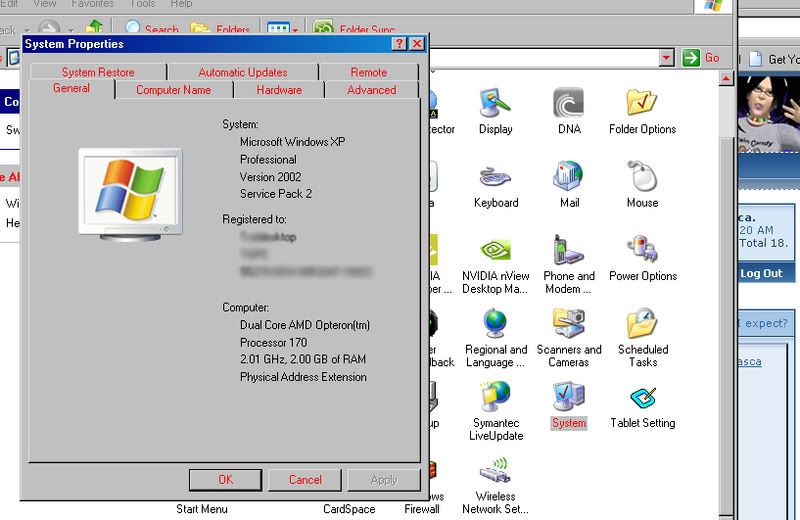 Never have! Every high-end game, every high-end graphics & software package doesnt even register my video card as "part of system RAM". Vista might treat it differently, but I keep seeing people saying it does the same for XP. Well it just doesnt. I've searched every Technical Book, and the internet. I still haven't seen any proof it does. Now, if it's "shared" Memory, then yes it will count. Come to think of it, if it worked that way, then you should be able to yank out the System RAM & run off a video card. Someone try it & let me know if it works.  _____________________
really pissy & mean right now and NOT happy with Life.
|
|
Macphisto Angelus
JAFO

Join date: 21 Oct 2004
Posts: 5,831
|
11-26-2008 16:57
Also XPProSP3 now sees 3.5 of my 4GB Ram.
 _____________________
Second Life: Where being the super important, extra special person you've always been sure you are (at least when you're drunk) can be a reality! I put on my robe and wizard ha... Oh. Nevermind then. |
|
Chosen Few
Alpha Channel Slave
Join date: 16 Jan 2004
Posts: 7,496
|
11-26-2008 18:02
If you have Vista, then YES, your system will use your Video RAM. What do you mean by that? Video RAM is used by the video card, not by the rest of the system. Just because you might or might not be running Vista doesn't change that. BUT- it will NOT count towards your total system RAM unless you have a small amount to begin with. No, it won't count TOWARDS your total system RAM, at least not by the definition of "towards" you seem to be implying. That's not what we've been saying. It's actually the exact opposite. Your video memory (and other device memory) counts AGAINST the maximum amount of system RAM you can have, not towards it. I'll (re)explain. If your OS is 32-bit, then the maximum memory usable by the OS is 4GB. The first chunk of that goes to devices, such as video. So if you've got a 512MB video card, that half-gig gets SUBTRACTED from the 4GB total, leaving you with a maximum possible system RAM of 3.5GB. If you've got a 1GB video card, then your maximum possible system is 3GB. Etc., etc., etc. This is equally true in all 32-bit OS's, whether you're talking XP, Vista, OSX, Linux, or what have you. 32-bit is 32-bit is 32-bit. I'm not sure what you might have meant by "unless you have a small amount to begin with". If you've got a small amount of system RAM, well, you've just got a small amount of system RAM, and that's that. How much video memory you might or might not have won't affect it. It's only when you've got enough system RAM that it, added to device memory, comes out to 4GB or more that one starts to cut into the other. If you have XP, then NO- your video card RAM does NOT count towards how much RAM you have. Yes, it does. Once again, the maximum total RAM you can have in any 32-bit OS is 4GB. That includes the memory being used by all devices, as well as system RAM. Subtract device memory from the 4GB total, and the remainder is the amount of system RAM you can use. The 2 are basically separate. They are "separate" in that they're used by different pieces of hardware, and for different purposes. But that doesn't mean they aren't both counted in the total memory that exists in the machine. Video RAM is considered GDDR. Graphics Dynamic Data Rate. Video Card Memory. Actually, it's graphics DOUBLE data rate, not "dynamic". http://www.acronymfinder.com/Graphics-Double-Data-Rate-(GDDR).html That's not really all that relevant to the discussion, though. We haven't been talking about data transfer speeds at all so far, only about quantities of memory. If your system is sucking on this, then all the pretty bells & whistles go bye-bye as your system chugs along trying to show it. Not good. I'm not sure what you mean by "sucking on this" in this context. Is that a euphemism for not having enough? I have 2 GB of RAM and 512MB on my video card. I dont show as having 2.5 GB of RAM: Nor should you. The amount of RAM shown by the system properties window will always be the amount of usable system RAM available to Windows. It doesn't ever reflect video memory. But the fact still remains that the total amount of memory in your machine includes devices as well as system RAM. The 4GB cap is inclusive of ALL memory in the machine, not just system RAM. Since you've got a 512MB video card, the maximum usable system RAM you could possibly have is 3.5GB. Never have! Every high-end game, every high-end graphics & software package doesnt even register my video card as "part of system RAM". Right, because it's not supposed to. I'm not sure why you seem to think that that's somehow in dispute. Vista might treat it differently, but I keep seeing people saying it does the same for XP. As I said, Vista vs. XP is not the issue. It's 32-bit vs. 64-bit architecture that's relevant here. All 32-bit operating systems, by definition, have a 4GB memory limit. It cannot be otherwise. Two to the thirty second power is 4,294,967,296. In bytes, that's precisely 4GB. If you want more than 4GB at your disposal, you need to go 64-bit. Well it just doesnt. I've searched every Technical Book, and the internet. I still haven't seen any proof it does. What exactly were you searching for? You seem to have interpreted the relevant points in this thread a little backwards, so it's not surprising that you didn't find anything. Come to think of it, if it worked that way, then you should be able to yank out the System RAM & run off a video card. Someone try it & let me know if it works. Again, you're interpreting backwards. No one tried to say video memory and system RAM were interchangeable, or somehow synonymous, or anything like that. The only point was that the memory cap in any operating system includes the sum total of all memory (system plus devices) in the machine. If you're running a 32-bit OS, and you've got devices using 512MB of memory (be that for video or anything else), then your maximum usable system RAM will be 3.5GB. If your devices are using 1GB of memory, then your max system RAM will be 3GB. If it's 2GB for devices, then the max for the system will be 2GB. The max total for everything is always 4GB. |
|
Tod69 Talamasca
The Human Tripod ;)
Join date: 20 Sep 2005
Posts: 4,107
|
11-26-2008 20:50
No, not backwards.
By what I'm reading, people are saying if you have 1 GB on the Video Card & 2 GB RAM in your system, it totals 3 GB. The two are totally separate from each other. 1 GB video RAM is.... 1 GB video RAM. It will never be subtracted from what a system has. 4 GB System + 1 GB Video = 4 GB System &1 GB Video. 32-bit or not. I can't find ANY thing that says otherwise. Still waiting for someone to show me WHERE it says they count against you or get added together. I would be interested in seeing that. _____________________
really pissy & mean right now and NOT happy with Life.
|
|
SuezanneC Baskerville
Forums Rock!

Join date: 22 Dec 2003
Posts: 14,229
|
11-26-2008 21:00
If I understand correctly correctly, some memory can be used in a high speed mode, I think called dual channel mode, but doing so requires that you add it in matched sets. This would have some implications as to just how one should add memory to a system, wouldn't it?
What I'm thinking is that in some cases you might want to buy the 4 gigs, knowing it won't all be used, because you have to in order for the part that will be used to be running in the high speed mode. _____________________
-
So long to these forums, the vBulletin forums that used to be at forums.secondlife.com. I will miss them. I can be found on the web by searching for "SuezanneC Baskerville", or go to http://www.google.com/profiles/suezanne - http://lindenlab.tribe.net/ created on 11/19/03. Members: Ben, Catherine, Colin, Cory, Dan, Doug, Jim, Philip, Phoenix, Richard, Robin, and Ryan - |
|
Tod69 Talamasca
The Human Tripod ;)
Join date: 20 Sep 2005
Posts: 4,107
|
11-26-2008 21:03
The max total for everything is always 4GB. Yes. I do see what you're saying, but it still sounds like you're telling folks it will subtract from their System Memory. hard to explain, I guess. 4 GB RAM on 32-bit XP Pro and 1 GB VRAM on the video card doesnt = 5 GB. That I know. You'll show less than 4 GB just cuz 32-bit cant handle more than that. _____________________
really pissy & mean right now and NOT happy with Life.
|
|
SuezanneC Baskerville
Forums Rock!
Join date: 22 Dec 2003
Posts: 14,229
|
11-26-2008 21:09
Here's some discussion which basically confirms what Chosen said: http://www.dansdata.com/askdan00015.htm .
Here's some info at microsoft: http://msdn.microsoft.com/en-us/library/aa366778.aspx _____________________
-
So long to these forums, the vBulletin forums that used to be at forums.secondlife.com. I will miss them. I can be found on the web by searching for "SuezanneC Baskerville", or go to http://www.google.com/profiles/suezanne - http://lindenlab.tribe.net/ created on 11/19/03. Members: Ben, Catherine, Colin, Cory, Dan, Doug, Jim, Philip, Phoenix, Richard, Robin, and Ryan - |
|
Tod69 Talamasca
The Human Tripod ;)
Join date: 20 Sep 2005
Posts: 4,107
|
11-26-2008 21:09
If I understand correctly correctly, some memory can be used in a high speed mode, I think called dual channel mode, but doing so requires that you add it in matched sets. This would have some implications as to just how one should add memory to a system, wouldn't it? What I'm thinking is that in some cases you might want to buy the 4 gigs, knowing it won't all be used, because you have to in order for the part that will be used to be running in the high speed mode. Sort of. Mostly "matched" means same timing, CAS latency. And Chosen, if you search around, you'll find that Vista DOES accept the Video RAM as part of the System RAM if it needs it. Same as it will with a thumb drive. _____________________
really pissy & mean right now and NOT happy with Life.
|
|
SuezanneC Baskerville
Forums Rock!
Join date: 22 Dec 2003
Posts: 14,229
|
11-26-2008 21:27
Somehow this has lead me to run a Microsoft "Can my system handle Vista" application. I must have gone crazy as a result of reading about Physical Address Extensions.
_____________________
-
So long to these forums, the vBulletin forums that used to be at forums.secondlife.com. I will miss them. I can be found on the web by searching for "SuezanneC Baskerville", or go to http://www.google.com/profiles/suezanne - http://lindenlab.tribe.net/ created on 11/19/03. Members: Ben, Catherine, Colin, Cory, Dan, Doug, Jim, Philip, Phoenix, Richard, Robin, and Ryan - |
|
Void Singer
Int vSelf = Sing(void);

Join date: 24 Sep 2005
Posts: 6,973
|
11-26-2008 21:33
and for fun lets muddy the waters with PAE http://en.wikipedia.org/wiki/Physical_Address_Extension
this increases the addressing space of 32bit systems to 48bits allowing higher memory amounts.... unfortunately not everything plays nice with PAE also seeing as I only skimmed Chosen's post 2, I'll (re?)mention that addressing space is taken for bus mapping as well as video memory mapping.... meaning most 32 bit systems won't see more than ~3.2-3.6gb usable ram depending on a few factors (vid is the biggest these days) _____________________
|
| . "Cat-Like Typing Detected" | . This post may contain errors in logic, spelling, and | . grammar known to the SL populace to cause confusion | | - Please Use PHP tags when posting scripts/code, Thanks. | - Can't See PHP or URL Tags Correctly? Check Out This Link... | - |
|
SuezanneC Baskerville
Forums Rock!
Join date: 22 Dec 2003
Posts: 14,229
|
11-26-2008 21:45
and for fun lets muddy the waters with PAE http://en.wikipedia.org/wiki/Physical_Address_Extension I do seem to recall 8 bit processors using 16 bits of address space way back when, it's been so long it's hard to recall. I remember wanting to arrange your memory use to keep from needing to cross memory page boundaries so you didn't get slowed down by having to switch the base pointer. Something like that. _____________________
-
So long to these forums, the vBulletin forums that used to be at forums.secondlife.com. I will miss them. I can be found on the web by searching for "SuezanneC Baskerville", or go to http://www.google.com/profiles/suezanne - http://lindenlab.tribe.net/ created on 11/19/03. Members: Ben, Catherine, Colin, Cory, Dan, Doug, Jim, Philip, Phoenix, Richard, Robin, and Ryan - |
|
Jesse Barnett
500,000 scoville units

Join date: 21 May 2006
Posts: 4,160
|
11-26-2008 21:54
Here's some discussion which basically confirms what Chosen said: http://www.dansdata.com/askdan00015.htm . There was one problem I spotted with Dan's article. For most of it, he was advocating using 3 gig of ram as follows; 2 ram at 1 gig each and 2 ram at 512 mg each. But he never pointed out that you should make sure and put 1-1/2 in the first 2 slots and the other 1-1/2 in the second pair of slots. If you don't then you end up with 2 gig for one channel and only 1 for the other channel. Finally at the end and due to the low price of DDR2 ram he said not to worry about the lost ram and just install 4 gig anyways. Which is what I have been doing. And setting PAE with boot.ini gives you 64 bit not 48. But it is something you never really wanted to do anyway because then you needed 64 bit drivers for a 32 bit system when even XP 64 bit is sorely lacking in support, plus most if any benefit was lost because you eat into your cpu time. That was news to me that setting PAE was disabled starting with XP service pack 2 though. EDIT: Damn typos! bit drivers NOT but drivers _____________________
I (who is a she not a he) reserve the right to exercise selective comprehension of the OP's question at anytime.
I am still around, just no longer here. See you across the aisle. Hope LL burns in hell for archiving this forum |