Skewed Texture Problem
|
|
Astrid Schwade
pronounced 'Swede'

Join date: 11 Feb 2008
Posts: 107
|
12-20-2008 22:07
Yes yes I know, there's a forum dedicated to texture stuff, but here I know I'll get an answer. I'm currently working on a build with a pitched roof supported by a brick wall. The wall below the pitched roof is formed from two right angle triangle prims. One triangle being an exact copy of the first rotated through 180 degrees and joined at the short side. The hypotenuse being the upper surface supporting the roof. On the first triangular prim the brick texture alignes horizontally with the lower side however when I rotate the second prim I find the texture is aligned with the hypotenuse (see pic below). I've tried adjusting the prim shape and the texture alignment without success. Anyone got any idea how to get horizontal texture alignment on both sides of a triangular prim ? Thanks, Astrid  (Hope all that made sense..) 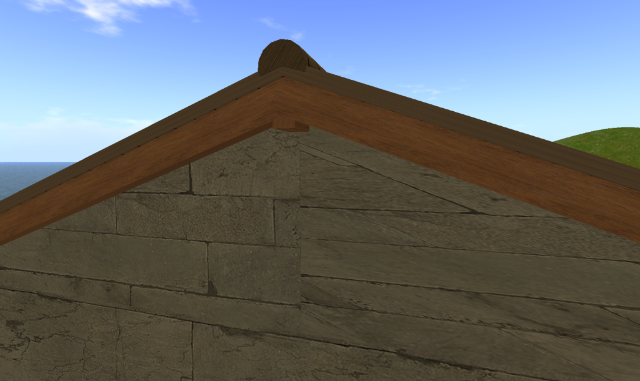 |
|
Kaimi Kyomoon
Kah-EE-mee

Join date: 30 Nov 2006
Posts: 5,664
|
12-20-2008 22:10
Are you applying the texture to each surface separately or to the whole prim at once? I think you might need to do it on surface at a time. And possibly rotate the texture.
_____________________

Kaimi's Normal Wear From: 3Ring Binder i think people are afraid of me or something.
|
|
Rhaorth Antonelli
Registered User
Join date: 15 Apr 2006
Posts: 7,425
|
12-20-2008 22:13
also trying setting it to planar
and you probably would have better luck in the building section of the forums
_____________________
From: someone Morpheus Linden: But then I change avs pretty often too, so often, I look nothing like my avatar.  They are taking away the forums... it could be worse, they could be taking away the forums AND Second Life...
|
|
Osprey Therian
I want capslocklock

Join date: 6 Jul 2004
Posts: 5,049
|
12-21-2008 01:29
Also you could use a tapered cube.
|
|
Chosen Few
Alpha Channel Slave
Join date: 16 Jan 2004
Posts: 7,496
|
12-21-2008 04:58
From: Astrid Schwade Yes yes I know, there's a forum dedicated to texture stuff, but here I know I'll get an answer. What's that supposed to mean, exactly? The Texturing Tips forum is perhaps the best answered forum on this entire site. Several us volunteer considerable time there every single day, answering all sorts of texture-related questions, including ones just like yours, which get asked all the time. Please don't deliberately post in the wrong places, and please don't insult the good folks who freely volunteer their time and expertise. I have to admit, I'm offended by your comment. I'm half tempted not to anwser your question now. But since that's not the kind of person I am, and out of respect for others who might be having similar problems (as I said, this question comes up all the time), I will. The solution is simple. Use planar texture mapping. This is precisely what it's for. The distortion you're experiencing from standard mapping is quite common, and happens in every single 3D modeling environment in the world, not just SL. That's why different types of mappings exist. For more information on planar mapping, how and when to use it, and why it works, see /109/1a/93769/1.html (yes, on the texturing forum).
_____________________
.
Land now available for rent in Indigo. Low rates. Quiet, low-lag mainland sim with good neighbors. IM me in-world if you're interested.
|
|
Rhaorth Antonelli
Registered User
Join date: 15 Apr 2006
Posts: 7,425
|
12-21-2008 10:26
From: Chosen Few The solution is simple. Use planar texture mapping. This is precisely what it's for. The distortion you're experiencing from standard mapping is quite common, and happens in every single 3D modeling environment in the world, not just SL. That's why different types of mappings exist. For more information on planar mapping, how and when to use it, and why it works, see /109/1a/93769/1.html (yes, on the texturing forum). isn't that what I said??? thanks for the link with the more info though, that is very helpful and I agree they should use the proper forums, especially when they know they should...
_____________________
From: someone Morpheus Linden: But then I change avs pretty often too, so often, I look nothing like my avatar. They are taking away the forums... it could be worse, they could be taking away the forums AND Second Life...
|
|
Osprey Therian
I want capslocklock
Join date: 6 Jul 2004
Posts: 5,049
|
12-21-2008 11:41
From: Rhaorth Antonelli isn't that what I said???
Yes, it is. |
|
Qie Niangao
Coin-operated

Join date: 24 May 2006
Posts: 7,138
|
12-21-2008 12:40
Or you could use planar mapping. 
_____________________
Archived for Your Protection
|
|
Osprey Therian
I want capslocklock
Join date: 6 Jul 2004
Posts: 5,049
|
12-21-2008 13:36
Unless you a texturing a wart - then you need plantar mapping.
|
|
Astrid Schwade
pronounced 'Swede'
Join date: 11 Feb 2008
Posts: 107
|
12-22-2008 05:36
Thanks everyone for your advice - I used 'planar' as suggested and solved the problem. My apologies for not responding sooner; I've been having a few computer problems. Also I do apologise if I implied the good folks over in the Texture Forum were anything other than dedicated and helpful, very poor choice of words on my part. I merely meant that when you're standing scratching your head trying to figure out a problem and you want an instant reply - like in the next five minutes - 'sometimes' the Resident Answers is quicker. Thanks again..Astrid  |
|
Mjolnir Uriza
Hammer of the Gods
Join date: 14 Sep 2007
Posts: 504
|
12-22-2008 06:40
From: Chosen Few What's that supposed to mean, exactly? The Texturing Tips forum is perhaps the best answered forum on this entire site. Several us volunteer considerable time there every single day, answering all sorts of texture-related questions, including ones just like yours, which get asked all the time. Please don't deliberately post in the wrong places, and please don't insult the good folks who freely volunteer their time and expertise. I have to admit, I'm offended by your comment. I'm half tempted not to anwser your question now. But since that's not the kind of person I am, and out of respect for others who might be having similar problems (as I said, this question comes up all the time), I will. The solution is simple. Use planar texture mapping. This is precisely what it's for. The distortion you're experiencing from standard mapping is quite common, and happens in every single 3D modeling environment in the world, not just SL. That's why different types of mappings exist. For more information on planar mapping, how and when to use it, and why it works, see /109/1a/93769/1.html (yes, on the texturing forum). Yea! what Chosen said! |