I just bought some land and when I purchashed it, the thing I liked was the light crystal blue colour that the shoreline faded into...a day later and its that dark ugly default blue that you can't see through.
Is there someone to ask to change this?
Welcome to the Second Life Forums Archive
These forums are CLOSED. Please visit the new forums HERE
Colour of water on mainland |
|
|
Honey Balogh
honey is bee barf
Join date: 18 Mar 2007
Posts: 68
|
01-19-2008 05:12
|
|
Min Fairweather
Registered User

Join date: 21 Feb 2007
Posts: 202
|
01-19-2008 05:23
If your property in on Linden water (not 'object' water created by a resident) then it's likely this is a change in your viewer graphic preferences rather than any change made by Linden Labs.
Take a look in your Graphics preferences and make sure Enable Ripple Water is turned on. |
|
Honey Balogh
honey is bee barf
Join date: 18 Mar 2007
Posts: 68
|
01-19-2008 05:31
Enable Rippled Water is greyed out and won't let me check it.
|
|
Ava Glasgow
Hippie surfer chick

Join date: 27 Jan 2007
Posts: 2,172
|
01-19-2008 08:30
Honey, for those of us who can't use the Rippled Water, we are stuck with the blue Linden water. And as you've noticed, the appearance of the blue Linden water varies over time. Sometimes shallow water is transparent with just a faint blue tint, and sometimes it is dark blue and totally opaque.
I don't know what exactly determines the appearance, but I suspect it may be the time of SL day. At least in my browser, changing the sun position doesn't change it, so I'm guessing it's based on what time the server thinks it is (even though the effect is obviously client-side). The worst part about this, which you may not have noticed yet: If you take a snapshot, the snapshot will show the dark blue opaque water, even if normal viewing shows it partially transparent. I learned this the hard way when taking a picture of an animation on the end of my dock: 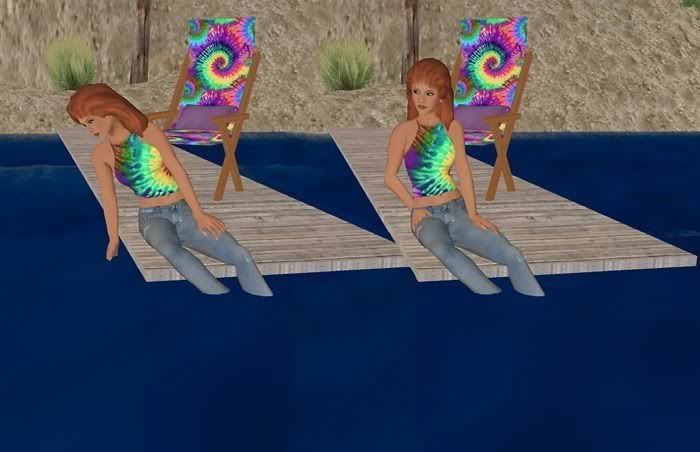 So them's just the breaks as long as you have the blue water. One possible solution: This doesn't work on my desktop, but on my laptop I can turn off the "auto-detect" option (I think near the window size option). Then the Ripple Water option becomes available, maybe after restarting the software. You will take a hit on performance, though. And of course there's always the option of using Windlight, but if your machine doesn't do Ripple Water, chances are it can't do Windlight water without seriously choking.  |
|
Aki Shichiroji
pixel pusher

Join date: 22 Jul 2006
Posts: 246
|
01-19-2008 08:35
There has also been a bug (or feature?) introduced with the lastest Windlight - it appears the folks behind Windlight have deemed some lower end video cards incapable of handling shaders when they clearly can. If this is the case for you, check out the First View forum for this thread for useful tips: /333/6d/234692/1.html
_____________________
|
|
Snowman Jiminy
Registered User
Join date: 23 Dec 2007
Posts: 424
|
01-19-2008 09:45
I just bought some land and when I purchashed it, the thing I liked was the light crystal blue colour that the shoreline faded into...a day later and its that dark ugly default blue that you can't see through. Is there someone to ask to change this? The hue changes with the time of day, and also depends on the depth of the water and the land texture - the land underneath might have been terraformed. _____________________
|
|
Bree Giffen
♥♣♦♠ Furrtune Hunter ♠♦♣♥

Join date: 22 Jun 2006
Posts: 2,715
|
01-19-2008 10:25
You can change the color of your water in the windlight viewer. I made mine blood red for a while and then I changed it to a deep ocean blue which looks good when sailing.
_____________________
|
|
Xplorer Cannoli
Cache Cleaner
Join date: 18 Sep 2005
Posts: 1,131
|
01-19-2008 13:19
A couple times, I clicked on the wrong viewer and got a different water look.
_____________________
Region Names for a Themed Shopping Experience:
New Region: Gifts Accessories, Art, Avatars, Cars, Clothes, Clothing, Fashion, Fashions, Furnishings, Furniture, Gadgets, Games, Gifts, Hair, Jewellery, Jewelry, Mall, Men, Money, Music, Pets, Shoes, Shopping, Skin, Skins, Something, Women, X Attractions: Explore our new park at HOME New Racetrack at CAR WEAPONS Region Now Open! |


