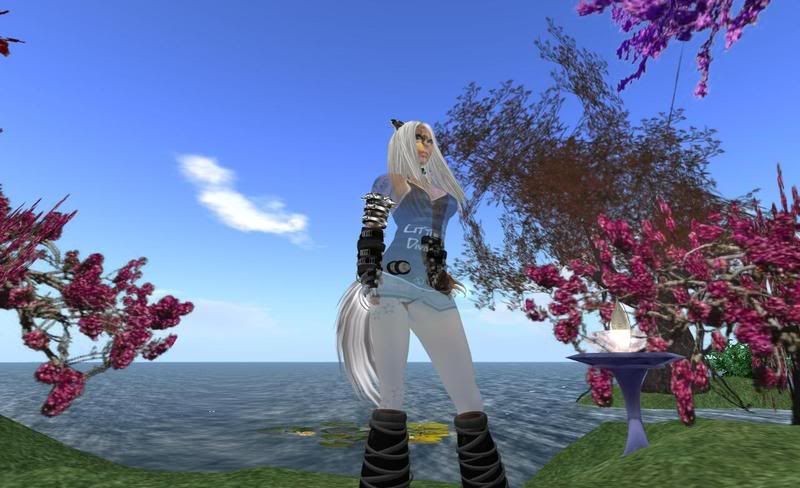
Hello Forums! I just got a new Toshiba Satellite Laptop and have a question. I installed SL on it and got in world and everything seems to rez fine for me, a tad slower than my pc but actually better than I expected, since I also am on a wireless connection at home. I had a friend help me research some laptops in my price range before making a decision to find one that had decent graphics for what I needed as far as SL goes, so I stayed away from the Intel graphics and I was told that even though my ATI 3100 still shares the memory, that it would be better than the Intel graphics. Anyways, the only problem I see so far is that other avatars are transparent, ghostly. I can see myself fine and attachments on other avatars show up fine. Other avatars skin and clothing are see-through. (I see dead peoples?) I have been messing around with SL settings, making sure the VBO is off, but nothing seems to 'bring people back to life' so to speak. Not sure if I need to adjust any settings on my pc settings for graphics or what. I was hoping someone may have a laptop or is familiar with them and can offer advice.
My basic specs are: Windows Vista, 4 GB Ram, 320 GB Hard drive, 2.0GHz AMD Turion X2 dual-core mobile processor RM-70 with HyperTransport 3 technology AMD M780V chipset, ATI Radeon 3100 graphics - 256MB-1406MB dynamically allocated shared graphics memory. (If you need more info I can give it.)
Thanks much for any help!
Welcome to the Second Life Forums Archive
These forums are CLOSED. Please visit the new forums HERE
~New Laptop / Graphics Question~ |
|
|
ZsuZsanna Raven
~:+: Supah Kitteh :+:~
Join date: 19 Dec 2004
Posts: 2,361
|
08-11-2008 09:29
_____________________
~Mewz!~
 |
|
Yosef Okelly
Mostly Harmless

Join date: 26 Aug 2007
Posts: 2,692
|
08-11-2008 10:54
Bumpage.
I think I have heard some people talk about this before but I have no idea what the problem was. Bumping to keep the question on the 1st page and hope someone knows an answer. _____________________
|
|
Stallion Haystack
Registered User
Join date: 3 Aug 2008
Posts: 125
|
08-11-2008 11:05
Can you post a screen shot of this? I think I know what is happening, but I want to be sure.
|
|
Mjolnir Uriza
Hammer of the Gods
Join date: 14 Sep 2007
Posts: 504
|
08-11-2008 11:22
one amd release several new drivers for the ati cards check to see if yu have the newest second make sure duel prossers are turned on most vista computes are not set up to use the full duel prossor options
|
|
ZsuZsanna Raven
~:+: Supah Kitteh :+:~
Join date: 19 Dec 2004
Posts: 2,361
|
08-11-2008 13:27
Can you post a screen shot of this? I think I know what is happening, but I want to be sure. I fired up my laptop here at work and logged in to SL real quick. To my dismay I am now seeing myself as partially see-through. I went into appearance and I looked fine, came back out and am ghostly again. I was fine last night, it was others who I saw weird. So I just took a snapshot to post and it shows me looking fine. I'm not sure how that could be, doesn't a snapshot take a pic of what the screen shows? I'm also not sure what someone meant by making sure my pc is running both processors. Hopefully someone can help me. _____________________
~Mewz!~
|
|
Stallion Haystack
Registered User
Join date: 3 Aug 2008
Posts: 125
|
08-11-2008 13:28
Just do prnt screen and paste it to Paint, and then upload it using something like imageshack.us
|
|
Chosen Few
Alpha Channel Slave
Join date: 16 Jan 2004
Posts: 7,496
|
08-11-2008 13:42
The snapshot function has its own settings, almost as if it's a secondary viewer in and of itself. It won't necessarily record exactly what you're seeing live. It's not really supposed to. For an accurate capture, do an OS screenshot.
In Windows, it's ctrl-printscreen to capture the desktop to clipboard, or alt-printscreen to capture the currently active window. Then paste into any paint program. If you're on a Mac, there are several additional screenshot options. See http://digitalmedia.oreilly.com/2006/01/01/mac-os-x-screenshot-secrets.html for a complete list. I'm not sure about Linux. In any case, try turning off avatar imposters in your SL graphics preferences. Just a stab in the dark, but I'm guessing that could be the cause of your issue. _____________________
.
Land now available for rent in Indigo. Low rates. Quiet, low-lag mainland sim with good neighbors. IM me in-world if you're interested. |
|
ZsuZsanna Raven
~:+: Supah Kitteh :+:~
Join date: 19 Dec 2004
Posts: 2,361
|
08-11-2008 13:54
Ok here is what I am seeing, I was going to take the pic in the air to avoid the background distractions but when I flew up to take a pic, my av was back to normal. So I thought all was fixed and flew back down and I was back to what you see here. See-through skin and clothes, but all attachments are normal as well as all the prims at my home etc. I hope I don't have some sort of flesh eating virus cuz that would suck. There are no invisible prims or anything in my area causing this oddity. I'm hoping it is a simple fix.
 _____________________
~Mewz!~
|
|
Chosen Few
Alpha Channel Slave
Join date: 16 Jan 2004
Posts: 7,496
|
08-11-2008 14:25
Wow, that's a new one. It almost looks like a draw order issue. I have no idea what might cause that.
_____________________
.
Land now available for rent in Indigo. Low rates. Quiet, low-lag mainland sim with good neighbors. IM me in-world if you're interested. |
|
Viktoria Dovgal
…

Join date: 29 Jul 2007
Posts: 3,593
|
08-11-2008 14:44
That looks a lot like http://jira.secondlife.com/browse/VWR-5948 - apparently it's an ATI driver problem. There are a few workarounds mentioned in there, hopefully at least one of them will carry over to screen shots for you.
_____________________
|