Got one of those low prim photo background screen and a low prim pose stand.
When i 'stand' on the photo stand, i can't zoom in real close with camera control? when i get off the stand i can can zoom in with my camera as close as i want.
I've noticed this with other free photo places, i've ended up just getting off the stand so i can do more close up work.
Is there a secret to zooming in closer with the camera control while ON a photo stand?
Welcome to the Second Life Forums Archive
These forums are CLOSED. Please visit the new forums HERE
Photo stand.....camera control |
|
|
Sylvester Dragonash
Just call me Sly =p

Join date: 26 Jan 2008
Posts: 103
|
07-29-2008 15:20
|
|
Smoke Gordonstone
-------------------------

Join date: 13 Jan 2008
Posts: 371
|
07-29-2008 15:25
I've not had that problem with zooming while on a pose stand, but I can answer the 2nd part. You can press "Ctrl + 0" (zero) to zoom in closer and Ctrl 9 sets the view back to normal.
|
|
Chosen Few
Alpha Channel Slave
Join date: 16 Jan 2004
Posts: 7,496
|
07-29-2008 15:36
The alt-mouse controls always work, whether you're standing, sitting, flying, whatever. The on-screen camera controls are very clunky, and should never, ever, ever, ever be used. Simply hold down alt, and wherever you click will become the focal point of the camera. Drag the mouse to zoom and rotate.
Adding ctrl and shift along with alt will open up further rotation and panning options. Here's a quick diagram of how it works.  This might take a little getting used to if all you've ever used before are the on-screen controls. But after a day or two, it will feel as natural as turning your head in RL. The behavior habitualizes quickly, and then you never even have to think about it. There's nothing faster, more reliable, or more precise. _____________________
.
Land now available for rent in Indigo. Low rates. Quiet, low-lag mainland sim with good neighbors. IM me in-world if you're interested. |
|
Chosen Few
Alpha Channel Slave
Join date: 16 Jan 2004
Posts: 7,496
|
07-29-2008 15:40
You can press "Ctrl + 0" (zero) to zoom in closer and Ctrl 9 sets the view back to normal. That's not quite correct. Ctrl-0 does not actually zoom in. It narrows the camera focus to make the view more orthographic. Ctrl-8 does the opposite. It widens the focus to make the view more fisheyed. Ctrl-9 returns the lens setting to its standard default focal length. The only ways to zoom in and out are these: 1. Use the alt-mouse controls I described above. -OR- 2. Use the scroll wheel on the mouse. -OR- 3. Use the on-screen camera controls. (hotkeys for these are alt, ctrl, and shift, along with the arrow keys) -OR- 4. Let a scripted object take control of your camera. _____________________
.
Land now available for rent in Indigo. Low rates. Quiet, low-lag mainland sim with good neighbors. IM me in-world if you're interested. |
|
Smoke Gordonstone
-------------------------
Join date: 13 Jan 2008
Posts: 371
|
07-29-2008 15:49
That's not quite correct. Ctrl-0 does not actually zoom in. It narrows the camera focus to make the view more orthographic. Well after seeing your diagram and everything I feel stupid for even attempting to answer the question in the first place. I've never had a problem with zooming when using alt controls, although I assumed the OP was using alt controls and still having an issue. |
|
Chosen Few
Alpha Channel Slave
Join date: 16 Jan 2004
Posts: 7,496
|
07-29-2008 15:57
Well after seeing your diagram and everything I feel stupid for even attempting to answer the question in the first place. Don't feel stupid.  It certainly wasn't my intention to make you feel bad. It certainly wasn't my intention to make you feel bad.I assumed the OP was using alt controls I assumed the opposite. I guess we both probably should have asked instead of assuming anything at all. _____________________
.
Land now available for rent in Indigo. Low rates. Quiet, low-lag mainland sim with good neighbors. IM me in-world if you're interested. |
|
Ann Launay
Neko-licious™

Join date: 8 Aug 2006
Posts: 7,893
|
07-29-2008 16:00
I personally prefer the arrow keys plus the aforementioned alt, alt-ctrl, or alt-ctrl-shift. I do sometimes use alt/left mouse button/scroll wheel to zoom, but the arrow keys generally give me better precision than the mouse does.
_____________________
~Now Trout Re-Re-Re-Certified!~
I am bumping you to an 8.5 on the Official Trout Measuring Instrument of Sluttiness. You are an enigma - on the one hand a sweet, gentle, intelligent woman who we would like to wrap up in our arms and protect, and on the other, a temptress to whom we would like to do all sorts of unmentionable things. Congratulations and shame on you! You are a bit of a slut. |
|
Smoke Gordonstone
-------------------------
Join date: 13 Jan 2008
Posts: 371
|
07-29-2008 16:01
Don't feel stupid. It certainly wasn't my intention to make you feel bad.It was more a joke, no offense was taken but thanks |
|
Sylvester Dragonash
Just call me Sly =p
Join date: 26 Jan 2008
Posts: 103
|
07-29-2008 17:08
Thank you...i'll try it out tonight. all i ever used was the onscreen camera controls...I'll give these suggetions a try......
|
|
Oryx Tempel
Registered User

Join date: 8 Nov 2006
Posts: 7,663
|
07-29-2008 17:15
I personally prefer the arrow keys plus the aforementioned alt, alt-ctrl, or alt-ctrl-shift. I do sometimes use alt/left mouse button/scroll wheel to zoom, but the arrow keys generally give me better precision than the mouse does. Same here... I can scoot across the screen incrementally with the arrow keys (esp the zoom control) better than I can with my mouse. Could be that I have poor motor control or something.  _____________________
|
|
Chosen Few
Alpha Channel Slave
Join date: 16 Jan 2004
Posts: 7,496
|
07-29-2008 17:31
The alt-arrow keys work pretty much the same as the on-screen controls. There are several problems with them. Most handicapping is the fact that they don't allow you to set the focal point. There's no real control with them over what you're zooming in on, or what you're orbiting around. Also, since the keys operate incrementally, as was mentioned, there's no fluidity. If you want to go in between two stops, you're out of luck.
The beauty of alt-mouse is you have complete dynamic control over everything, and absolute fluidity, all with very natural hand movements. Give it a little practice, and I'm sure you'll find that the mouse beats the heck out of the arrow keys. _____________________
.
Land now available for rent in Indigo. Low rates. Quiet, low-lag mainland sim with good neighbors. IM me in-world if you're interested. |
|
SuezanneC Baskerville
Forums Rock!

Join date: 22 Dec 2003
Posts: 14,229
|
07-29-2008 17:31
There may be a terminology problem somewhere.
The View menu shows three Zoom commands, "Zoom In", "Zoom Default", and "Zoom Out", with keystroke shortcuts of Ctrl-0, Ctrl-9, and Ctrl-8. So it's not exactly a totally clear cut case that Ctrl-0 doesn't zoom in. The Second Life interface says it does, in version Second Life 1.20.15 (92456) . 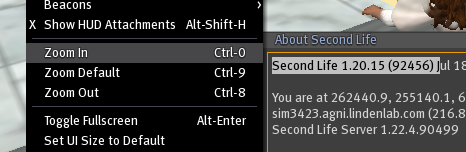 The listed 4 ways to zoom ( alt-mouse, scroll wheel, on-screen controls, and scripts) don't include Alt-UpArrow or Alt-DownArrow, which seem to do the same thing as the scroll wheel, so far as I can tell. Does the zoom lens on a camera work like the scroll wheel or like Ctrl-0 and Ctrl-8? Ctrl-0 can be quite useful for picture taking, regardless of what name you give to what it does. You can also zoom in and out using the editor dialog.  You can also zoom in and out on the map, but I guess that doesn't really count.  You can also make your avatar travel rapidly from one spot to another, thereby zooming in and out of a certain area, but that really really doesn't count.  _____________________
-
So long to these forums, the vBulletin forums that used to be at forums.secondlife.com. I will miss them. I can be found on the web by searching for "SuezanneC Baskerville", or go to http://www.google.com/profiles/suezanne - http://lindenlab.tribe.net/ created on 11/19/03. Members: Ben, Catherine, Colin, Cory, Dan, Doug, Jim, Philip, Phoenix, Richard, Robin, and Ryan - |
|
Chosen Few
Alpha Channel Slave
Join date: 16 Jan 2004
Posts: 7,496
|
07-29-2008 17:40
Good catch, Suzanne. I didn't realize they'd misnamed the controls like that. That would seem to explain why so many people think the ctrl-0 and ctrl-8 are zoom controls instead of focal length adjustments. For what it's worth, it's certainly not the first misnomer LL has cooked up.
As for picture-taking, it depends what your goal is. If you want to eliminate perspective, then going all the way in with ctrl-0 is the way to do it. You can then zoom out with alt-mouse to widen the field of view, while maintaining the orthographic focus. I do this all the time to grab reference shots for making shadows, and for doing what I call "reverse UV mapping" for texturing of certain types of complex mutli-prim objects. It works really well for that sort of thing. But if your goal is realistic perspective, alt-0 is the last thing you'd want to use. You'll get much better results by zooming in with alt-drag, or with the scroll wheel. _____________________
.
Land now available for rent in Indigo. Low rates. Quiet, low-lag mainland sim with good neighbors. IM me in-world if you're interested. |
|
Alx Harrop
Registered User
Join date: 4 Jun 2007
Posts: 10
|
07-30-2008 12:47
Ctrl-0 seems to be exactly the way the zoom ring works on a camera, making things bigger while changing how "compressed" the depth of the picture is and all.
Alt-forward is more like actually moving your camera closer to the thing you have in view. All the alt-ctrl-shift move combos are like that - moving your camera around. Ctrl-8 and Ctrl-0 are the only ones changing settings in your camera. |
|
Imnotgoing Sideways
Can't outlaw cute! =^-^=

Join date: 17 Nov 2007
Posts: 4,694
|
07-30-2008 13:34
_____________________
Somewhere in this world; there is someone having some good clean fun doing the one thing you hate the most. (^_^)y
 http://slurl.com/secondlife/Ferguson/54/237/94 |
|
Ann Launay
Neko-licious™
Join date: 8 Aug 2006
Posts: 7,893
|
07-30-2008 13:40
There's no real control with them over what you're zooming in on, or what you're orbiting around. I generally alt-click on whatever to center, then take over with the arrow keys. Works great. If you want to go in between two stops, you're out of luck. I have no idea what this means. Give it a little practice, and I'm sure you'll find that the mouse beats the heck out of the arrow keys. Newp, I have mild nerve damage and tendinitis in my dominant hand/arm and I simply can't control the mouse well enough to use it as standard. I'm comfortable with the arrow keys and they work well for me...that's really the only thing that matters. _____________________
~Now Trout Re-Re-Re-Certified!~
I am bumping you to an 8.5 on the Official Trout Measuring Instrument of Sluttiness. You are an enigma - on the one hand a sweet, gentle, intelligent woman who we would like to wrap up in our arms and protect, and on the other, a temptress to whom we would like to do all sorts of unmentionable things. Congratulations and shame on you! You are a bit of a slut. |
|
Chosen Few
Alpha Channel Slave
Join date: 16 Jan 2004
Posts: 7,496
|
07-30-2008 17:10
I have no idea what this means. Sorry if I was unclear the first time around. I'll explain. When you move the camera by tapping an arrow key, the movement snaps to a fixed minimum distance each time. This increment is what I was calling a "stop". If you want to go half that distance, or any other fraction of it, there's simply no way to do it with the keys. But with a mouse, the resolution is seemingly almost infinite. I'm sure there must be some minimum increment in play, since it's a digital system, but whatever that measurement is, it appears to be at least as small as the smallest discernible hand movement. Tracking therefore is pretty much as fluid and controllable as your own hand. If you want to move the camera less than the minimum distance the keys would move it, it's absolutely doable with the mouse (assuming your hand is so capable). Make sense now? Newp, I have mild nerve damage and tendinitis in my dominant hand/arm and I simply can't control the mouse well enough to use it as standard. I'm comfortable with the arrow keys and they work well for me...that's really the only thing that matters. If you've got a debilitating condition that prevents you from using a mouse properly, that's of course a different story. By all means, use whatever works for you in your particular situation. Tales like yours are perhaps the most important reason that good UI's should always include multiple ways to do things. But as far as recommendations for others go, you do have to realize your predicament is fairly unique. There might just as easily be someone out there who's in the opposite situation as you, someone who can't use a keyboard properly, due to some physiological issue. I'm sure you'd agree that that person would hardly be qualified to talk about how well the keys themselves do or don't work. His reason for not using them would have nothing to do with their actual performance capabilities, and his experience-based advice would only be truly applicable for those who have the same condition as he. With all due respect, and with absolutely no insult intended whatsoever, I have to submit that your stated "preference" for the keys, as you put it in your first post, isn't applicable for most people. The keys may very well be better for you, but not because they're inherently more precise than the mouse. They are, in point of fact, considerably less precise, in and of themselves. That they might be the best option for your particular situation doesn't change that. I hope I'm not offending you in any way by pointing that out. Those who are fully able-bodied will be able to take advantage of the fact that a mouse, by definition, offers at least three things no keyboard ever could: fluidity, acceleration, and multi-diemsnionality. A key, on the other hand, is just an on/off switch. There's just no way it can compete with any motion-tracking device in this context. While we're on the subject of disabilities, though, I guess I should retract my earlier statement that the on-screen controls should never ever be used. I should properly adjust it to say you shouldn't use the on-screen controls unless you only have one usable hand. _____________________
.
Land now available for rent in Indigo. Low rates. Quiet, low-lag mainland sim with good neighbors. IM me in-world if you're interested. |