This is answered in the Knowledge Base, which of course is difficult to link to. Here is the info...
***** Knowledge Base article *****
Why do Landmarks come in two different colors?
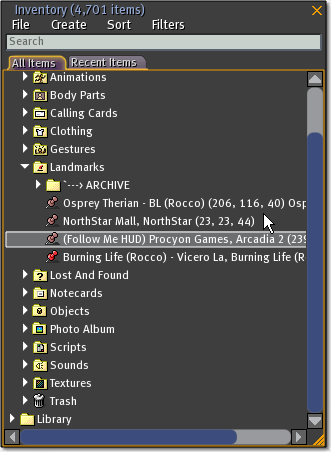
If you've looked in your Inventory > Landmarks folder, you may have noticed some of the pushpin icons are bright red, while others are a faded, almost purple tone.
Here's the difference:
Bright red landmarks are ones you've teleported to. They probably won't change to that color until after you relog.
Faded mauve landmarks are ones you haven't been to yet.
An easy way to test is:
- Go to a parcel of land you can create landmarks on.
- Select World menu > Create Landmark Here twice.
- Then, in your Inventory > Landmarks folder, teleport to one of those landmarks (right-click it, Teleport To Landmark) and relog.
- Look at your landmarks again.
See the difference?
***** end Knowledge Base article *****
Of course, this is how it is SUPPOSED to work. In my experience, most of the landmarks I use frequently have never changed to red.


