hi
ive just downloaded the Release Candidate for the first time. Ive been told you can have more then one av on at a time(good for camping) but if i have the main version of sl on, it wont load the Release Candidate. then i was told i needed to change the settings but i dont know what i need change
can some one help me please
Abbie xoxox
Welcome to the Second Life Forums Archive
These forums are CLOSED. Please visit the new forums HERE
Release Candidate settings for more then one av |
|
|
Abbie Szumski
Registered User
Join date: 8 Oct 2008
Posts: 6
|
11-11-2008 23:52
|
|
Matthorn Avro
Registered User
Join date: 19 Nov 2007
Posts: 10
|
11-12-2008 00:16
See: http://blog.secondlife.com/2008/01/10/tip-of-the-week-17-how-to-run-multiple-viewers-at-the-same-time/
Also, I do believe the release candidate is obsolete (older than the current version) - just use the latest version (1.21.6.99587) available at secondlife/downloads and follow the instructions in the blog link above. |
|
June Oh
Remember I'm a Blonde.
Join date: 20 Feb 2007
Posts: 383
|
11-12-2008 00:17
Is there a RC?
Looks like the main viewer is later version than the RC. _____________________
Love
June |
|
Abbie Szumski
Registered User
Join date: 8 Oct 2008
Posts: 6
|
11-12-2008 00:34
the RC works if i dont have the main sl program running. works fine.
and the link about the tip thing doesnt work. adress is not valid thank for you help any way ive been told i need to put something the properties for the RC something about muilt use |
|
Matthorn Avro
Registered User
Join date: 19 Nov 2007
Posts: 10
|
11-12-2008 00:53
Try this link:
www.youtube.com/watch?v=JI4jKwZBEqY& When you copy & paste, don't copy the and bits - just copy what's in between. |
|
June Oh
Remember I'm a Blonde.
Join date: 20 Feb 2007
Posts: 383
|
11-12-2008 01:24
The youtube video worked for me and changing the Openlife Viewer short cut as instructed got me 2 SL running.
_____________________
Love
June |
|
LittleMe Jewell
...........

Join date: 8 Oct 2007
Posts: 11,319
|
11-12-2008 07:38
You don't need to use the RC at all - it is actually older than the main release.
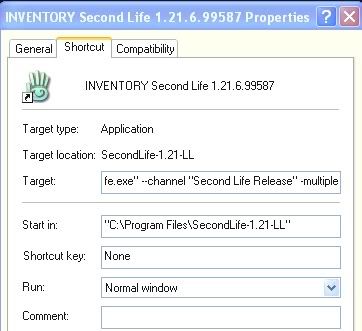
Right click on the regular SL ICON on your desktop and select 'Properties'. On the 'Target' line, add a space and then type '-multiple' (without the quotes). Then simply startup a second occurence of SL just like you started the first one. _____________________
♥♥♥
-Lil Why do you sit there looking like an envelope without any address on it? ~Mark Twain~ Optimism is denial, so face the facts and move on. ♥♥♥ Lil's Yard Sale / Inventory Cleanout: http://slurl.com/secondlife/Triggerfish/52/27/22 . http://www.flickr.com/photos/littleme_jewell |
|
Abbie Szumski
Registered User
Join date: 8 Oct 2008
Posts: 6
|
11-12-2008 08:06
were do i type the -multiple bit as its not workin
|
|
LittleMe Jewell
...........
Join date: 8 Oct 2007
Posts: 11,319
|
11-12-2008 08:14
On the 'Target' line - shown below. Also, for some reason, you sometimes need to type --mulitple (two dashes rather than one).
 _____________________
♥♥♥
-Lil Why do you sit there looking like an envelope without any address on it? ~Mark Twain~ Optimism is denial, so face the facts and move on. ♥♥♥ Lil's Yard Sale / Inventory Cleanout: http://slurl.com/secondlife/Triggerfish/52/27/22 . http://www.flickr.com/photos/littleme_jewell |
|
treat Pick
Wants A Leendin Bear!

Join date: 19 Sep 2008
Posts: 155
|
11-12-2008 08:19
|