Welcome to the Second Life Forums Archive
These forums are CLOSED. Please visit the new forums HERE
Bridging Two Sims |
|
|
Arielyn Docherty
I DO Believe in Santa!

Join date: 3 Jul 2007
Posts: 625
|
04-27-2009 19:40
My partner and I just purchased a large plot of land behind our current main store. First, it's a different sim, and second, it's much "higher" and the land can't be lowered for a seamless match. So....we're trying to find a way to join the sims so that customers can readily move back and forth between them. We've tried steps and an escalator, but you "fall through " both when you hit the sim borders. Any suggestions beyond a tp?
|
|
Starfire Desade
Can I play with YOUR mind

Join date: 10 Jul 2006
Posts: 404
|
04-27-2009 20:14
you need two copies of the steps...
each one will need to be rooted in one of the sims (one in one, the other in the other).. they need to completely overlap with half of the steps in the sim they are rooted in, the other half overlapping into the other sim. one of them can be totally transparent so you don't have to worry about flicker. SL will have you walk on the steps in the sim you are leaving until it registers that you are in the new sim. _____________________
"Hypnotic Magic" - Second Life's Hypnosis Specialists - Home of the TranceStar (Hypno, BDSM, Mind Control) Free your mind from the ordinary!
http://slurl.com/secondlife/Stellar%20Dreams/122/67/26/ |
|
Nina Stepford
was lied to by LL

Join date: 26 Mar 2007
Posts: 3,373
|
04-27-2009 20:17
...or two megaprims; one on either side.
'one on either side' is the magic phrase. _____________________
SLU - ban em then bash em!
~~GREATEST HITS~~ pro-life? gtfo! slu- banning opposing opinions one at a time http://www.sluniverse.com/php/vb/zomgwtfbbqgtfololcats/15428-disingenuous.html learn to shut up and nod in agreement... or be banned! http://www.sluniverse.com/php/vb/off-topic/1239-americans-not-stupid.html |
|
CarlCorey Colman
Fnord

Join date: 15 Dec 2006
Posts: 177
|
04-27-2009 20:46
What Starfire said. There's a video tutorial on it at http://www.youtube.com/watch?v=mgcIiz6m7ng
_____________________
Reality leaves a lot to the imagination.
John Lennon |
|
Arielyn Docherty
I DO Believe in Santa!
Join date: 3 Jul 2007
Posts: 625
|
04-27-2009 20:59
Thanks so much!! We'll give it a try in the morning. I knew someone here would have the answer.
|
|
Ceera Murakami
Texture Artist / Builder

Join date: 9 Sep 2005
Posts: 7,750
|
04-28-2009 06:59
Details on how to seamlessly create a prim bridge between two sims can be found here:
/8/86/247749/1.html All it takes is 2 extra prims, with one half of the bridge or stairs on one side of the border, and the other half on the other side. Read the above thread for my detailed explanation. _____________________
Sorry, LL won't let me tell you where I sell my textures and where I offer my services as a sim builder. Ask me in-world.
|
|
Pserendipity Daniels
Assume sarcasm as default
Join date: 21 Dec 2006
Posts: 8,839
|
04-28-2009 07:05
1. To go downwards make a waterfall all along the border and provide barrels
2. To go upwards provide high diving platforms Pep (Yeah, I know they probably don't work, but it's Friday!) _____________________
Hypocrite lecteur, — mon semblable, — mon frère!
|
|
Love Hastings
#66666
Join date: 21 Aug 2007
Posts: 4,094
|
04-28-2009 07:28
Pep (Yeah, I know they probably don't work, but it's Friday!) Wow, what timezone are you in?? _____________________
 |
|
Pserendipity Daniels
Assume sarcasm as default
Join date: 21 Dec 2006
Posts: 8,839
|
04-28-2009 07:30
Wow, what timezone are you in?? Pep (Don't believe everything you read) _____________________
Hypocrite lecteur, — mon semblable, — mon frère!
|
|
Front Dawes
Registered User
Join date: 28 Oct 2007
Posts: 76
|
04-28-2009 07:33
The key is that the two bridges should each have their 'root' prim in each sim. Get the bridge into edit mode and look for the prim highlighted in yellow (the others should be in blue). This is the prim that should be in each sim.
Front |
|
Love Hastings
#66666
Join date: 21 Aug 2007
Posts: 4,094
|
04-28-2009 07:34
Just seeing who is stupid enough to take the bait. Pep (Don't believe everything you read) LOL, being your usual charming self I see. _____________________
|
|
sable Valentine
AU United
Join date: 30 Apr 2006
Posts: 1,275
|
04-28-2009 08:00
Wow, what timezone are you in?? Perhaps, he is in the Twilight Zone. _____________________
|
|
Isablan Neva
Mystic

Join date: 27 Nov 2004
Posts: 2,907
|
04-28-2009 08:12
Follow Ceera's directions, she's the best at this.
Word of advice - you cannot use steps or any change in altitude at all. It has to be a totally flat transition from one sim to the next. _____________________
 http://slurl.com/secondlife/TheBotanicalGardens/207/30/420/ |
|
Arielyn Docherty
I DO Believe in Santa!
Join date: 3 Jul 2007
Posts: 625
|
04-28-2009 08:14
Follow Ceera's directions, she's the best at this. Word of advice - you cannot use steps or any change in altitude at all. It has to be a totally flat transition from one sim to the next. And there is the problem.....on one side we have land that has been terraformed and transformed into an aviary. The other side is a mountain that can't be lowered to match the existing land without the mountain sloping right to the sim edge. We're going to work through the suggestions tonight and see what we can do. Why is it such a problem to move from sim to sim?? GRRR!!  |
|
Ceera Murakami
Texture Artist / Builder
Join date: 9 Sep 2005
Posts: 7,750
|
04-28-2009 08:32
Well, I haven't tested this, but if the two halves of the "bridge" form a ramp, I expect that should work just fine as well. In other words, as long as what is in the sim you are leaving agrees with what is in the sim you are arriving in, the method SHOULD work.
So put phantom prims for steps over a ramp, made the way I described for a level bridge. I'll do some expermenting later today and see what I can determine on this. _____________________
Sorry, LL won't let me tell you where I sell my textures and where I offer my services as a sim builder. Ask me in-world.
|
|
Arielyn Docherty
I DO Believe in Santa!
Join date: 3 Jul 2007
Posts: 625
|
04-28-2009 08:37
Thanks Ceera!
|
|
Ceera Murakami
Texture Artist / Builder
Join date: 9 Sep 2005
Posts: 7,750
|
Confirmed: Ramps that work across sim borders
04-28-2009 11:20
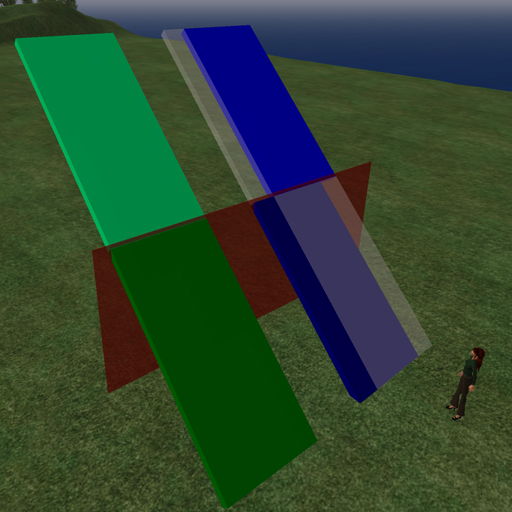 In the above example, the red wall is right at the sim border. The green ramp is a 2-prim ramp, root prim on the lower end. Walk up that ramp, and you'll fall through it after you pass the red wall. Even if you don't link the two halves, you fall through, because the server you are leaving doesn't think there is anything ahead of you, and the one you are entering hasn't had time yet to tell you what is there. The blue ramp is a 4-prim ramp, in 2 sections (offset sideways for clarity). One ramp has the root prim on the low end, in sim A, while the high end of the linkset is in sim B. The second ramp has the root prim in the upper end, so it is in sim B, with the low end of the linkset in sim A. The semi-transparent parts are what is projecting into the other sim from the far side. Make these 100% alpha textured. This ramp will support you going either up or down, from either side of the sim, with no fall-through. As far as either sim is concerned, prims extending across the border from other sims are always phantom. But as you cross, it "remembers" were the previous sim's extensions were, and supports you until the new sim can confirm it also has a ramp under you. Make the assembly all on one side of the sim border, so you can link the associated parts together, then position the transition point over the sim border by moving the assembled ramp. To do stairs, make the stairs normally and place this ramp just under the stair steps, to support you as you cross. Personally, I would use a phantom sculpted prim stairstep over the ramp, and it won't matter which side that phantom step prim is rooted on. _____________________
Sorry, LL won't let me tell you where I sell my textures and where I offer my services as a sim builder. Ask me in-world.
|
|
Argent Stonecutter
Emergency Mustelid

Join date: 20 Sep 2005
Posts: 20,263
|
04-28-2009 11:33
Word of advice - you cannot use steps or any change in altitude at all. It has to be a totally flat transition from one sim to the next. _____________________
Argent Stonecutter - http://globalcausalityviolation.blogspot.com/
"And now I'm going to show you something really cool." Skyhook Station - http://xrl.us/skyhook23 Coonspiracy Store - http://xrl.us/coonstore |
|
Arielyn Docherty
I DO Believe in Santa!
Join date: 3 Jul 2007
Posts: 625
|
04-28-2009 15:20
Thank you all SOOO much! Ceera, your pic helped tremendously and worked perfectly. You all are the BEST!!!!!!!
|
|
Ceera Murakami
Texture Artist / Builder
Join date: 9 Sep 2005
Posts: 7,750
|
04-29-2009 06:26
Thank you all SOOO much! Ceera, your pic helped tremendously and worked perfectly. You all are the BEST!!!!!!! _____________________
Sorry, LL won't let me tell you where I sell my textures and where I offer my services as a sim builder. Ask me in-world.
|